252
If you specify the cellular keyword but not specify the interface-number argument, the command
displays information about existing cellular interfaces.
Hot swapping a USB 3G/4G modem clears the cellular interface statistics.
Examples
# Display information about Cellular 2/4/0.
<Sysname> display controller cellular 2/4/0
Cellular2/4/0
Current state: UP
Description: Cellular2/4/0 Interface
Modem status: Present
DM port status: Disabled
Capability:
1 Control channel, 1 PPP channel
Control channel 0 traffic statistics:
TX: 0 packets, 0 errors
RX: 0 packets, 0 errors
PPP channel 0 traffic statistics:
TX: 0 packets, 0 errors
RX: 0 packets, 0 errors
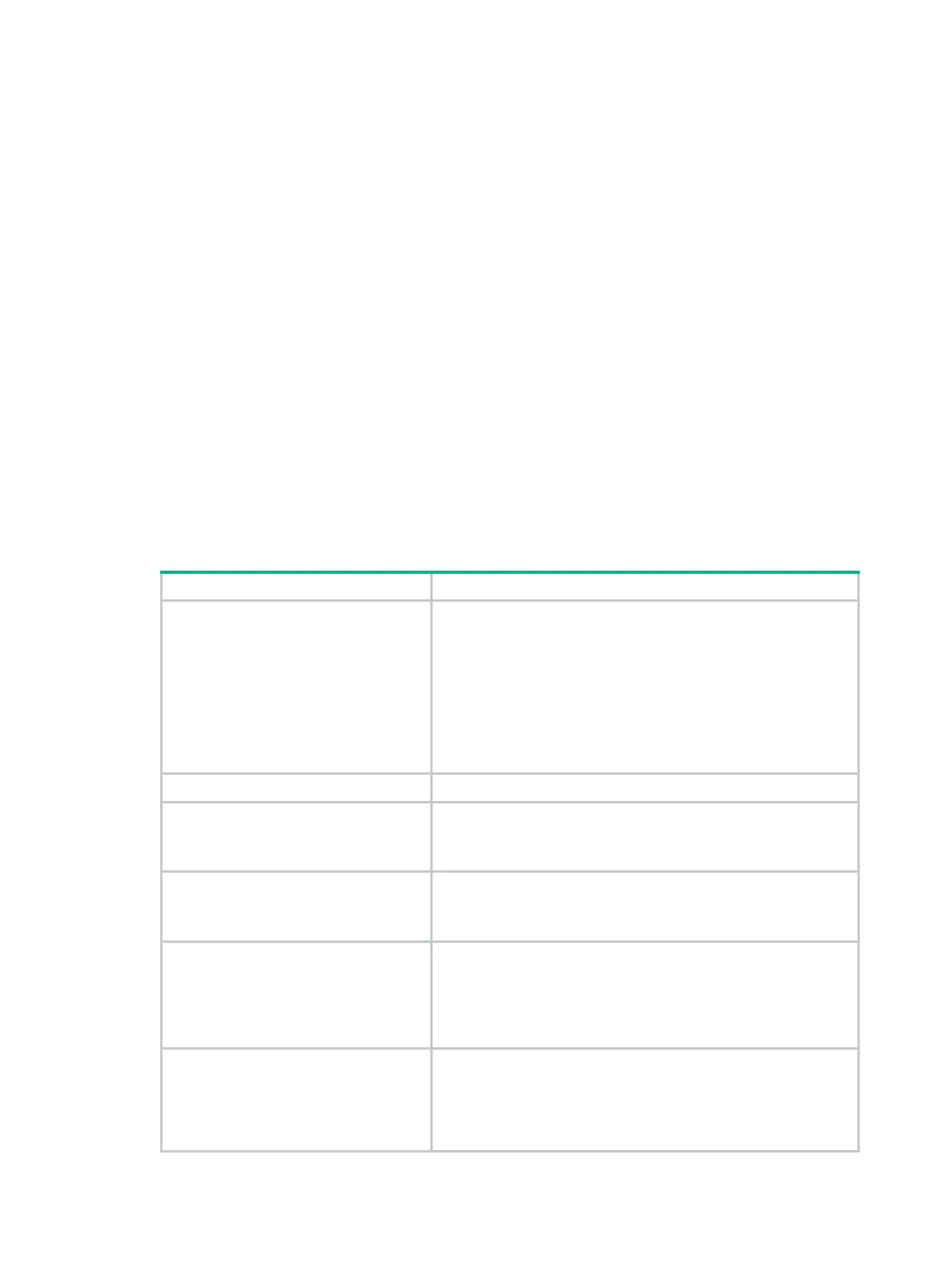
Table 53 Command output
Cellular2/4/0
Current state
Status of the interface:
• DOWN(Administratively)—The interface has been
administratively shut down by using the shutdown
command.
• DOWN—The interface is administratively up but its physical
state is down, possibly because of a connection or link
failure.
• UP—The administrative and physical states of the interface
are both up.
Description Description of the interface.
Modem status
Status of the USB 3G/4G modem:
• Present—The modem is present.
• Absent—The modem is absent.
DM port status
DM status:
• Enabled.
• Disabled.
Capability:
1 Control channel, 1 PPP channel
Type and number of channels the cellular interface supports:
• 1 Control channel—Supports one control channel.
• 1 PPP channel—Supports one asynchronous serial
subchannel.
• 1 ETH channel—Supports one Ethernet subchannel.
Control channel 0 traffic statistics:
TX: 0 packets, 0 errors
RX: 0 packets, 0 errors
Control channel statistics:
• TX: 0 packets, 0 errors—Number of packets and number
of error packets sent through the control channel.
• RX: 0 packets, 0 errors—Number of packets and number
of error packets received through the control channel.


 To Next Page