FlexLine plus, User Interface
27
Sidecover keys
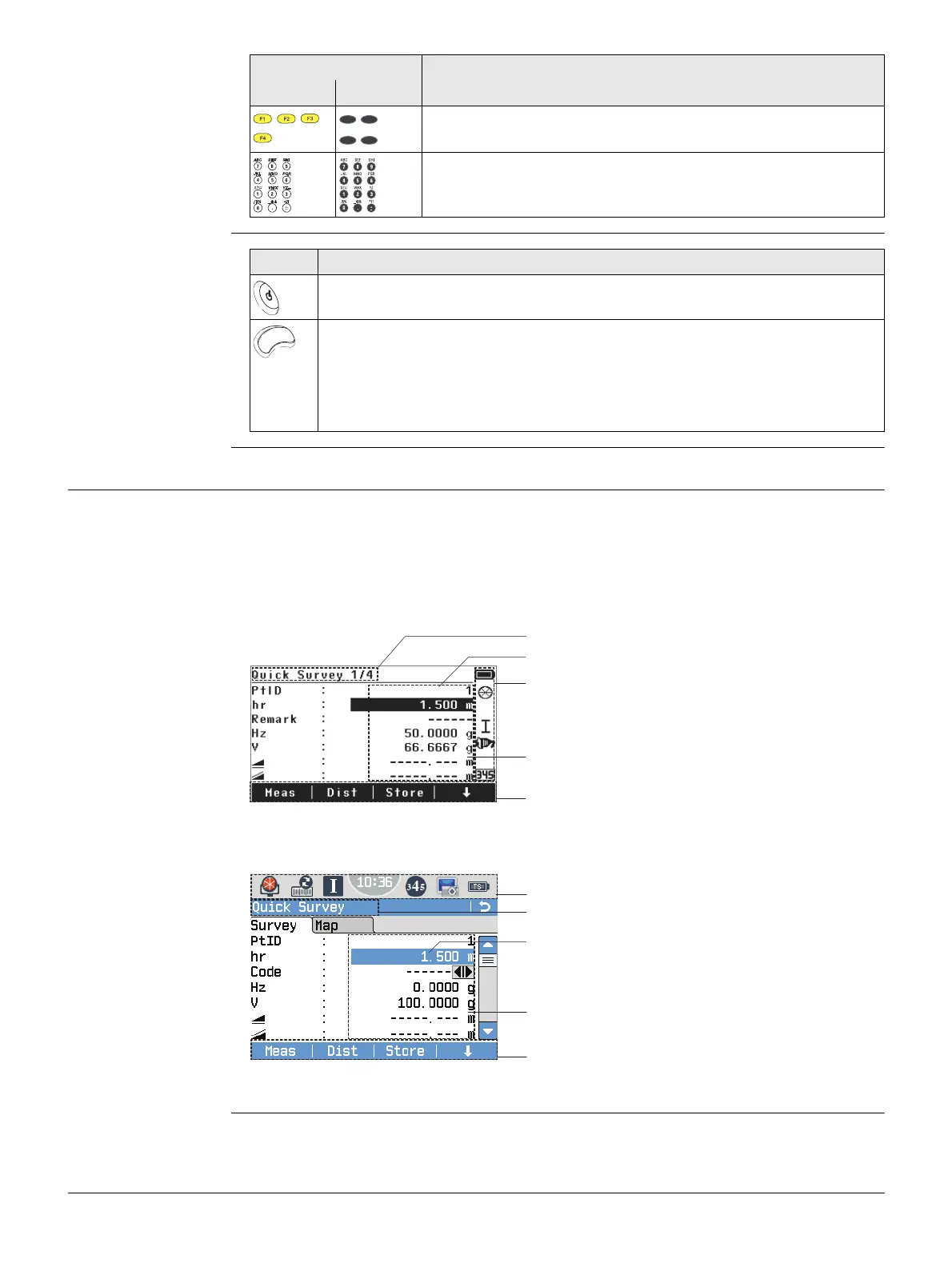
3.2 Screen
Screen The instruments are available with Black&White (B&W) or with Color&Touch (C&T)
display.
Black&White screen:
Color&Touch screen:
,,, ,,
,
Function keys that are assigned the variable functions
displayed at the bottom of the screen.
Alphanumeric keypad for entry of text and numerical values.
Key Description
B&W C&T
Key Description
On / Off key. Switches the instrument on or off.
Trigger key. Quick key programmable with functions Meas or Dist if desired.
TS06 plus/TS09 plus: Programmable with both of the functions.
TS02 plus: Programmable with one of the functions.
The trigger key can be programmed in the Settings screen. Refer to "5.1
Work Settings".
All screens shown in this manual are examples. It is possible that local firmware
versions are different to the basic version.
a) Title of screen
b) Focus in screen. Active field
c) Status icons
d) Fields
e) Softkeys
a) Status icons
b) Title of screen
c) Focus in screen. Active field
d) Fields
e) Softkeys
Tap on an icon, field or tab to run a function.
a
b
c
d
e
002873_002



 To Next Page