FlexLine plus, User Interface
28
3.3 Status Icons
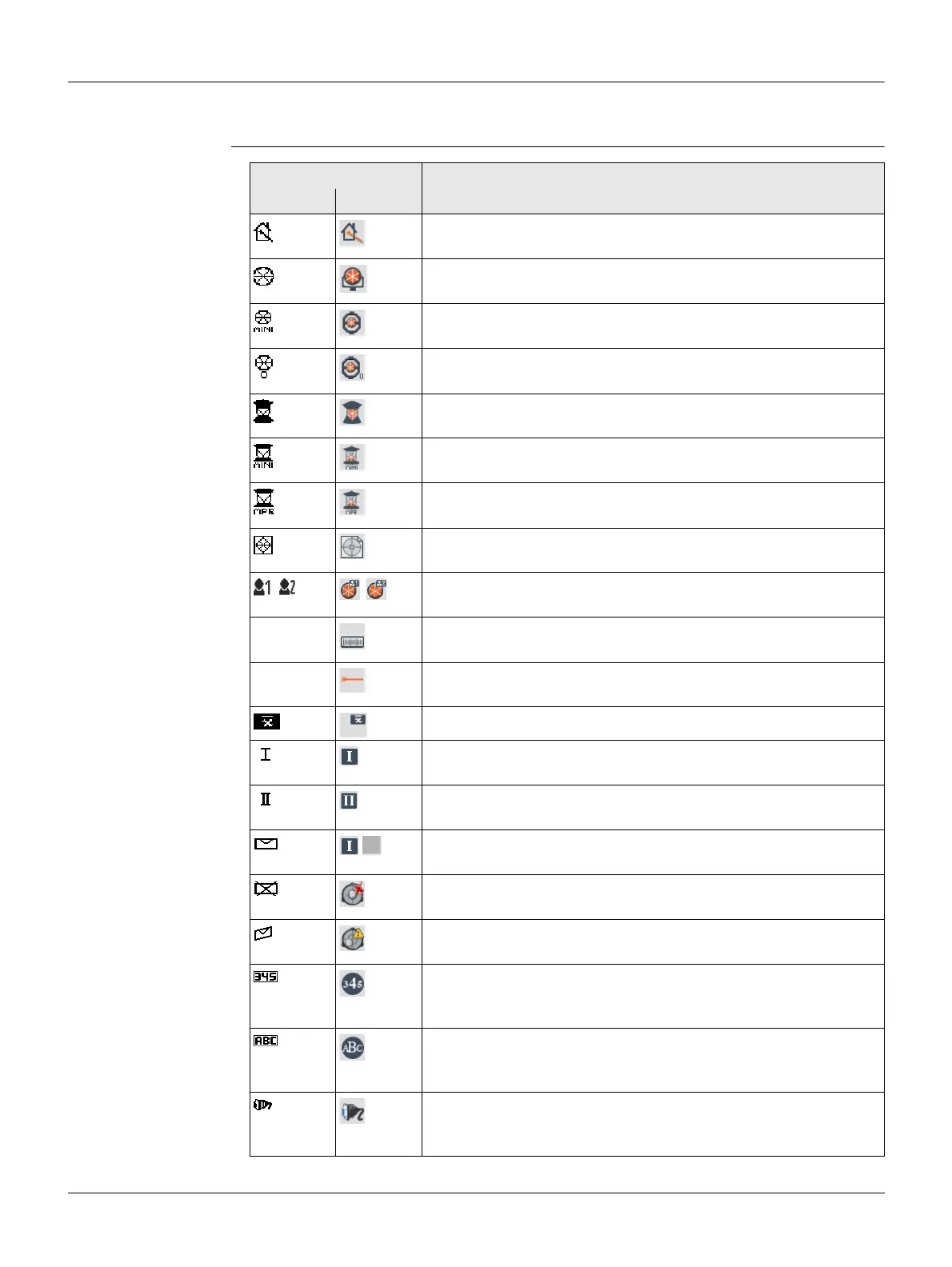
Description The icons provide status information related to basic instrument functions. Depending
on the display type, different icons are displayed.
Icons
Icon Description
B&W C&T
Non-prism EDM mode for measuring to all targets.
For C&T: Tapping the icon opens the EDM Settings screen.
Leica standard prism is selected.
For C&T: Tapping the icon opens the EDM Settings screen.
Leica mini prism is selected.
For C&T: Tapping the icon opens the EDM Settings screen.
Leica mini 0 prism is selected.
For C&T: Tapping the icon opens the EDM Settings screen.
Leica 360° prism is selected.
For C&T: Tapping the icon opens the EDM Settings screen.
Leica 360° mini prism is selected.
For C&T: Tapping the icon opens the EDM Settings screen.
Leica 360° MPR122 prism is selected.
For C&T: Tapping the icon opens the EDM Settings screen.
Leica reflector tape is selected.
For C&T: Tapping the icons opens the EDM Settings screen.
User defined prism is selected.
For C&T: Tapping the icons opens the EDM Settings screen.
- Indicates EDM measurement activity.
For C&T: Tapping the icons opens the EDM Settings screen.
- Indicates an active laser pointer.
For C&T: Tapping the icon opens the EDM Settings screen.
Indicates that Meas. Mode: Average is active.
Indicates telescope position in face I.
For C&T: Tapping the icon opens the Level & Plummet screen.
Indicates telescope position in face II.
For C&T: Tapping the icon opens the Level & Plummet screen.
Compensator is on. For C&T: Tapping the icon opens the Level
& Plummet screen.
Compensator is off.
For C&T: Tapping the icon opens the Level & Plummet screen.
Compensator out of range.
For C&T: Tapping the icon opens the Level & Plummet screen.
Keypad is set to numeric mode. Displayed when an editable
field is highlighted.
For C&T: Tapping the icon switches to alphanumeric mode.
Keypad is set to alphanumeric mode. Displayed when an edit-
able field is highlighted.
For C&T: Tapping the icon switches to numeric mode.
RS232 communication port is selected.
For C&T: Tapping the icon opens the Interface Settings
screen.



 To Next Page