11
Time Zone is an offset time off GMT. You have to select the time zone first and then perform
time sync via NTP because the switch will combine this time zone offset and updated NTP time
to come out the local time, otherwise, you will not able to get the correct time. The switch
supports configurable time zone from –12 to +13 step 1 hour.
Default Time zone: +8 Hrs.
Web Interface
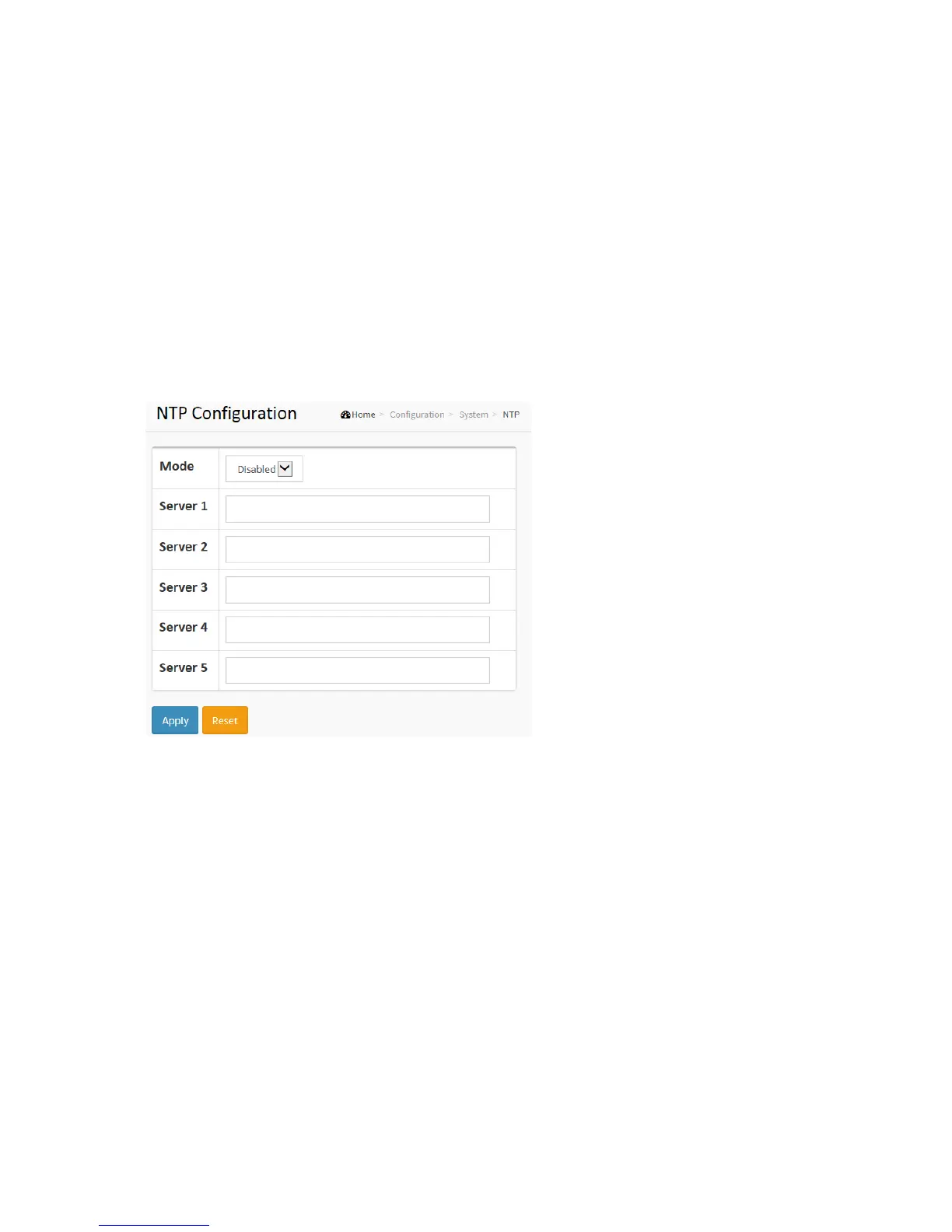
To configure NTP in the web interface:
1. Click Configuration, System, NTP.
2. Specify the Time parameter in manual parameters.
3. Click Apply.
Figure 2-1.3: The NTP configuration
Parameter description:
Mode :
Indicates the NTP mode operation. Possible modes are:
Enabled: Enable NTP client mode operation.
Disabled: Disable NTP client mode operation.
Server 1 to 5 :
Provide the IPv4 or IPv6 address of a NTP server. IPv6 address is in 128-bit records
represented as eight fields of up to four hexadecimal digits with a colon separating each
field (:). For example, 'fe80::215:c5ff:fe03:4dc7'. The symbol '::' is a special syntax that can be
used as a shorthand way of representing multiple 16-bit groups of contiguous zeros; but it
can appear only once. It can also represent a legally valid IPv4 address. For example,
'::192.1.2.34'. In addition, it can also accept a domain name address.
Buttons
Apply – Click to save changes.
Reset - Click to undo any changes made locally and revert to previously saved values.



 To Next Page