EasyManua.ls Logo

LSIS SV-IS7 - Multi-Step Acc;Dec Time Configuration

LSIS SV-IS7
255 pages
Print Icon
To Next Page IconTo Next Page
To Previous Page IconTo Previous Page
Loading...
138
6.8.3
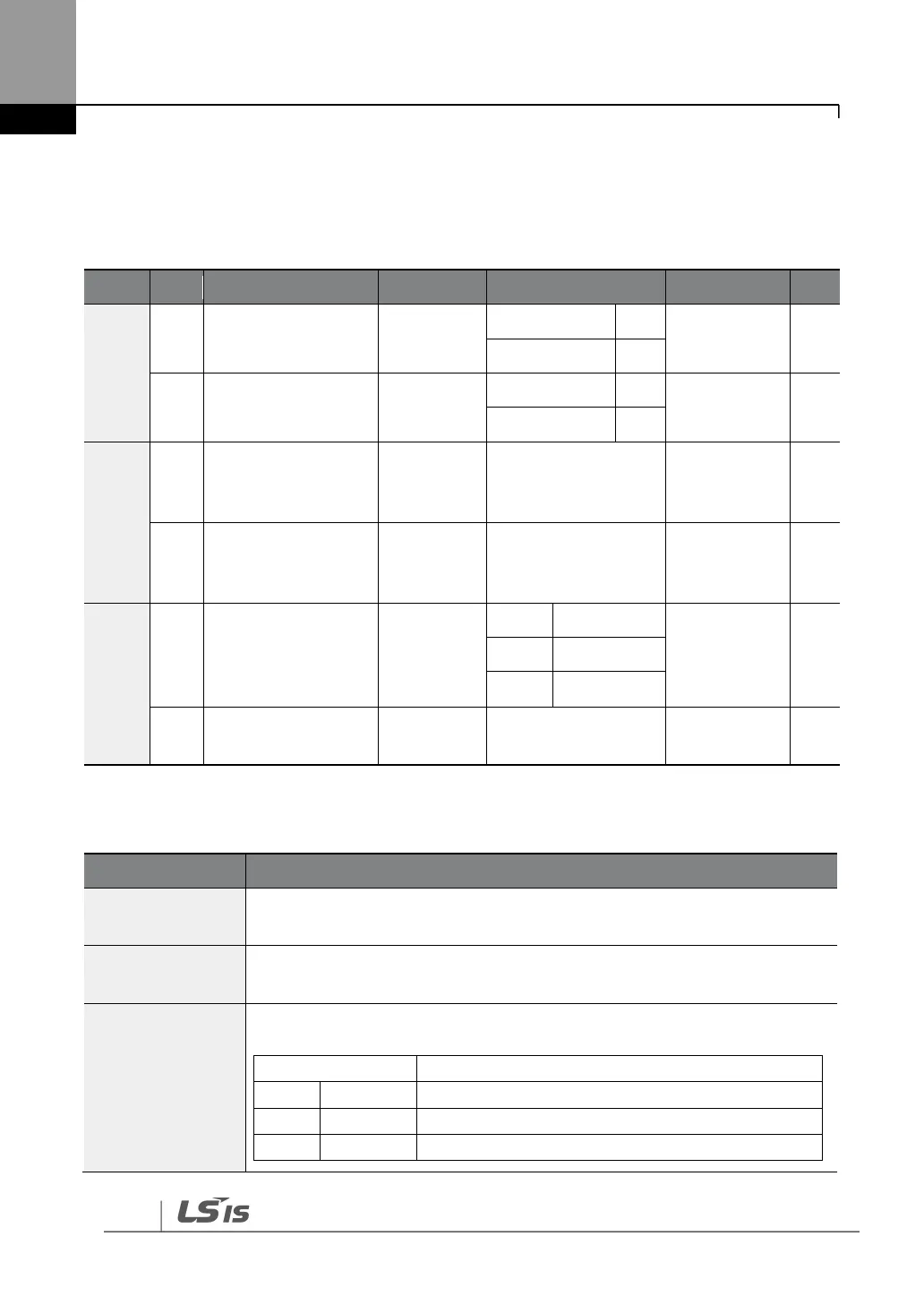
Multi-Step Acc/Dec Time Configuration
The acc/dec times can be configured via a multi-function terminal by setting the ACC
(acceleration time) and DEC (deceleration time) codes in the DRV group.
Group
Code
Name
LCD Display
Parameter Setting
Setting Range
Unit
DRV
03
Acceleration time
Acc Time
75 kW and less
20.0
0.0–600.0
sec
90 kW and up
60.0
04
Deceleration time
Dec Time
75 kW and less
30.0
0.0–600.0
sec
90 kW and up
90.0
BAS
70,
72,
74
Multi-step
acceleration time1–3
Acc Time–x
x.xx
0.0–600.0
sec
71,
73,
75
Multi-step
deceleration time1–3
Dec Time–x
x.xx
0.0–600.0
sec
IN
65–
75
Px terminal
configuration
Px Define
(Px: P1–P8
[optional:
P9–P11])
11
XCEL-L
-
-
12
XCEL-M
49
XCEL-H
89
Multi-step command
delay time
In Check
Time
1
1–5000
ms
Acc/Dec Time Setup via Multi-function Terminals – Setting Details
Code
Description
BAS-70, 72, 74
Acc Time 1–3
Set multi-step acceleration time 1–3.
BAS-71, 73, 75
Dec Time 1–3
Set multi-step deceleration time 1–3.
IN-65–75
Px Define (P1–P8
[optional P9–P11])
Choose and configure the terminals to use for multi-step acc/dec time
inputs.

Configuration
Description
11
XCEL-L
Acc/Dec command-L
12
XCEL-M
Acc/Dec command-M
49
XCEL-H
Acc/Dec command-H

Table of Contents