5-11
AUDIO
USB Music File Player
Using the USB Music File Player
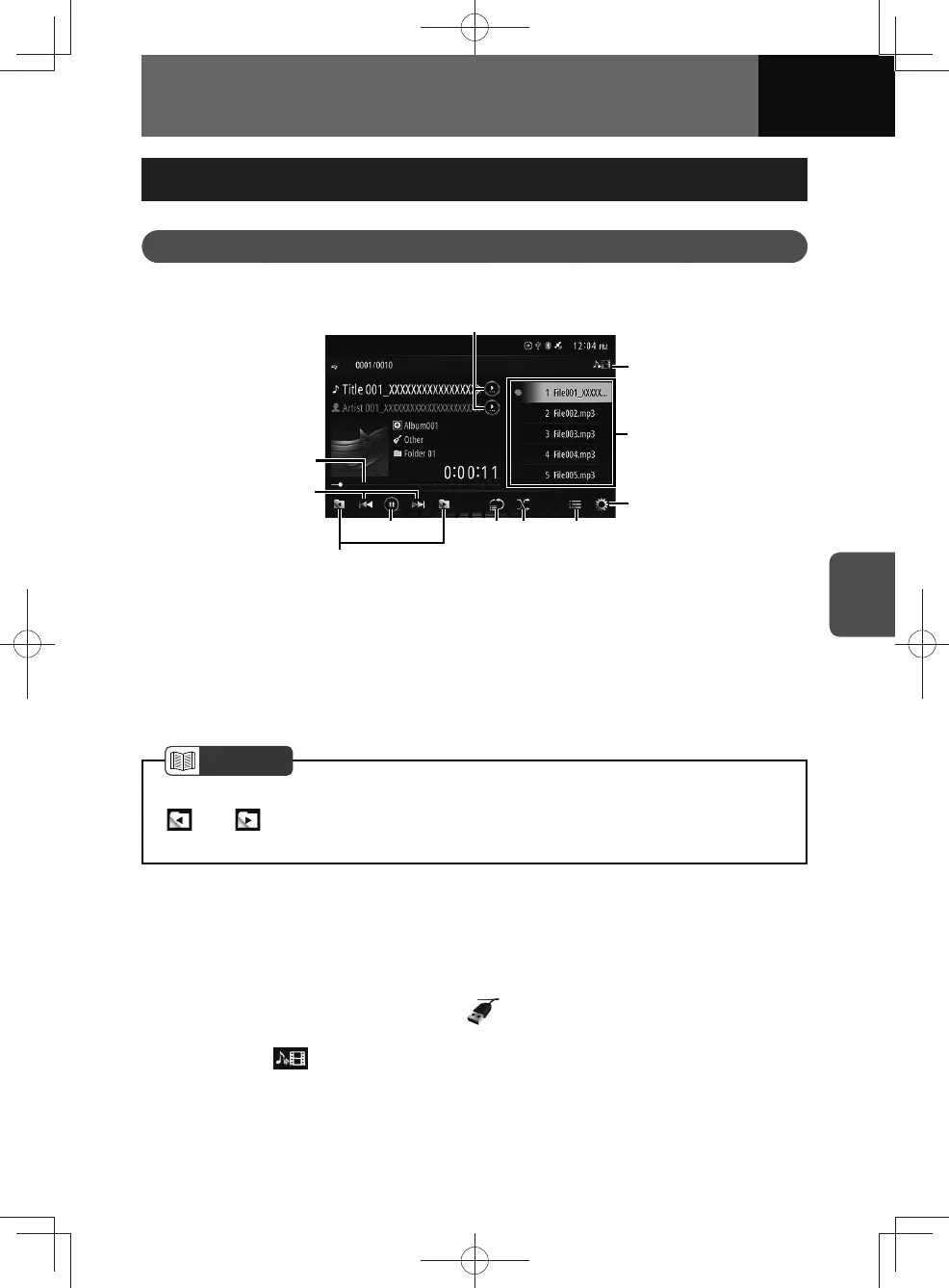
This unit can play music files saved in a USB flash drive. Only MP3/WMA/AAC/WAV
playback is supported.
(1)
(2)
(9)
(4)
(10)
(11)
(5) (6) (7)
(8)
(3)
(1) Progress bar
(2) File up/down and fast forward/fast
reverse buttons
(3) Folder selection buttons
(4) Play/Pause button
(5) Repeat button
(6) Random button
(7) List button
(8) Audio settings button
(9) File list
(10) Music/Video select button
(11) Text scroll button
NOTE
• Some functions may not be available when the vehicle is in motion.
•
and buttons: This function is available only when the folder is selected
from a list and played.
Listening to a USB music file
1. Open the protective cover on the USB/AUX terminal.
2. Connect a USB flash drive to the USB terminal.
3. On the audio menu screen, touch .
• The playback starts.
• Touch the
button to switch from video mode to music mode.











 To Next Page