7-8
APPS
When connecting an iPhone via Bluetooth
When using this function via Bluetooth, it must be paired to an iPhone in the Bluetooth
settings. See "Adding a mobile phone or portable device" on page 3-20 for details
about Bluetooth settings.
Your iPhone's Wi-Fi setting must be turned on in order to connect via Bluetooth. On
your iPhone, go to "Settings" "Wi-Fi" and turn the Wi-Fi toggle switch to on.
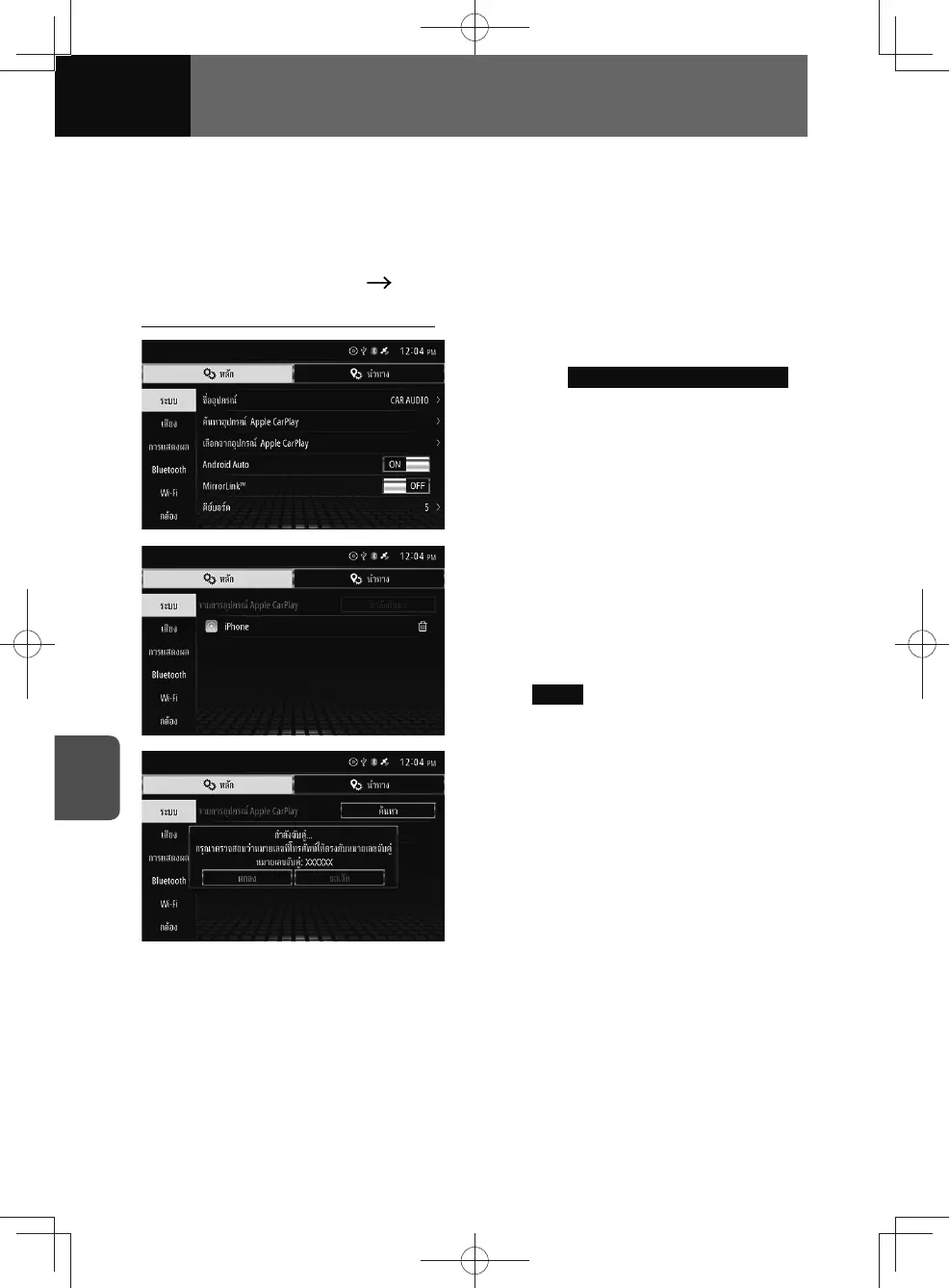
Connect to an iPhone from this unit
1. On the System settings screen,
touch Search Apple CarPlay Device .
2. Touch the iPhone you would like
to connect to.
• Once connected, the System
settings screen will appear.
• If the iPhone you would like to
connect to does not appear, touch
Search .
3. Check that the unit and your
iPhone show the same matching
code, then press "OK"* on your
iPhone.
• * The button may differ by iPhone.
4. The Apple CarPlay screen
appears.
• If another screen is displayed,
touch "Apple CarPlay" on the audio
menu or connected menu.











 To Next Page