6-6
HANDSFREE
Making a Call
You can make a call from the unit by entering a telephone number, using a stored
number in the phone book or speed dial, or calling from the incoming, missed or
outgoing call history.
WARNING
• Do not make a call while driving. Be sure to park the vehicle in a safe location and
apply the parking brake before making a call.
Making a Call by Entering a Telephone Number
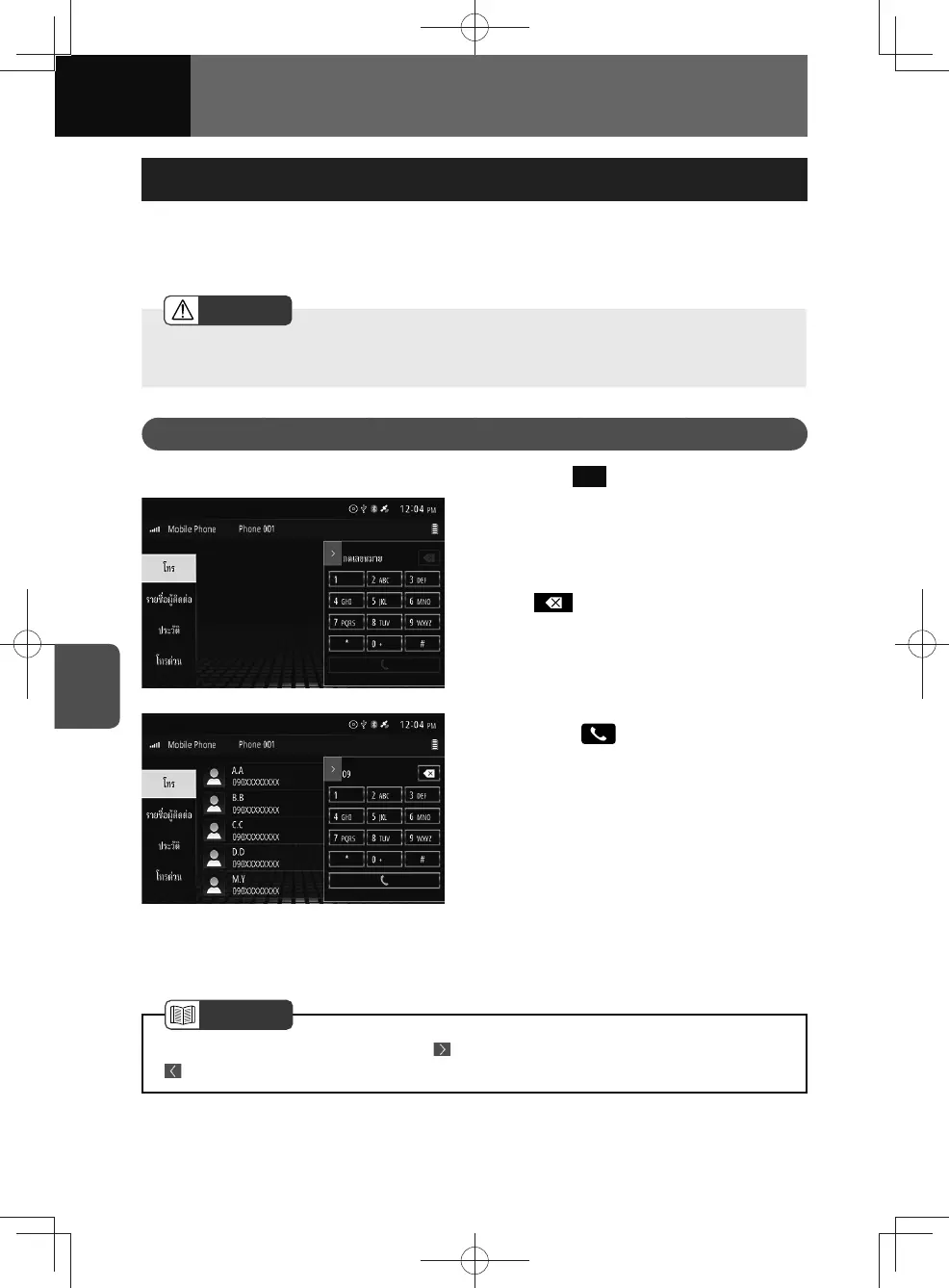
1. Touch Dial .
2. Enter the telephone number on
the handsfree screen.
• You can enter telephone numbers
of up to 32 digits.
•
:
Touch to delete 1 digit from the
entered number. Touch and hold for
more than 1 second to all delete the
digits.
3. Touch ( ) after entering a
phone number.
• A call is made to the entered
telephone number.
• If phone book data has been
transferred, numbers are searched
for in the phone book as you enter
them and displayed in a list. You
can touch the displayed list and
select a phone number.
(See pages 3-27, 6-14)
NOTE
• To close the keypad screen, touch . To display the keypad screen again, touch
.











 To Next Page