4-10
NAVIGATION (Models with NAVI)
Destination Search
Setting a Route to the Destination
Searching and setting the destination
Destinations can be displayed and selected from addresses, business names,
keywords and past destinations.
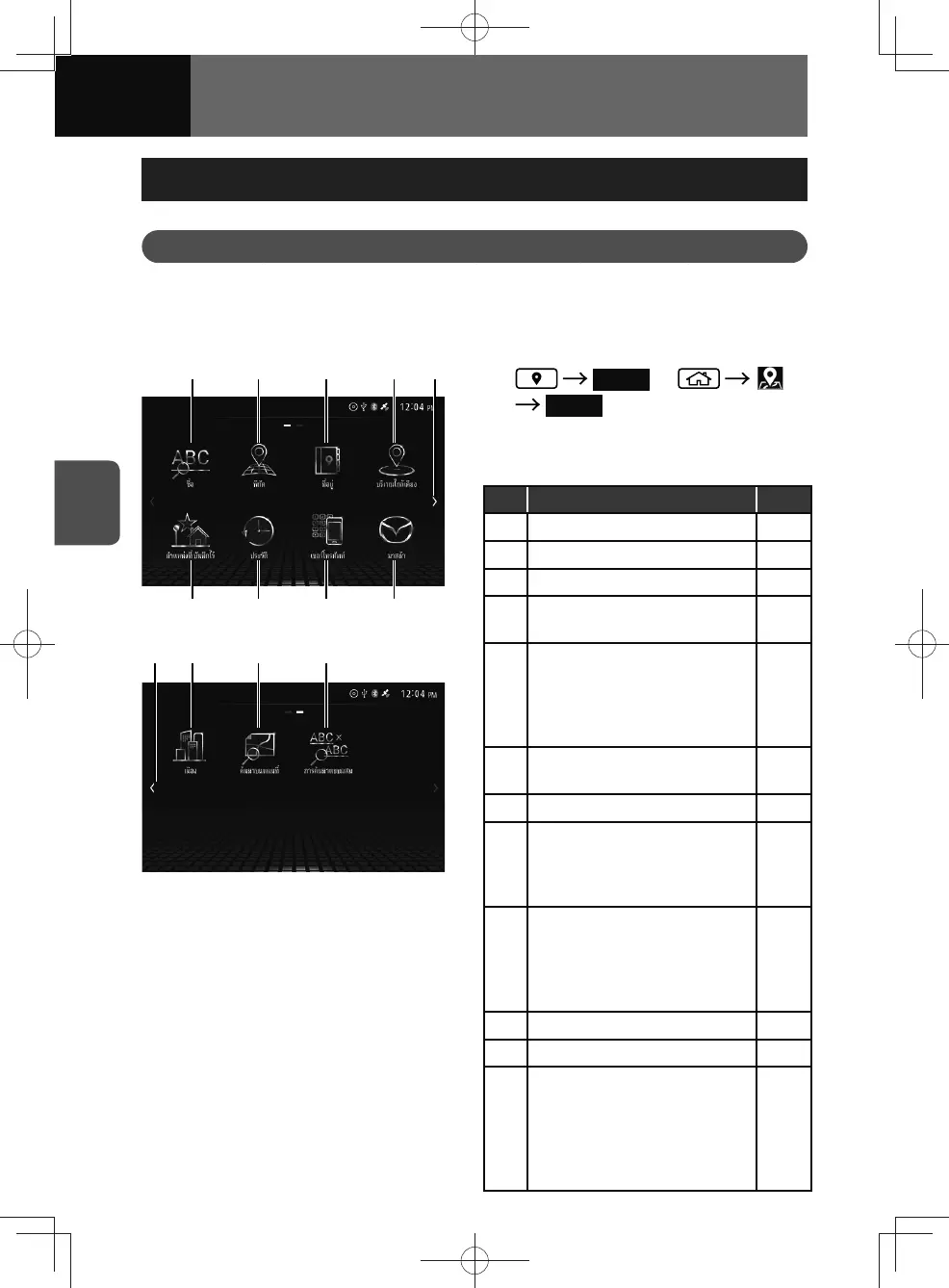
(1) (2) (3) (4) (5)
(9) (8) (7) (6)
(10)(5) (11) (12)
1. Search or
Search
2. Search for a location with the
following methods.
No. Function Page
(1) Searches by name. 4-12
(2) Searches by coordinates. 4-13
(3) Searches by address. 4-14
(4)
Searches a Points of Interest
(POI).
4-15
(5)
Displays the next or previous
page.
• You can flick left or right to
display the next or previous
page.
—
(6)
Searches nearby MAZDA
dealers.
4-16
(7) Searches by telephone number. 4-17
(8)
Searches from recent locations.
• This function is available only
when you have searched for
the location in the past.
4-18
(9)
Searches from saved location
list.
• This function is available only
when locations are saved in
the navigation system.
4-19
4-24
(10) Searches by city name. 4-20
(11) Searches on the map. 4-21
(12)
Search with two keywords.
(Combined Search)
• Search by entering two
keywords from data about
your destination, such as POI
name or city.
4-22











 To Next Page