4-23
NAVIGATION (Models with NAVI)
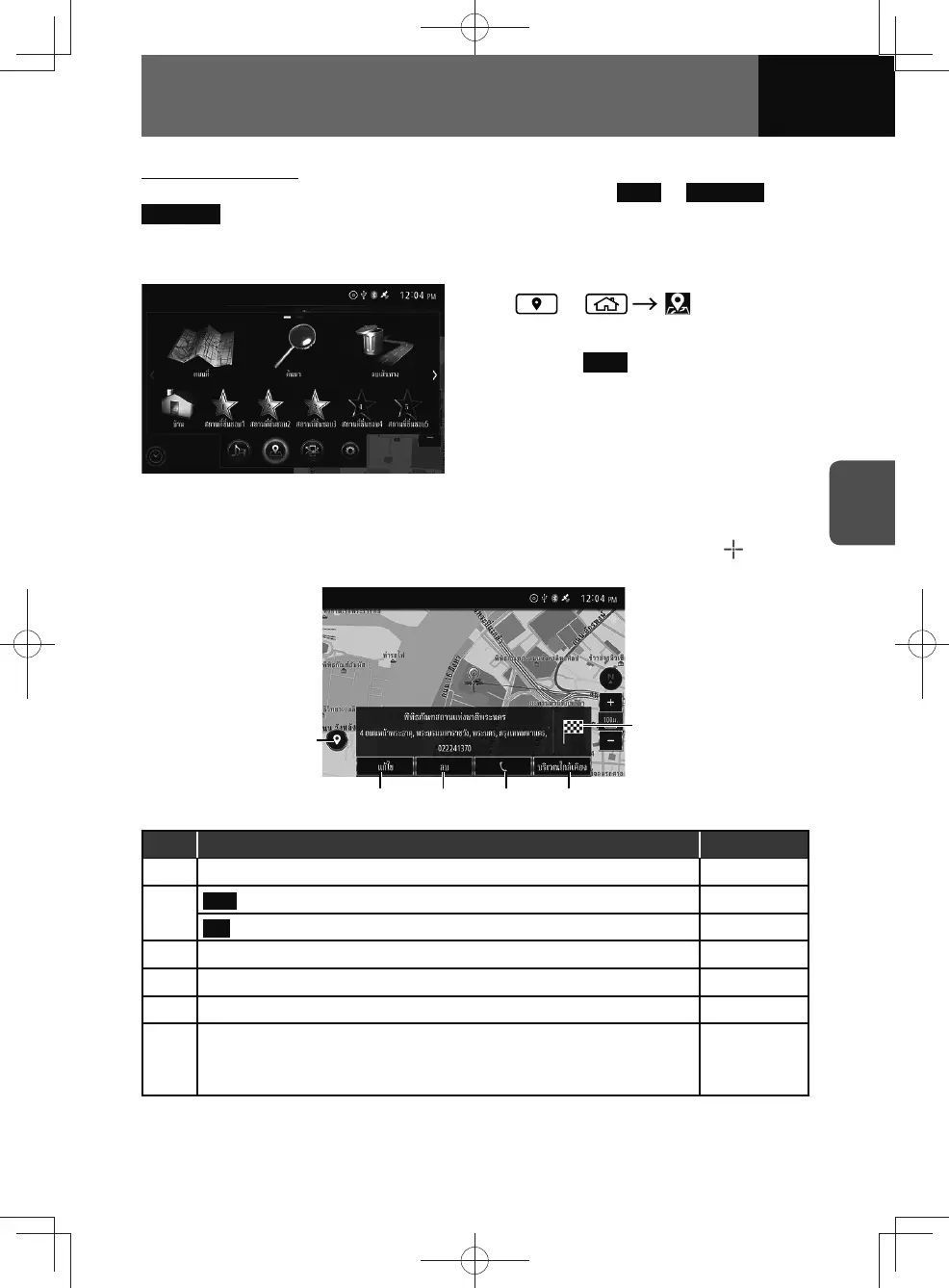
Using the favourite
If you have favourite already saved in the preset buttons (e.g.
Home or Favourite 1 to
Favourite 5 ), you can set your destination by specifying one of them.
• This function is available only when locations are saved in the preset buttons. (See
page 4-24)
1. or
2. Touch one of the preset button.
• Touch Home , the route will be
automatically calculated with the
fastest travel time or the straight
distance, and your navigation
system will start route guidance.
Location confirmation screen
Whenever you select a destination from a search features or point on map, marker
will appear over the selected location and information and options will be displayed.
(6)
(1)
(3)(2) (4) (5)
No. Function Page
(1) Display or hide the detailed information screen. —
(2)
Save
*1
: Display the saved point screen. 4-24
Edit
*2
: Display the point edit screen. 4-25
(3) Delete the saved point. (Only current point is saved.) 4-26
(4) Making a call. —
(5) Display the vicinity search screen. 4-15
(6)
Set the destination. (Only when information other than current location
displayed.)
• The route can be deleted during route guidance.
4-10
*1 If selected point not saved.
*2 If selected point already saved.











 To Next Page