Integritest Exacta Filter Integrity Test Instrument
Operating and Maintenance Manual Printer Maintenance and Troubleshooting 145
PRINTER MAINTENANCE AND TROUBLESHOOTING
To Rear of Instrument
To Front of Instrument
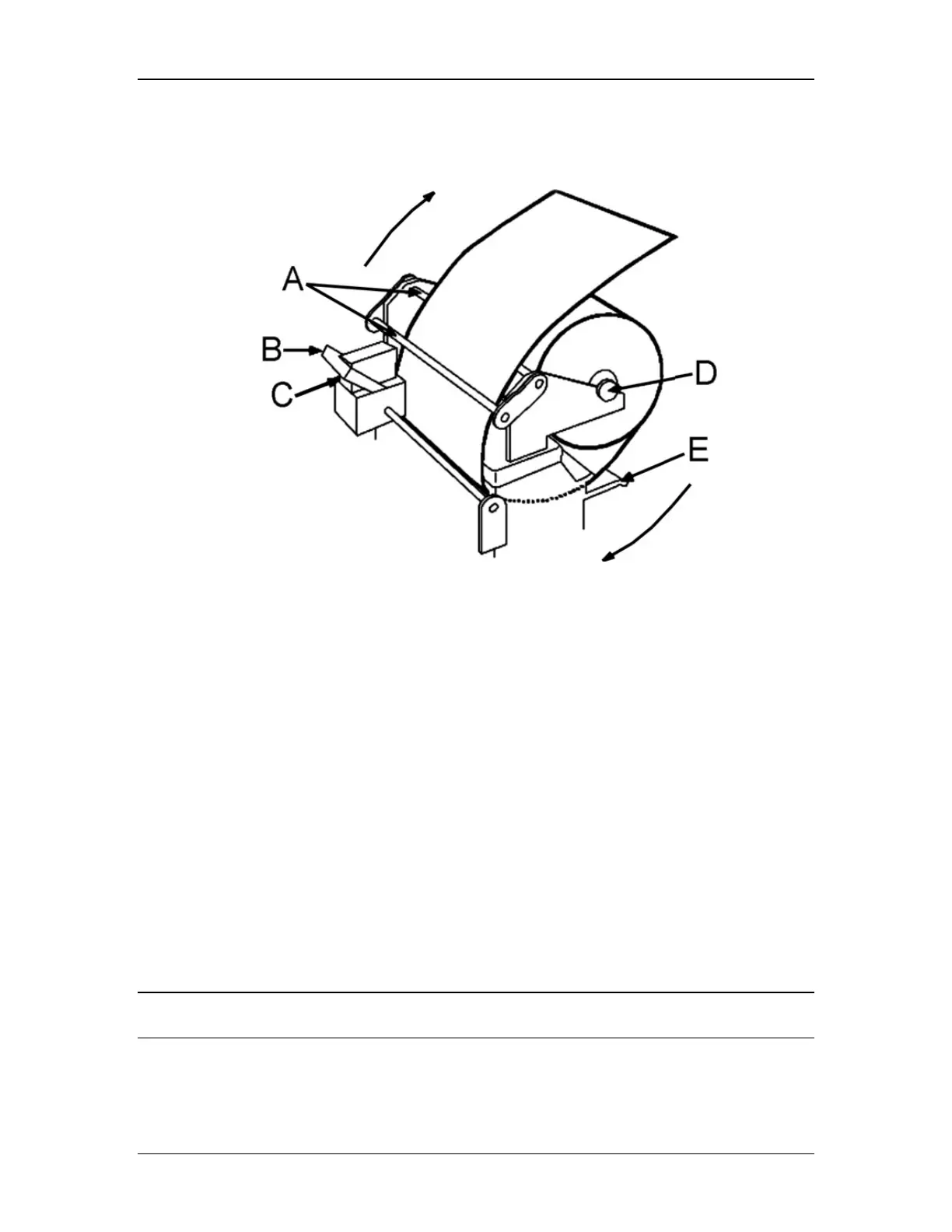
Diagram Key: A. Paper Roll Rod Guides D. Paper Roll Rod
B. Retaining Clip E. Print Guide Tab
C. Ink Cartridge
Figure 53: Internal Printer
Changing the Paper
1. Lift the paper roll rod to remove the old paper roll.
2. Cut the end of the paper on the new roll to form a clean edge.
3. Position the new paper roll so that the paper can be inserted into the printer (Figure
53).
4. Insert the end of the roll between the print guide tabs.
5. Press the Print Feed key to advance the paper.
6. Feed approximately 6 inches of paper through the printer (enough to reach just
through the slot at the rear of the instrument.
7. Place a new roll of paper on the paper roll rod as shown above.
8. Secure the holding rod to the rod guides.
Never attempt to force or pull paper through the printer. Damage to the mechanism may result.
Always use the Print Feed key to advance the paper.



 To Next Page