Millipore System Documentation Set
86 Operating and Maintenance Manual Publication XITXSP121 P Rev.A
1. Go to the Print Setup Screen and select the Language.
2. Click
to select a language.
3. Click
to save the selected language.
Step 2. Configure Operator Input Screen
The Integritest Exacta instrument allows the user to customize specific aspects of the test print
out. These include:
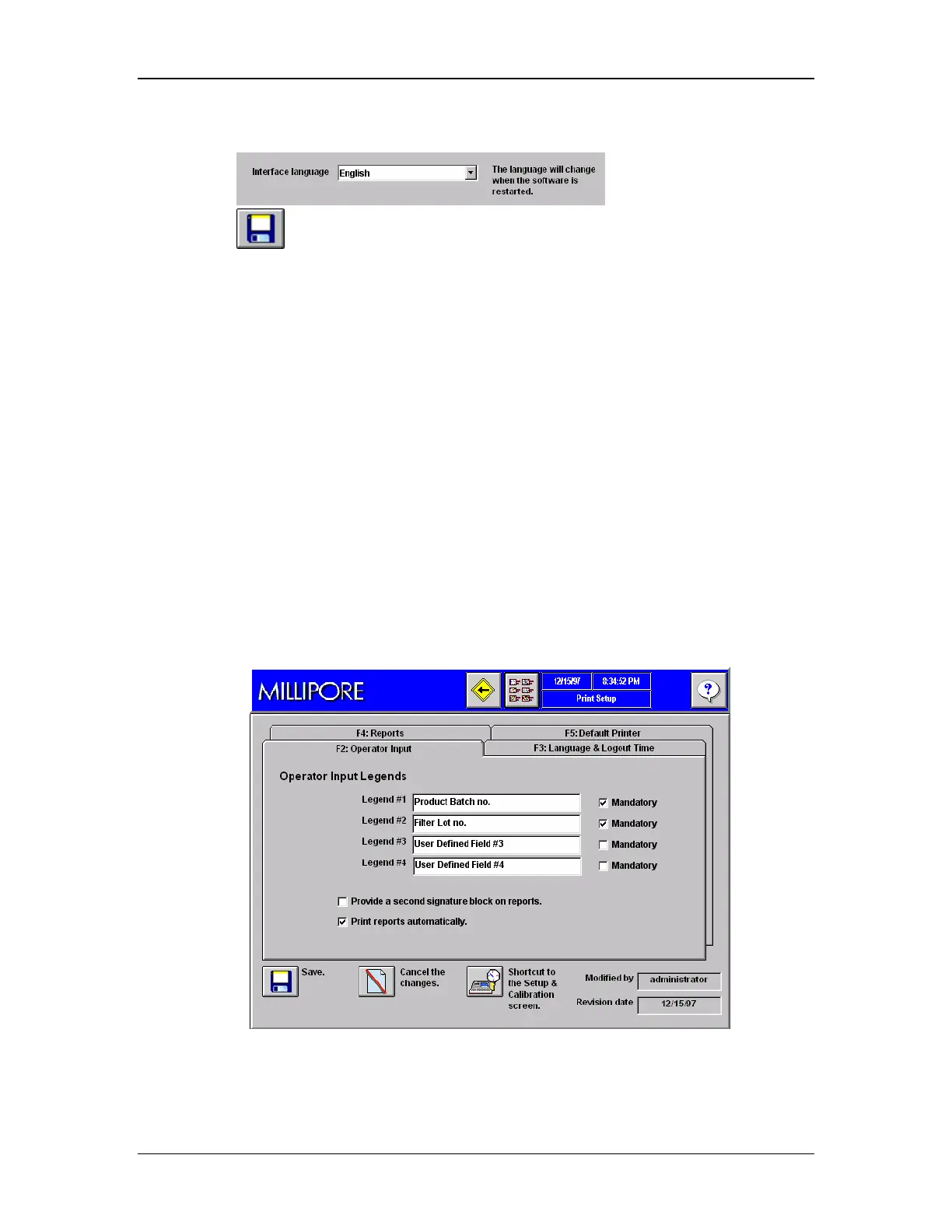
1. Adding 0–4 Operator Inputs to the test procedure.
• If an operator input is added, the user will be prompted to enter a value in the
corresponding field prior to running a test.
2. Modifying the Operator Input legends.
• Customizing operator input legends so they meet a user’s specific requirements.
3. Designating the Operator Inputs as optional or mandatory.
• If input is designated as mandatory, then a test cannot be run until the
corresponding field is entered.
4. Choosing to print one or two signature lines on the printout.
5. Choosing print on demand or automatic printing.
Procedure
1. Go to the Print Setup Screen and select the Operator Input Tab F2 (see Figure 37).
Figure 37: Print Setup Screen, Tab F2, Operator Input



 To Next Page