Millipore System Documentation Set
88 Operating and Maintenance Manual Publication XITXSP121 P Rev.A
Step 4. Choose a Report Format
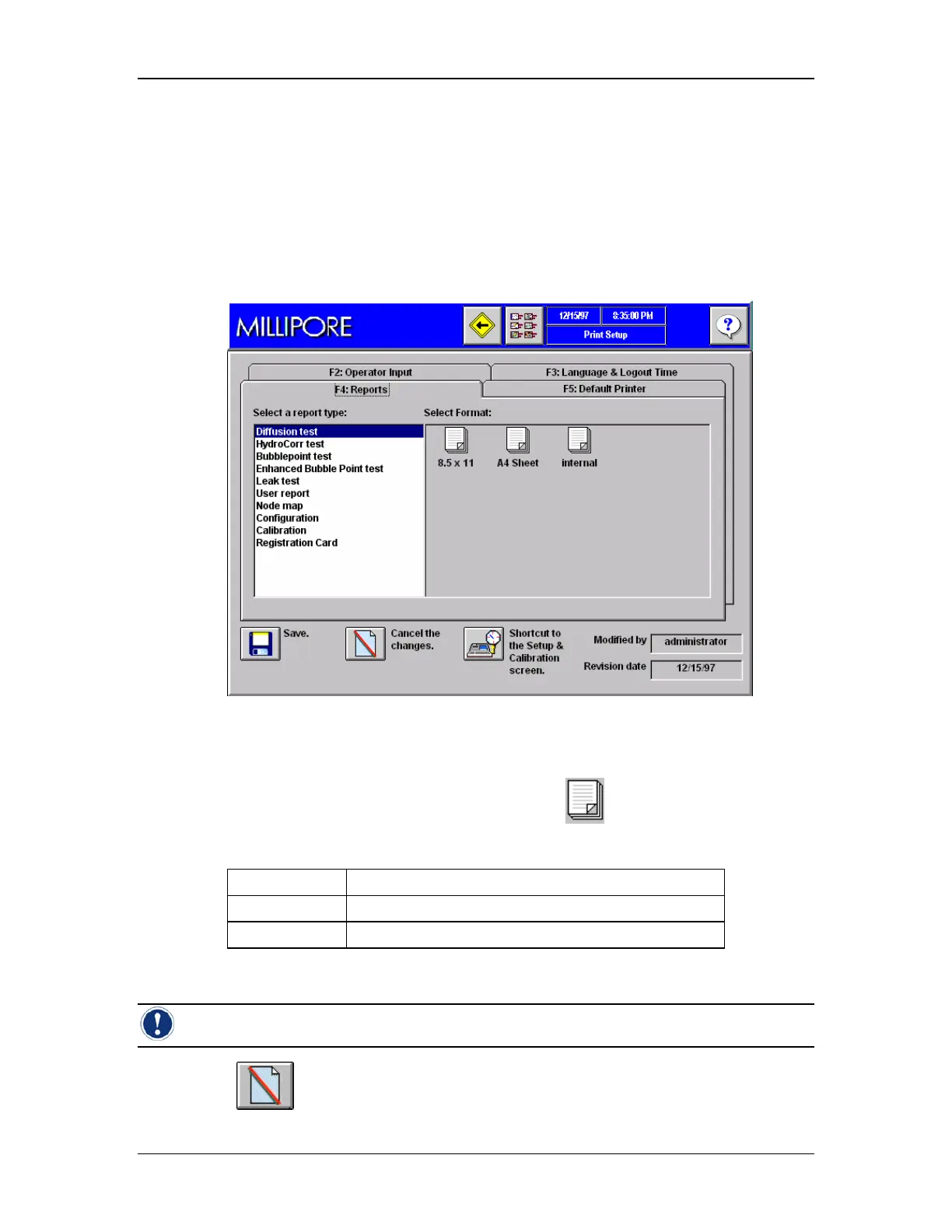
The following procedure explains how to select the preferred report format. To use the
Integritest Exacta’s internal printer the “Internal” format must be chosen so that the printout is
configured for the 3-inch internal printer. For external printers the choice of 8.5” x 11” or A4
format is available.
Procedure
1. Go to the Print Setup Screen and select the Reports Tab, F4 (Figure 39).
Figure 39: Print Setup Screen, Tab F4, Reports
2. Select a report type from the list.
3. For each report type, move the cursor over the icon for the desired paper size
and print format for the test that has been selected.
Internal The Internal Printer is being used;
8.5 x 11
To print on Standard Letter size paper
A4
To print on A4 size paper
4. Select a report format by highlighting the appropriate icon.
Note: the report format should always correspond with the choice of printer.
5. Click if you wish to cancel the changes.



 To Next Page