Millipore System Documentation Set
30 Operating and Maintenance Manual Publication XITXSP121 P Rev.A
The tubing can be connected to:
• The filter housing
• Directly to a capsule filter
To Remove the Two Protective Stem Protectors
• Push the collar towards the instrument
• Pull the fitting away from the instrument.
To Connect the Outlet Tubing to the Instrument
• Slide two quick disconnects of outlet tubing onto the connector stems labeled From
Housing and To Housing respectively. (see Figure 8: Cutting the Tubing).
• While grasping the rear of the connector, push it firmly against the outlet
connector stem and release it when you hear it “click” into place. Do not grasp the
flared section when making a connection. This section must be able to slide freely
into place.
• Verify that the tubing assembly is firmly attached to the outlet connector. If you can
easily detach the tubing assembly from the Integritest Exacta instrument if it is not
connected properly. Repeat steps 1 and 2 above until you achieve a firm
connection (see Figure 5).
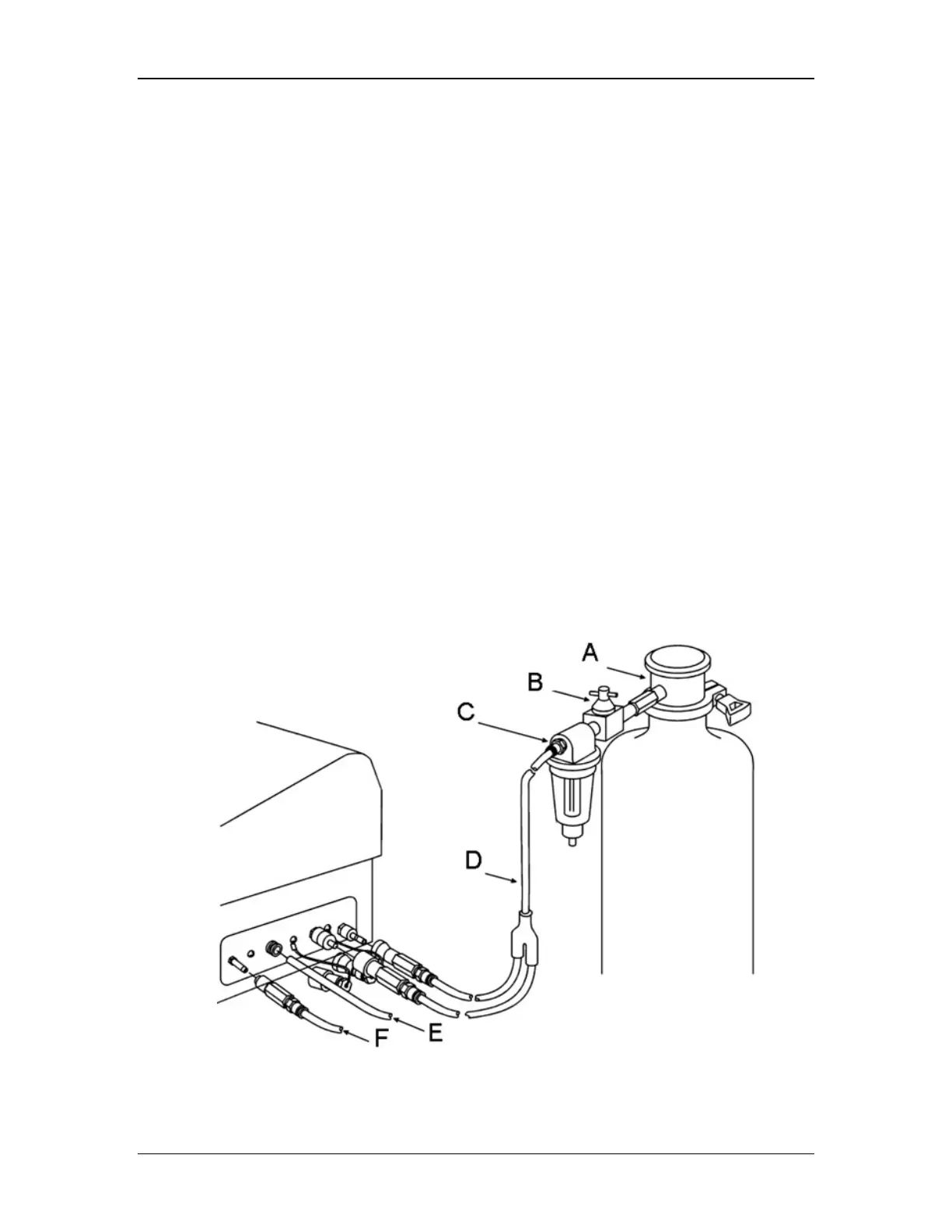
Your tubing connections to the Integritest Exacta instrument should now appear similar to that
shown in Figure 6, which illustrates the connection to a typical cartridge filter system.
Diagram Key: A. Disk Test Adapter w’ 1.5” TC Connector D.Outlet Tubing
B. Instrument Valve E. Exhaust Tubing*



 To Next Page