5 - 272 WiNG 5.6 Access Point System Reference Guide
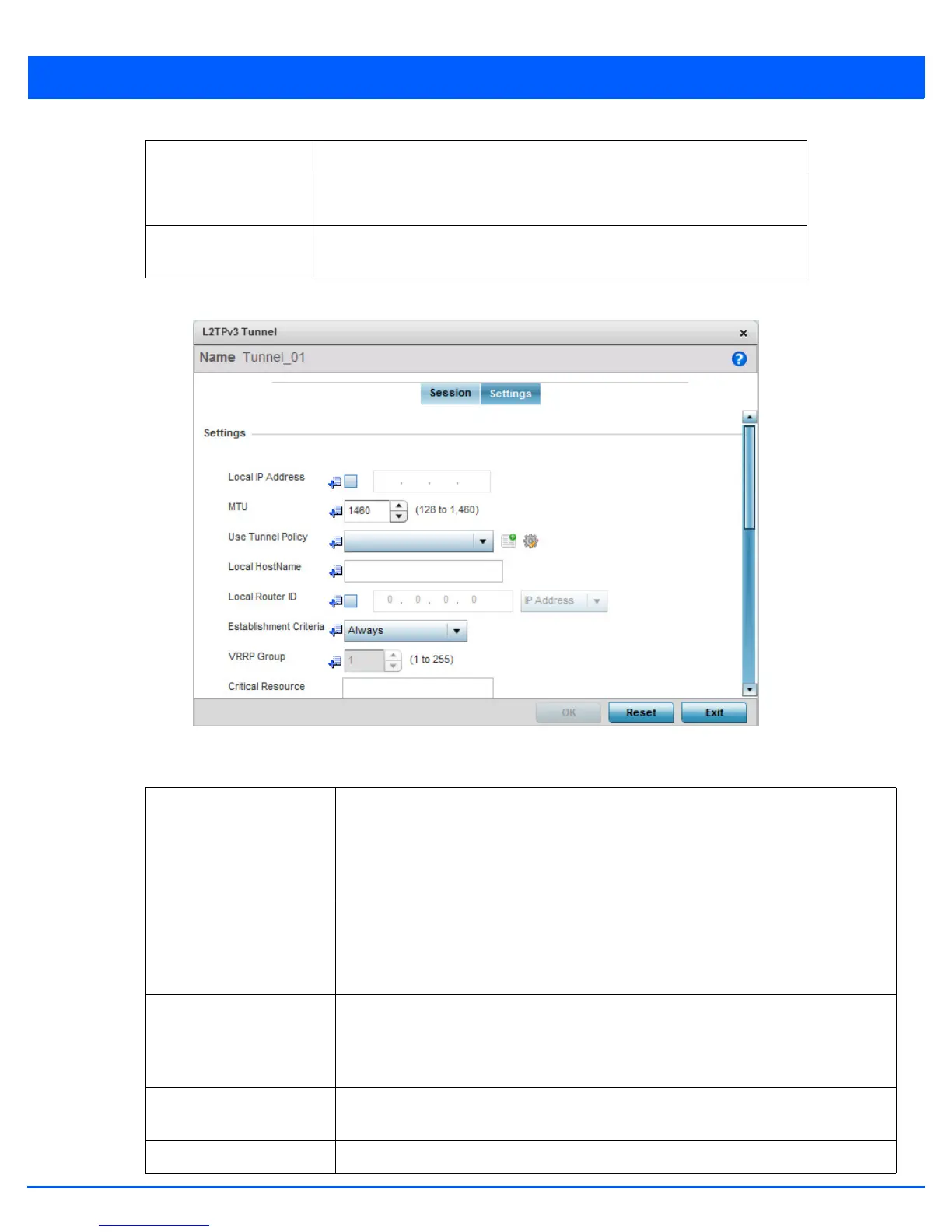
15. Select the Settings tab.
Figure 5-176 Device Overrides - Network - L2TPv3 screen - Add L2TPv3 Tunnel Configuration - Settings screen
16. Define the following Settings required for the L2TP tunnel configuration:
Traffic Source Type Lists the type of traffic tunnelled in this session (VLAN etc.).
Traffic Source Value Define a VLAN range to include in the tunnel session. Available VLAN ranges
are from 1 - 4,094.
Native VLAN Select this option to provide a VLAN ID that will not be tagged in tunnel
establishment and packet transfer.
Local IP Address Enter the IP address assigned as the local tunnel end point address, not the interface IP
address. This IP is used as the tunnel source IP address. If this parameter is not specified,
the source IP address is chosen automatically based on the tunnel peer IP address. This
parameter is applicable when establishing the tunnel and responding to incoming tunnel
create requests.
MTU Set the maximum transmission unit (MTU). The MTU is the size (in bytes) of the largest
protocol data unit the layer can pass between tunnel peers. Define a MTU from
128 - 1,460 bytes. The default setting is 1,460. A larger MTU means processing fewer
packets for the same amount of data.
Use Tunnel Policy Select the L2TPv3 tunnel policy. The policy consists of user defined values for protocol
specific parameters which can be used with different tunnels. If none is available a new
policy can be created or an existing one can be modified. For more information, refer to
Configuring Captive Portal Policies on page 9-2.
Local Hostname Provide the tunnel specific hostname used by this tunnel. This is the hostname advertised
in tunnel establishment messages.
Local Router ID Specify the router ID sent in tunnel establishment messages with a potential peer device.

 To Next Page
 Loading...