Home
MUTOH
Printer
spitfire 90
Page 67
MUTOH spitfire 90 - Page 67
319 pages
Manual
Save Page as PDF
To Next Page
To Next Page
To Previous Page
To Previous Page
Loading...
Spitfire – Maintenance Manual
67
AP-74096, Rev. 1.0, 09/06/05
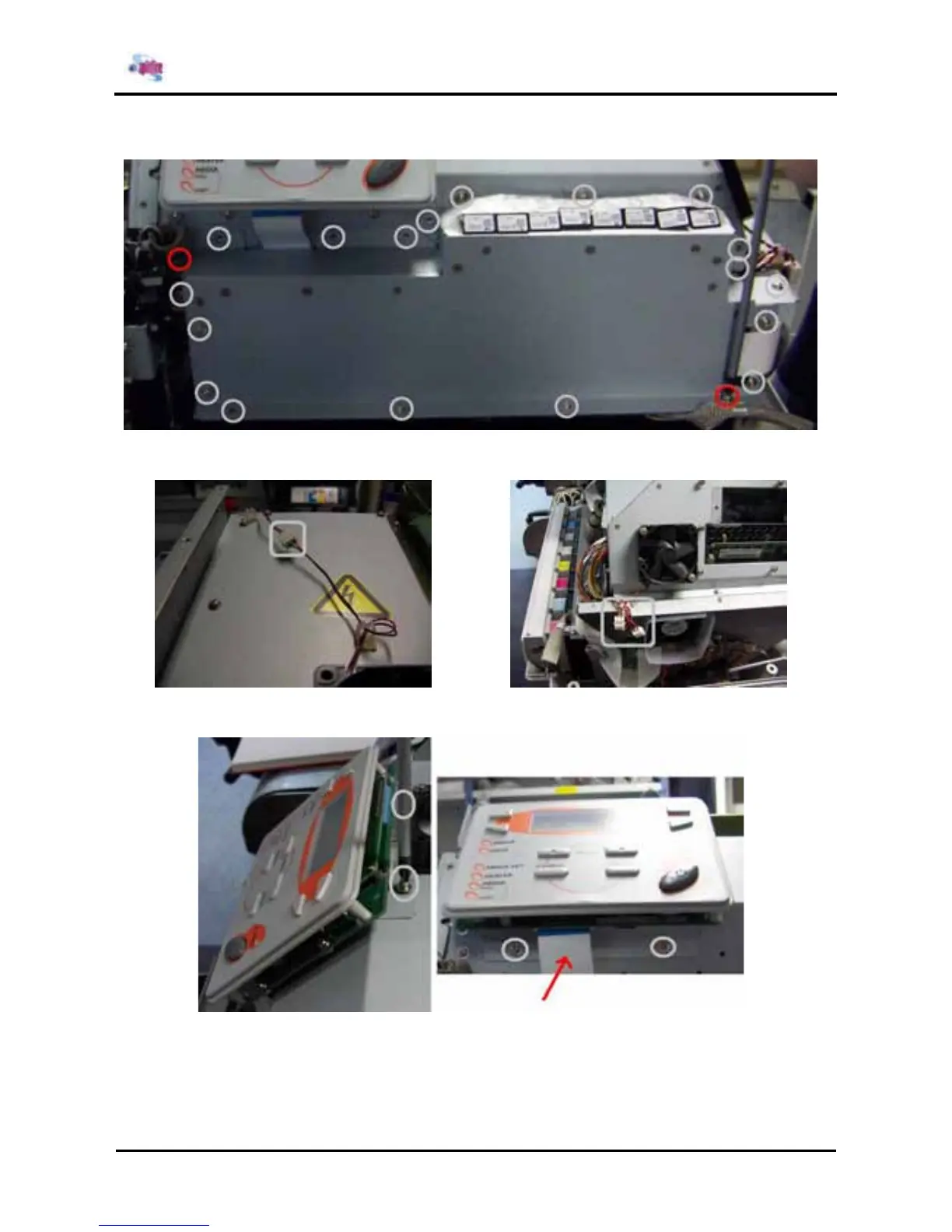
Step 4 :
Remove the mainboard cover 3
by loosening the 20 screws.
Step 5 :
Disconnect the cooling fan cables.
Step 6 :
Remove the display panel (4screws) and flatcable.
66
68
Table of Contents
Main Page
Default Chapter
5
Copyright Notice
5
Important Notice
7
Table of Contents
9
1 Safety Instructions
15
Introduction
15
Warnings, Cautions and Notes
15
Important Safety Instructions
15
Warning Labels
18
Labels in Function of Transportation
21
2 Product Overview
23
Introduction
23
Features
23
Part Names and Functions
24
Front
24
Back
26
Position and Function of the Heating Elements
27
Operation Panel
28
Printer Status
30
Normal
30
Setting Menu Display
30
Changing the Printer Status
31
3 Specifications
33
Introduction
33
Product Specifications
34
Interface Specifications
35
Network Interface Specifications
36
Installation
37
Choosing a Place for the Printer
37
Installing the Printer
39
4 Parts Replacement
41
Introduction
41
Removing the Cover
42
Removing the I/H Cover
43
Removing Side Cover R
44
Removing Side Cover L
46
Removing the
48
Removing the Panel Unit Assembly
52
Removing the y Rail Cover
53
Removing Front Paper Guide
54
Removing Rear Paper Guide
56
Removing the Head Cover
57
Removing the Maintenance Cover
58
Replacement of the Heater Element
59
Heater Elements
59
Replacing Board Bases
66
Replacing the Mainboard Assembly, Hdd_Extension Board Assembly
66
HEAD_DRV Board Assembly, Pci_Linux Board Assembly and Cooling Fan Assembly
66
Replacing the Power Source Board Assembly
72
Replacing the Inlet Assembly, Inlet Board Assembly and Lever Foot SW Cable Assembly
74
Replacing the JUNCTION Board Assembly
75
Replacing the PF Actuator
76
Replacing the PF Motor Assembly
76
Replacing the PF_ENC Assembly and PF Scale Assembly
77
Replacing the PF Deceleration Pulley Assembly
78
Replacing the PF Deceleration Belt
79
Replacing the P_REAR_R Sensor Assembly and P_REAR_L Sensor Assembly
80
Replacing the Suction Fan Assembly
81
Replacing the Lever Motor Assembly and the Arm Motor Installation Board
82
Replacing the Transmission Photosensor
84
Replacing the Flushing Box Assembly
86
Replacing the CR Actuator
92
Replacing the CR Motor Assembly
92
Replacing the Steel Belt
93
Replacing the SLIDE Motor Assembly, HD_SLIDE Sensor Assembly, and Slide Motor Installation Board
95
Replacing the T Fence (Timing Fence or Linear Y-Axis Encoder)
96
Replacing the CR Slave Pulley Assembly
98
Replacing the CR Actuator Pulley and the CR Deceleration Belt
99
Replacing the Steel Bearer, Tube Guide, CR Tape Power Cable and Ink Tube
100
Replace the Cover R Sensor Assembly and the Cover L Sensor Assembly
102
Replacing the Cursor
103
Replacing the Cutter Holder, Cutter Spring, Cutter Cap, Solenoid Assembly and Solenoid Spring
103
Replacing the Print Head Assembly and Head Tape Power Cable
105
Replacing the H Ink Tube, Tube Branch and Damper Assembly
107
Replacing the CR Board Assembly
108
Replacing the CR_ENC Assembly
110
Replacing the P_EDGE Sensor Assembly
111
Replacing the CR Cursor Assembly
112
Replacing the Cursor Roller Assembly
113
Replacing the MAINTENANCE Station Area
115
Replacing the Capping Station Assembly (Maintenance Assembly)
115
Assembling the Capping Station
118
Replacing the Caps
121
Replacing the Wiper and Wiperarm and Replace the Sponge
122
Replacing the SLIDE Motor Assembly (Wiper Arm)
127
Replacing the Transmission Photosensor (Wiper Home Position and Maintenance Home Position)
128
Replacing the Pump Area
129
Replacing the Pump Assembly
129
Replacing the Pump
131
Replacing the Pump Motor Assembly
132
Replacing the Cartridge Area
133
Replacing the I/H (Ink Holder) Assembly
133
Replacing Supports and Scroller
137
Replacing the Waste Fluid Bottle Assembly
137
Replacing the Waste Bottle Box Sensor Assembly
138
5 Self-Diagnosis Function
141
Introduction
141
Preparation
141
Preparations on Machine
141
Starting up
142
Operations in Self-Diagnosis Mode
143
Operating Self-Diagnosis Mode
143
Diagnosis Items in Self-Diagnosis Menu
145
Test / Inspection Menu
146
RAM Capacity Menu
147
Version Menu
147
Operation Panel Menu
148
Sensor Menu
149
Encoder Menu
150
Fan Menu
151
History Menu
151
Head Signal Menu
153
Adjustment Menu
154
Skew Check Menu
155
Head Rank Input Menu
156
Head Nozzle Check Menu
157
Head Slant Check Menu
159
Repeatability Adjustment (Bi-Directional)
164
CW Adjustments (Uni-Directional)
165
Band Feed Correction Menu (X Length)
166
Top & Bottom Adjustment Menu
168
P_REAR Sensor Position Adjustment Menu
169
Test Print Menu
170
Head Wash Menu
171
Software Counter Initialization Menu
173
Feed Pitch Check Menu
174
Fill Printing Menu
174
Purge Menu
175
Sample Printing Menu
176
Parameter Menu
177
Parameter Initialization Menu
177
Parameter Update Menu
178
Endurance Running Menu
187
CR Motor Endurance Menu
188
PF Motor Endurance Menu
189
Cutter Endurance Menu
190
Head Up/Down Endurance Menu
191
Head Lock Endurance Menu
192
Pump Endurance Menu
193
Lever Motor Endurance Menu
194
Sequential Printing Endurance Menu
195
General Endurance Menu
196
Endurance Running Check Menu
197
Head Lock Menu
198
Heater System Menu
199
Heater Status Menu
199
Heater Temperature Menu
199
Heater Test 30 Menu
200
Heater Test 50 Menu
200
Heater Test Max Menu
200
Test Aging Menu
201
Heater Version Menu
201
Sol Prepare Menu
202
SMS Menu
202
Machine Size Select Menu
203
6 Maintenance Mode
205
Introduction
205
Operating Maintenance Mode
205
Starting up Maintenance Mode
205
Maintenance Menu
206
Counter Display Menu
206
Counter Initialization Menu
208
MAC Address Write Enable Menu
209
Head Voltage
210
7 Adjustments
211
Introduction
211
Adjustment
211
Parameter Backup
214
Tools Required for Work
214
Procedure for Creating Backup Parameters
215
Backup Parameter Installation Procedure
216
Firmware Installation
217
Tools Required for Work
217
Installation Procedure
217
Steel Belt Tension Adjustment
220
Tools Required for Work
220
Adjustment Procedure
220
PF Deceleration Belt Tension Adjustment
222
Tools Required for Work
222
Adjustment Procedure
222
Head Precision Adjustment (Slant)
223
Head Slant Adjustment
223
Front and Back of Head Adjustment
225
Repeatability Adjustment (Bi-Directional)
228
CW Adjustments (Uni-Directional)
229
CR Deceleration Belt Tension Adjustment
230
Tools Required for Work
230
Adjustment Procedure
230
Cover Sensor Adjustment
231
Head Height Adjustment
232
Tools Required for Work
232
Adjustment Procedure
232
Media Sensor Sensitivity Adjustment
234
Tools Required for Work
234
Adjustment Procedure
234
Cutter Adjustment
238
Pump Tubing Layout for Pump Assembly
240
Pump Tubing Layout
240
Board Checklist
242
Power Supply Board
242
Control Board
243
Power Board
244
Heater Elements
244
Checklist
246
Flushing Box Height Position Adjustment
247
8 Maintenance
251
Introduction
251
Cleaning
252
Periodical Services
253
Service by End-User
253
Service by Authorised Mutoh Technician
255
Part Life Information
258
Jig and Tool List
259
Required Tools
259
Lubrication/Bonding
260
Transportation of Machine
262
9 Troubleshooting
265
Introduction
265
Troubleshooting Procedures When a Message Has Been Displayed
265
Operating Condition Display
266
Message Type Errors
268
Heating System Error
275
Data Error
276
Command Errors
277
Errors Requiring Restart
278
Troubleshooting Procedures When Errors Are Not Displayed
289
Problems Relating to Initial Operation
289
Problems Relating to Paper Feed
295
Problems Relating to the Printing Operation
296
Problems Relating to Noise
308
Problems Relating to the Paper Cutting Operation
310
Problems Relating to Online and Functions
313
Other Problems
315
10 Appendix
317
Introduction
317
Wiring Diagram
317
Service Parts List/Exploded Views/Configuration Diagrams
317
Related product manuals
MUTOH Spitfire 65
73 pages
MUTOH VJ-1624
232 pages
MUTOH VJ-1638
30 pages
MUTOH VJ-426UF
146 pages
MUTOH ValueJet
392 pages
MUTOH VJ-1938TX
148 pages
MUTOH ValueJet 1604
456 pages
MUTOH ValueJet 1304
124 pages
MUTOH VJ-628 ValueJet
80 pages
MUTOH ValueJet VJ-1604
141 pages
MUTOH ValueJet VJ-1624
324 pages
MUTOH DrafStation RJ-901X
244 pages















 To Next Page