119
Polyend Tracker+ Manual
NOTES
Instruments
6
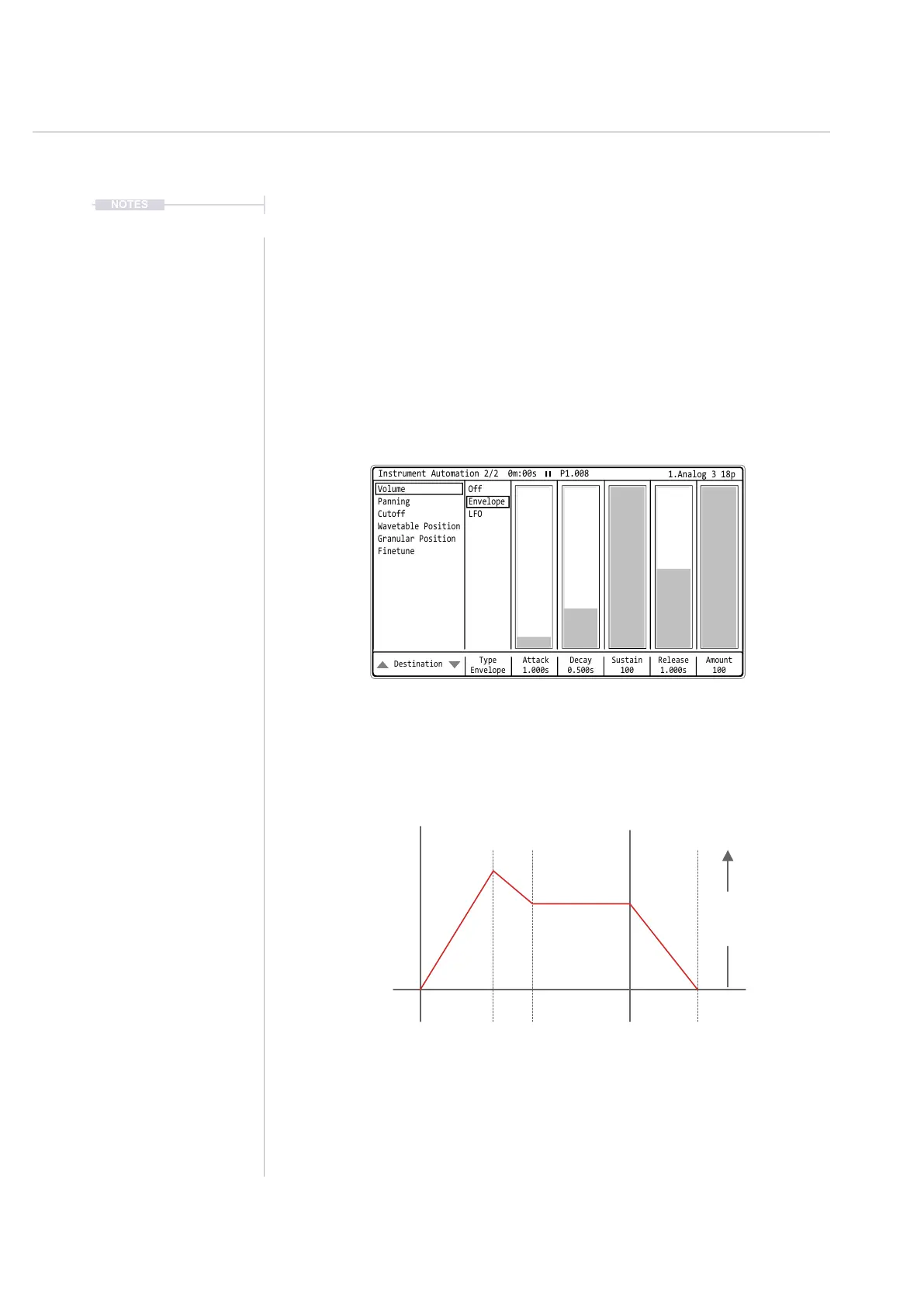
Envelope
An envelope shapes the audio over time. While an LFO will cycle, an
envelope is considered more of a one-shot function and typically operates
across a note length. This is normally used to shape the sound of a note
and how the sound develops from note on to note off (and beyond). It can
also be used as a modulation effect. Tracker+ uses an ADSR envelope
which has 3 time setting zones, Attack, Decay and Release plus the sustain
level zone.
The OFF Command can be triggered on an individual step using the Note ‘OFF’ special
command, accessible by turning (Jog) fully counter clockwise.
ADSR Envelope
Time
Note On
‘OFF’
Note Off
Attack
Time
A SD R
Sustain
Level
Decay
Time
Release
Time
Amplitude
Amount
Destination
Type
Envelope
Sustain
100
Attack
1.000s
Release
1.000s
Decay
0.500s
Amount
100
Instrument Automation 2/2 0m:00s P1.008
OffVolume
EnvelopePanning
LFOCutoff
Wavetable Position
Granular Position
Finetune
1.Analog 3 18p



 To Next Page