221
Polyend Tracker+ Manual
NOTES
Audio
8
8.7 Sampling
Everyone will develop a personal workow for sampling and the process
may differ due to the source to be recorded. This meets the maximum
project sample time.
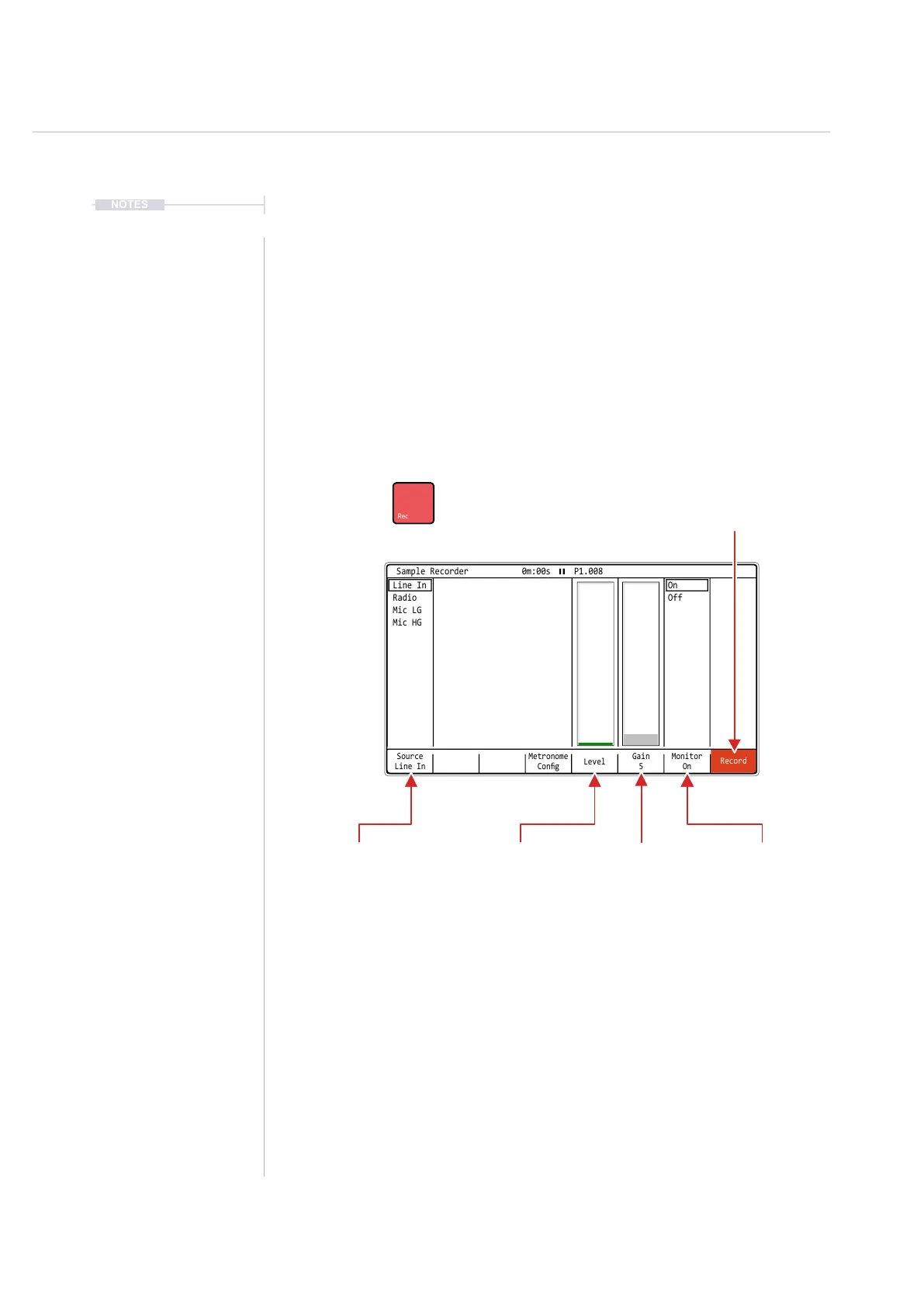
The main page used at the sampling stage is the [Sample Recorder]. Here
the parameter settings can adjusted pre sampling. The selected source will
determine the available options. Controlling the start and stop recording
process is triggered within this page.
Source
Line In
Gain
5
Monitor
On
Metronome
Cong
Record
Level
On
Off
Line In
Radio
Mic LG
Mic HG
Sample Recorder 0m:00s P1.008
Monitor.
Will allow the audio source to
be previewed at the output.
Source
Select the input to record
in the sampler.
Metronome Cong
The [Metronome Cong] screen button gives a quick access to the settings for the metronome. This button is
essentially a shortcut to the cong menu, metronome settings.
Gain
Boosts the signal
level
Recording
Starts Recording [Record].
Also button becomes [Stop] while recording in is in progress.
Also can be directly controlled with the [Rec] Button.
Level
Visual indicator of source
volume level.



 To Next Page