44
Polyend Tracker+ Manual
3.6 Project Pool & Instrument List
A pre-requisite for creating patterns is to have a series of instruments
available to record or program into steps. Instruments can be based on the
samples loaded into the project pool and parameters applied to create
instruments or can be one of the 3 synth slots loaded with one of the four
synth models. Instruments can also be loaded from other projects but must
exist in the current project instrument list to be accessible to the pattern
steps. A maximum of 48 instruments are available per project depending on
the sample size and hence memory usage.
An instrument or sample from the SD Card libraries can be added into the
active project instrument list. The instrument list is used to congure steps.
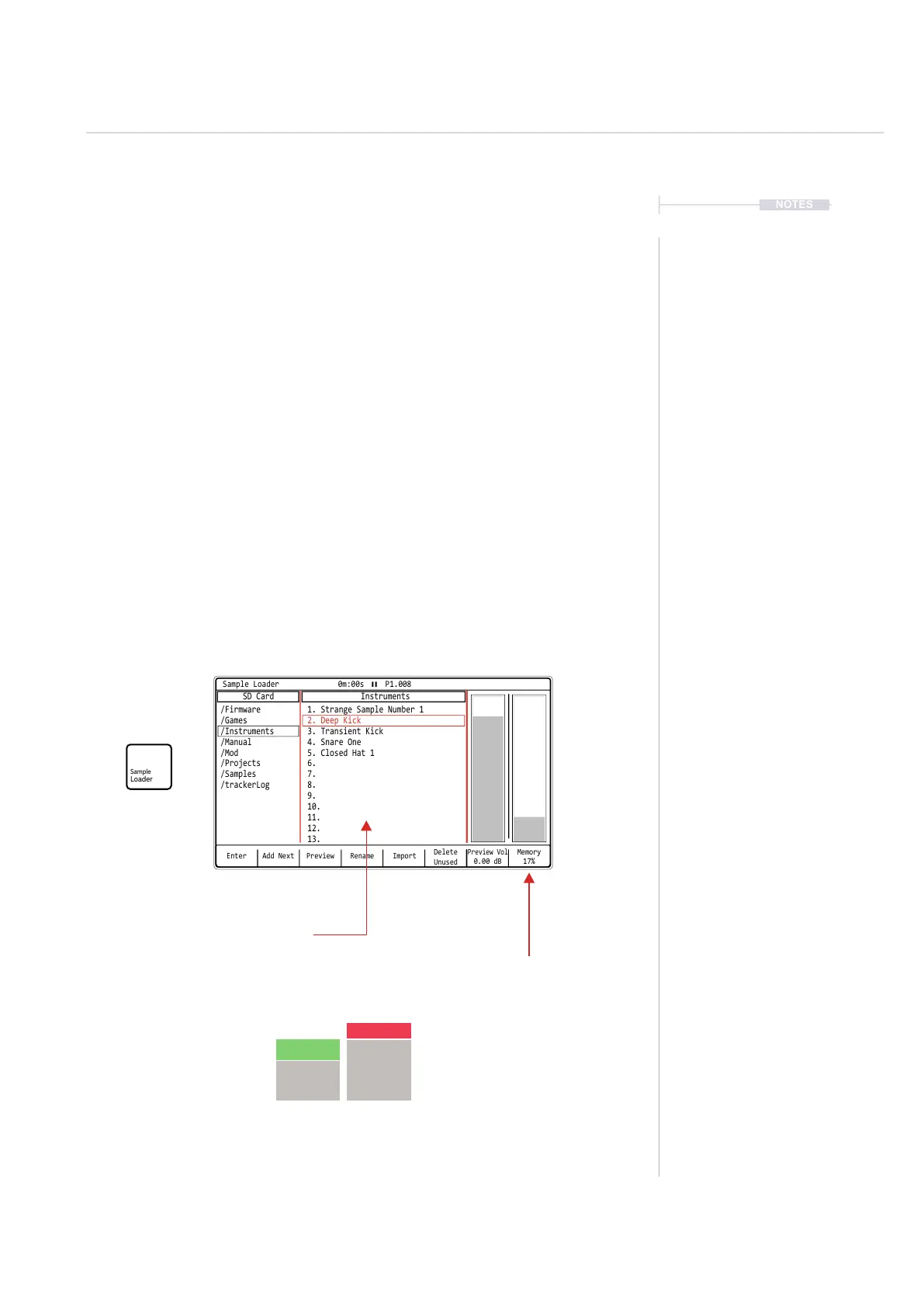
Basics of setting up a project instrument list using the [Sample Loader]
function is shown and further details on the sample management are
detailed later. A sample based instrument should be selected and not a
synth in order to edit and managed within the sample loader.
Enter
Preview Vol
0.00 dB
Memory
17%
Rename
Delete
Unused
PreviewAdd Next Import
Sample Loader 0m:00s P1.008
SD Card Instruments
/Firmware 1. Strange Sample Number 1
2. Deep Kick
4. Snare One
5. Closed Hat 1
6.
7.
8.
9.
10.
11.
12.
13.
3. Transient Kick
/Games
/Instruments
/Manual
/Mod
/Samples
/Projects
/trackerLog
Press [Left] or [Right] to navigate between the option windows a red
bounding box will indicate the selected window. Press [Up] or
[Down] or Turn (Jog) to navigate to the desired listed option.
Window display pains between SD Card
and Instrument List. Max 48 instruments
can be stored in a Tracker+ project.
Project memory available based on the
selected samples / instruments in the
instrument list.
The bar will show an additional red
element - if memory will increase and
green bar - if memory will decrease
when browsing a sample / instrument
indicating potential memory impact if
sample / instrument is added.
NOTES
Projects
3



 To Next Page