96
Polyend Tracker+ Manual
5.8 Note Steps
One of the four components of a step event is a Note. This may be a
musically scaled note or a note assigned to a sample or slice. Essentially
note controls a single note pitch in the step event for the instrument.
Note Summary
NOTES
Sequencing Steps
5
Note parameter has a dedicated
button when working in the pattern.
Note is the rst parameter in the step
event and is highlighted when selected
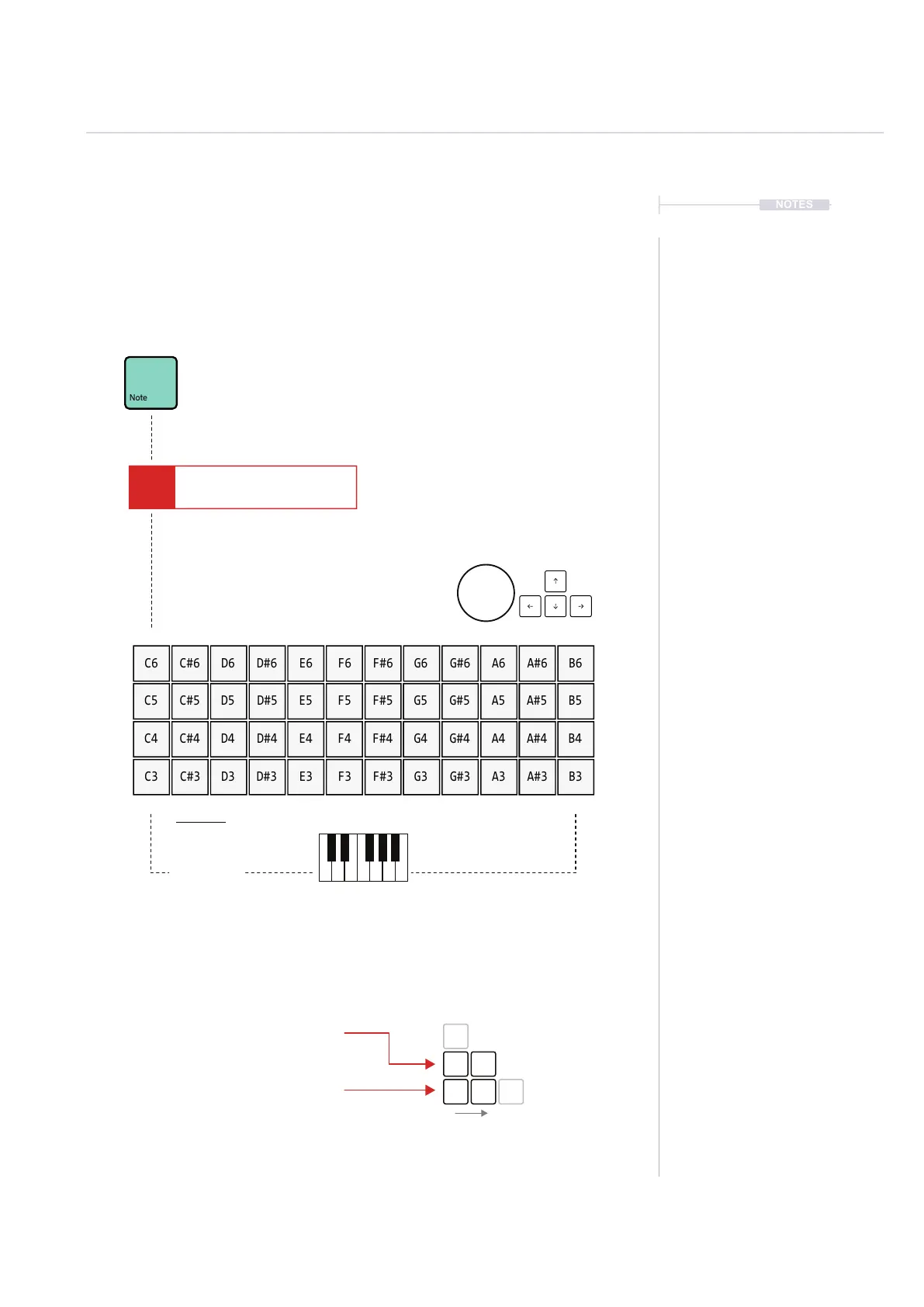
Pads are used to populate a note value to the step event.
Also it is possible to use (Jog) & [Up], [Down], [Left], [Right].
Press [Shift] + (Jog) to adjust existing note step in octaves.
Lowest Note
Chromatic
Scale shown - default
C
C#
B
A#
The notes value are mapped across the pads. Starting at C3 bottom left, by default
and pad top right, ends at B6. This therefore covers four octaves.
The Notes layout can be changed in the ‘Cong’ Menu.
Three key parameters are important when changing note layout for pads:-
Pads Layout - Default = 12
Found in Cong > Project Settings
In semitones for pad directly above root
Pads root note - Default = C3
Found in Cong > Project Settings
Pads Scale - Default = Chromatic
Found in Cong > Pads Scale
A full list of available scales is shown in the description for the ll utility.
Note PatternFX1
Instrument
FX2
C5 02 V 10 P 25
C6 E6 A6C#6 F#6F6 A#6D6 G6 B6D#6 G#6
C5 E5 A5C#5 F#5F5 A#5D5 G5 B5D#5 G#5
C4 E4 A4C#4 F#4F4 A#4D4 G4 B4D#4 G#4
C3 E3 A3C#3 F#3F3 A#3D3 G3 B3D#3 G#3
C3
+1
C#3
+12
C4
+2
D3



 To Next Page