168
Polyend Tracker+ Manual
NOTES
FX Steps
7
7.1 Step FX Descriptions
Step FX are a collection of 37 effect types that can be applied into one of
two step locations using the dedicated Step FX buttons. Creative step
patterns can be generated by applying and also combining. FX do not
always need a note and instrument in the same step event. For example,
lter cutoff can adjust the cutoff value, applied to previous triggered note.
The Step library also provides some brief information on each effect.
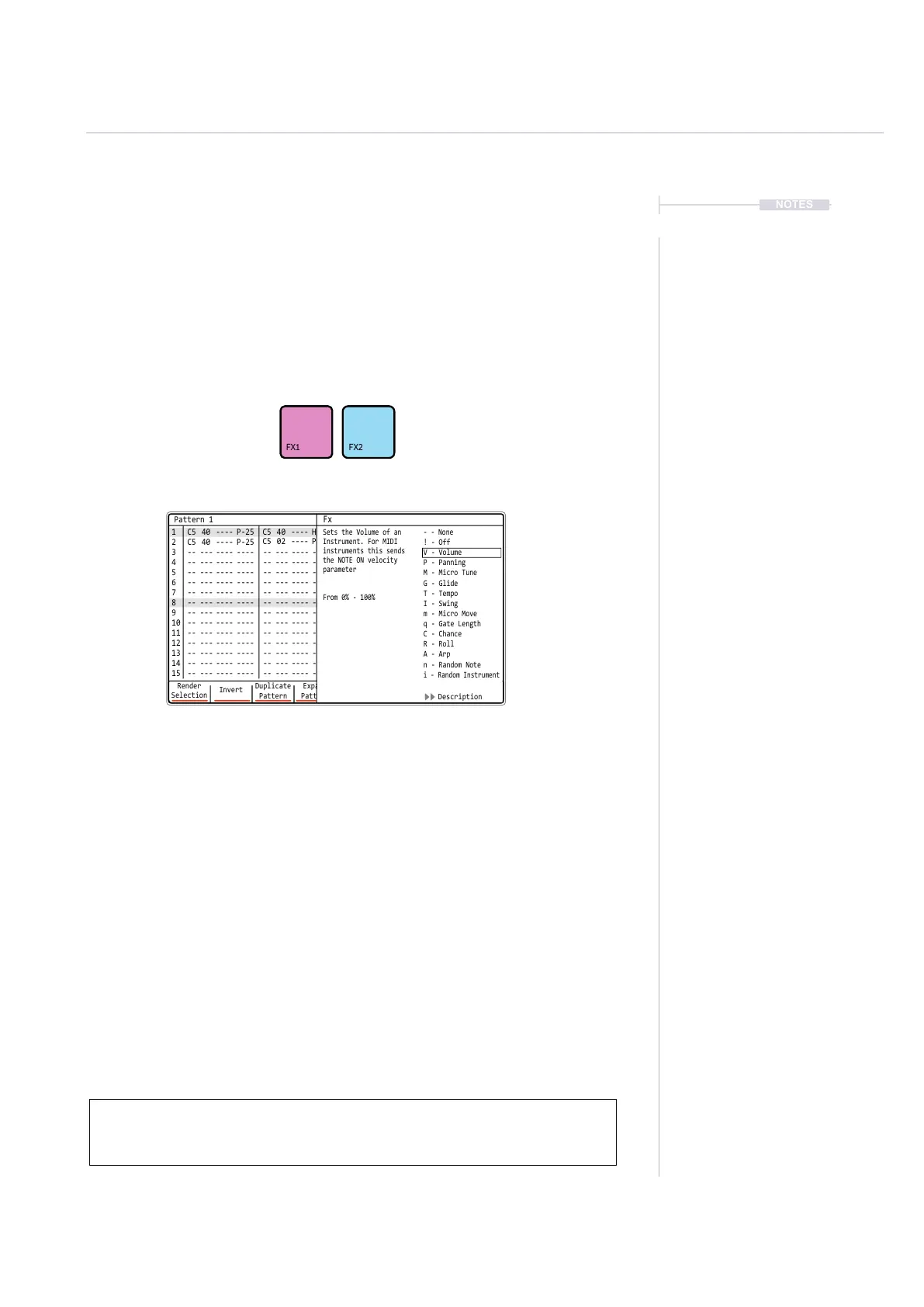
▌ ACCESSING THE EFFECT DESCRIPTIONS
1. Press [Pattern] to select the pattern mode page.
2. Select a blank or existing step event.
3. Hold [FX1] or [FX2] + Press Screen Button 7 or 8. This toggles the
description window open or closed.
4. Scroll to select effect while holding the FX button + Turn (Jog).The
description provided will represent the FX highlighted in the list.
5. If in REC mode the FX will be selected for the step from within this
menu list.
When adjusting the value with the jog control for an FX slot with an instrument
loaded to the step, the audio applied through the effect will be automatically
previewed.
Render
Selection
1 1
2
C5 40 ---- P-25
C5 40 ---- P-25
-- --- ---- ---- -- --- ---- ---- -- --- ---- ---- -- --- ---- ----
-- --- ---- ---- -- --- ---- ---- -- --- ---- ---- -- --- ---- ----
-- --- ---- ---- -- --- ---- ---- -- --- ---- ---- -- --- ---- ----
-- --- ---- ---- -- --- ---- ---- -- --- ---- ---- -- --- ---- ----
-- --- ---- ---- -- --- ---- ---- -- --- ---- ---- -- --- ---- ----
-- --- ---- ---- -- --- ---- ---- -- --- ---- ---- -- --- ---- ----
-- --- ---- ---- -- --- ---- ---- -- --- ---- ---- -- --- ---- ----
-- --- ---- ---- -- --- ---- ---- -- --- ---- ---- -- --- ---- ----
-- --- ---- ---- -- --- ---- ---- -- --- ---- ---- -- --- ---- ----
-- --- ---- ---- -- --- ---- ---- -- --- ---- ---- -- --- ---- ----
-- --- ---- ---- -- --- ---- ---- -- --- ---- ---- -- --- ---- ----
-- --- ---- ---- -- --- ---- ---- -- --- ---- ---- -- --- ---- ----
-- --- ---- ---- -- --- ---- ---- -- --- ---- ---- -- --- ---- ----
C5 02 ---- P-20
C5 40 ---- H-25
C4 12 ---- A 4
C5 40 ---- P-20
C5 40 ---- P-25
C5 40 ---- P-25
2
3 3
4 4
5 5
6 6
7 7
9 9
11 11
13 13
15 15
8 8
10 10
12 12
14 14
Paste
Pattern
Expand
Pattern
Copy
Pattern
Duplicate
Pattern
Invert
MoreShrink
Pattern
Pattern 1
Fx
- - None
Sets the Volume of an
Instrument. For MIDI
instruments this sends
the NOTE ON velocity
parameter
From 0% - 100%
! - Off
P - Panning
M - Micro Tune
G - Glide
T - Tempo
I - Swing
m - Micro Move
q - Gate Length
C - Chance
R - Roll
A - Arp
n - Random Note
i - Random Instrument
V - Volume
Description
Note PatternFX1
Instrument
FX2



 To Next Page