20
Polyend Tracker+ Manual
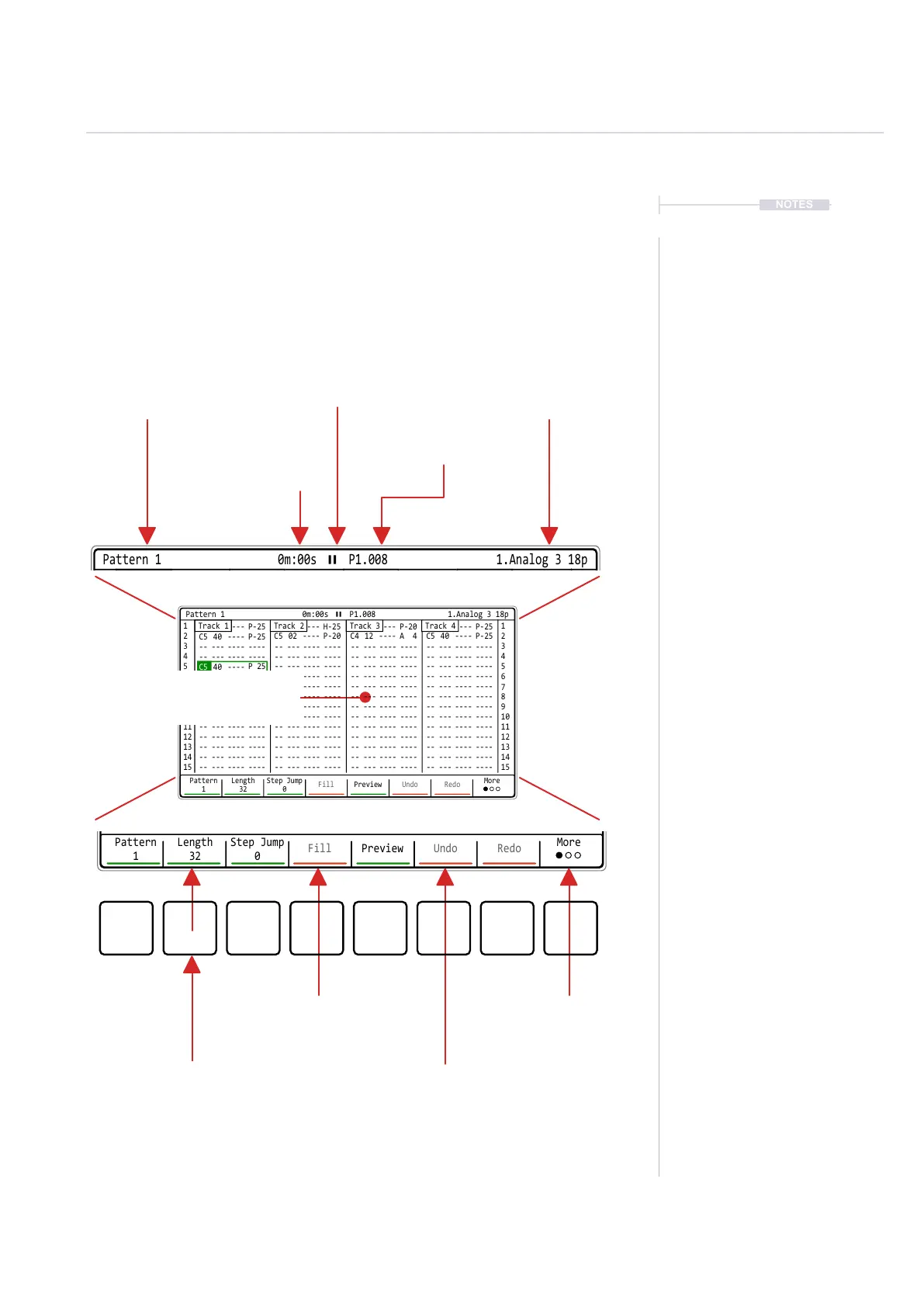
1.7 Page Layout.
Each page will display the information and control options for the selected
function. While this may be unique to the context there are some common
features and navigation principles that apply across all (or most) of the
generic pages of Tracker. There are 16 tracks available, the rst 8 can be
Sample, MIDI or Synth while tracks 9-16 focus on only MIDI or Synths.
NOTES
Overview
1
-- --- ---- ---- -- --- ---- ---- -- --- ---- ---- -- --- ---- ----
15 15
Pattern
1
Length
32
Step Jump
0
Fill Preview Undo Redo
More
Function / Page currently
selected and represented on the
page. Where multiple pages exist
this will also be shown i.e. 2/3
Time position in Minutes &
Seconds of the current
playhead. This is total play time
not time in a pattern or song
Current Pattern and
Step position
Transport status
Physical Screen Buttons
represent the command displayed
on the screen directly above.
Some dynamic screen buttons are underlined red or green in the bottom menu. Red underlined buttons
are only accessible when in edit mode. Edit must must be selected for these options.
Up to 8 selectable context based
options. These can be menu options,
navigation commands or blank.
Options are dimmed when not currently
available. For example, these may need
an item to be selected rst.
Selected instrument displayed,
although not shown on all pages.
This shows current project when in
the ‘File’ menu page.
1 1
2
C5 40 ---- P-25
C5 40 ----
C5 40 ---- P-25
-- --- ---- ---- -- --- ---- ---- -- --- ---- ---- -- --- ---- ----
-- --- ---- ---- -- --- ---- ---- -- --- ---- ---- -- --- ---- ----
P 25
-- --- ---- ---- -- --- ---- ---- -- --- ---- ----
-- --- ---- ---- -- --- ---- ---- -- --- ---- ---- -- --- ---- ----
-- --- ---- ---- -- --- ---- ---- -- --- ---- ---- -- --- ---- ----
-- --- ---- ---- -- --- ---- ---- -- --- ---- ---- -- --- ---- ----
-- --- ---- ---- -- --- ---- ---- -- --- ---- ---- -- --- ---- ----
-- --- ---- ---- -- --- ---- ---- -- --- ---- ---- -- --- ---- ----
-- --- ---- ---- -- --- ---- ---- -- --- ---- ---- -- --- ---- ----
-- --- ---- ---- -- --- ---- ---- -- --- ---- ---- -- --- ---- ----
-- --- ---- ---- -- --- ---- ---- -- --- ---- ---- -- --- ---- ----
-- --- ---- ---- -- --- ---- ---- -- --- ---- ---- -- --- ---- ----
-- --- ---- ---- -- --- ---- ---- -- --- ---- ---- -- --- ---- ----
C5 02 ---- P-20
C5 40 ---- H-25
C4 12 ---- A 4
C5 40 ---- P-20
C5 40 ---- P-25
C5 40 ---- P-25
2
3 3
4 4
5 5
6 6
7 7
9 9
11 11
13 13
15 15
8 8
10 10
12 12
14 14
Pattern
1
Length
32
Step Jump
0
Fill Preview Undo Redo
More
Track 2 Track 3 Track 4Track 1
Pattern 1 0m:00s P1.008 1.Analog 3 18p
Select Page
1 1
C5 40 ---- P-25 C5 40 ---- H-25 C5 40 ---- P-20 C5 40 ---- P-25
Track 2 Track 3 Track 4Track 1
Pattern 1 0m:00s P1.008 1.Analog 3 18p
Central area contains specic
information to the selected function
and settings.



 To Next Page