220
Polyend Tracker+ Manual
NOTES
Audio
8
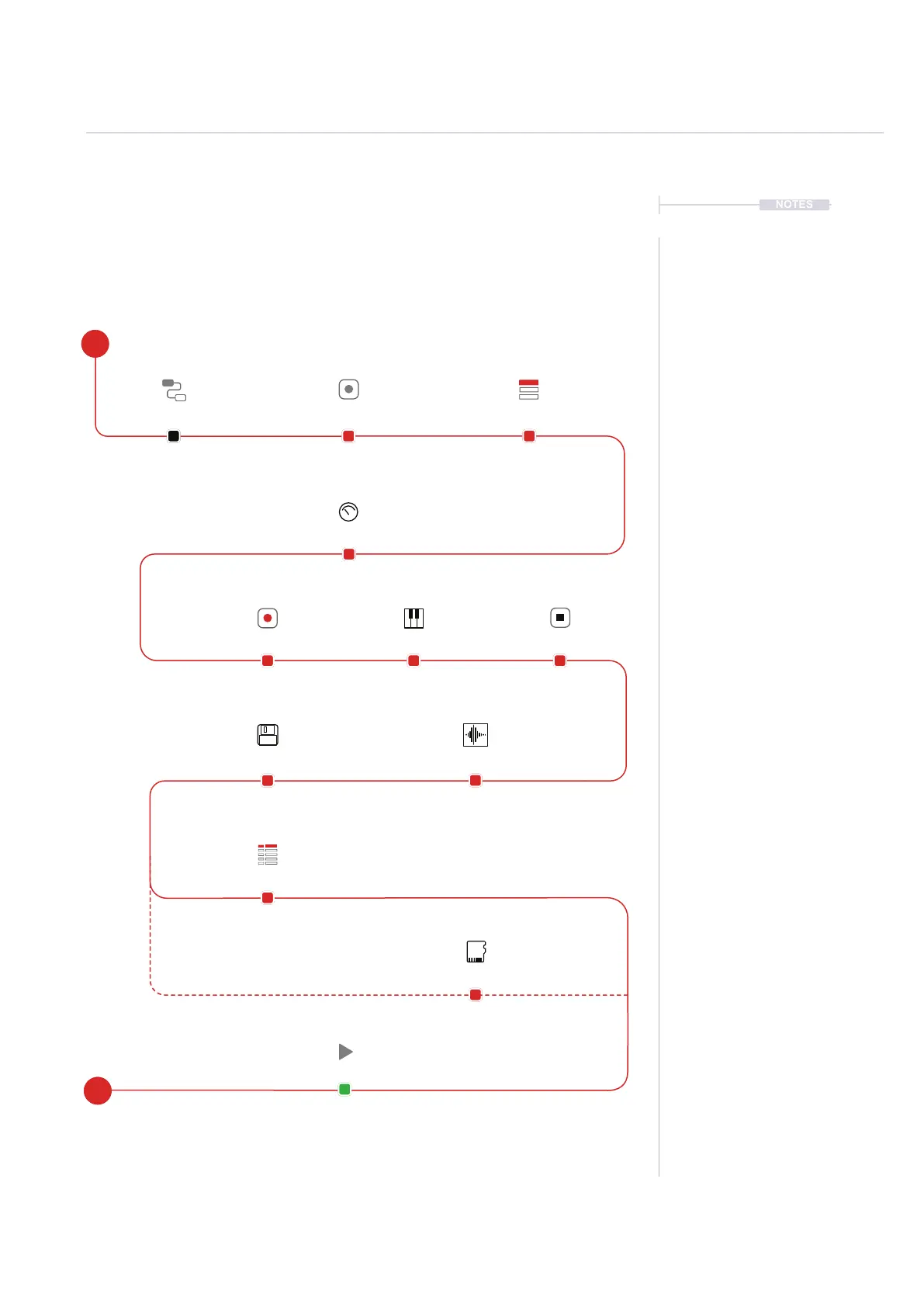
8.6 Recording Audio Workow
Sampling in Tracker+ takes place in the ‘Sample Recorder’ page. This is
the rst step in the process and is followed by editing the audio captured.
Sampling in this page can be from the Line In, Radio or Mic audio sources.
Connect an external synth or
audio source or microphone
or tune the radio to a channel.
Open the [Sample Recorder]
page to set up for sampling.
Select the source to record from.
Options are; Line In, Mic or Radio.
Save Only to the SD
Card.
Save to the SD Card
and also load into the
instrument list.
Program using the
instrument into a pattern.
Adjust gain to set to a
suitable level.
Play the connected
audio source.
Press [Record] to capture
the audio sample.
[Stop] sampling.
Max 750 sec mono audio
sample*.
Save the sample. Trim the start and end
of the sample to select
the area to save.
Connect Gear Sample Recorder
Gain
Play
Save
Record
Crop
Stop
Select Source
Save to SD
Save & Load
Pattern
E
S
* Sample Time, Max ~700 Sec Mono or ~350 Sec Stereo



 To Next Page