286
Polyend Tracker+ Manual
NOTES
MIDI
11
11.4 MIDI Instrument Overview
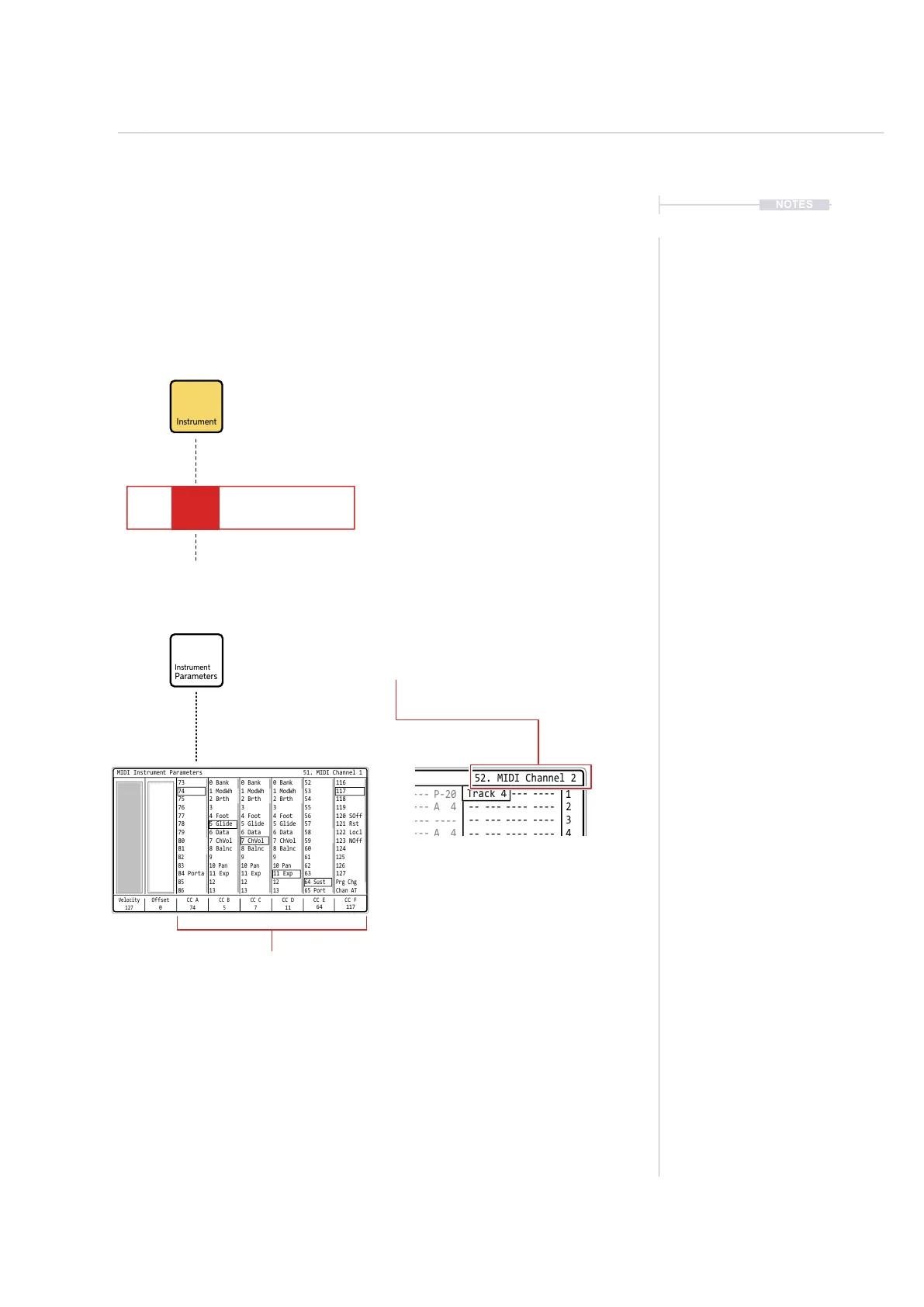
Tracker+ has a series of MIDI Instruments that can be assigned to steps in
a pattern. MIDI is dened per step, not per track, so MIDI and Audio
instruments can reside on the same track in the same pattern. A MIDI
instrument essentially denes the MIDI channel on which to transmit data
out and also gives access to the instruments MIDI parameters.
CC D
11
Velocity
127
CC A
74
CC B
5
CC C
7
Offset
0
CC F
117
CC E
64
MIDI Instrument Parameters 51. MIDI Channel 1
116
117
120 SOff
124
127
118
121 Rst
125
Prg Chg
119
123 NOff
122 Locl
126
Chan AT
52
53
56
60
63
54
57
61
64 Sust
55
59
58
62
65 Port
0 Bank
1 ModWh
4 Foot
8 Balnc
11 Exp
2 Brth
5 Glide
9
12
3
7 ChVol
6 Data
10 Pan
13
0 Bank
1 ModWh
4 Foot
8 Balnc
11 Exp
2 Brth
5 Glide
9
12
3
7 ChVol
6 Data
10 Pan
13
0 Bank
1 ModWh
4 Foot
8 Balnc
11 Exp
2 Brth
5 Glide
9
12
3
7 ChVol
6 Data
10 Pan
13
73
74
77
81
84 Porta
75
78
82
85
76
80
79
83
86
CC Outputs
Congure the 6 CC Outputs A-F,
used from a step FX1 or FX2
The instrument selection has a dedicated
button when working in the pattern.
Instruments 51-66 constitute the preset MIDI Instruments. Each of
these represents a MIDI channel 1-16. A MIDI instrument is tagged
with an ‘M’ in the step conguration.
The default velocity to send out can be applied as well as MIDI Latency compensation in the Offset parameter
This illustration shows several MIDI instruments set for MIDI Channel 2. The notes values will be sent on the
dened channel to a connected device such as another synth or DAW. MIDI Out would need to be set correctly
in the Cong > MIDI parameters to transmit the note values over MIDI.
The MIDI transmitted will be based on the project tempo. Also remember that tempo FX can be applied to steps
which would also affect the MIDI output timing.
The instrument parameters are accessible directly and are specic
to the currently selected instrument and it’s MIDI Channel.
Enter
1 1
2
C5 40 ---- P-25
C5 M02 ----
E5 M02
----
----
C5 40 ---- P-25
-- --- ---- ----
-- --- ---- ----
-- --- ---- ----
-- --- ---- ---- -- --- ---- ---- -- --- ---- ----
-- --- ---- ----
P 25
-- --- ---- ---- -- --- ---- ----
-- --- ---- ---- -- --- ---- ---- -- --- ---- ---- -- --- ---- ----
-- --- ---- ---- -- --- ---- ---- -- --- ---- ---- -- --- ---- ----
-- --- ---- ---- -- --- ---- ---- -- --- ---- ----
-- --- ---- ---- -- --- ---- ---- -- --- ---- ---- -- --- ---- ----
-- --- ---- ---- -- --- ---- ---- -- --- ---- ----
-- --- ---- ---- -- --- ---- ---- -- --- ---- ---- -- --- ---- ----
-- --- ---- ---- -- --- ---- ---- -- --- ---- ----
-- --- ---- ---- -- --- ---- ---- -- --- ---- ---- -- --- ---- ----
-- --- ---- ---- -- --- ---- ---- -- --- ---- ---- -- --- ---- ----
-- --- ---- ---- -- --- ---- ---- -- --- ---- ---- -- --- ---- ----
C5 02 ---- P-20
C3 04 ---- P-20
D3 04 ---- P-10
D3 04 ---- P-10
D3 04 ---- P-10
C5 40 ---- H-25
C4 12 ---- A 4
C4 12 ---- A 4
C5 40 ---- P-20
2
3 3
4 4
5 5
6 6
7 7
9 9
11 11
13 13
15 15
8 8
10 10
12 12
14 14
Auto Name Cancel Save
Track 2 Track 3 Track 4Track 1
Pattern 1 0m:00s P1.008 52. MIDI Channel 2
C5 40 ----
P 25
Note PatternFX1
Instrument
FX2
C5 M02 - - - -- - - -
M02



 To Next Page