113
Polyend Tracker+ Manual
NOTES
Instruments
6
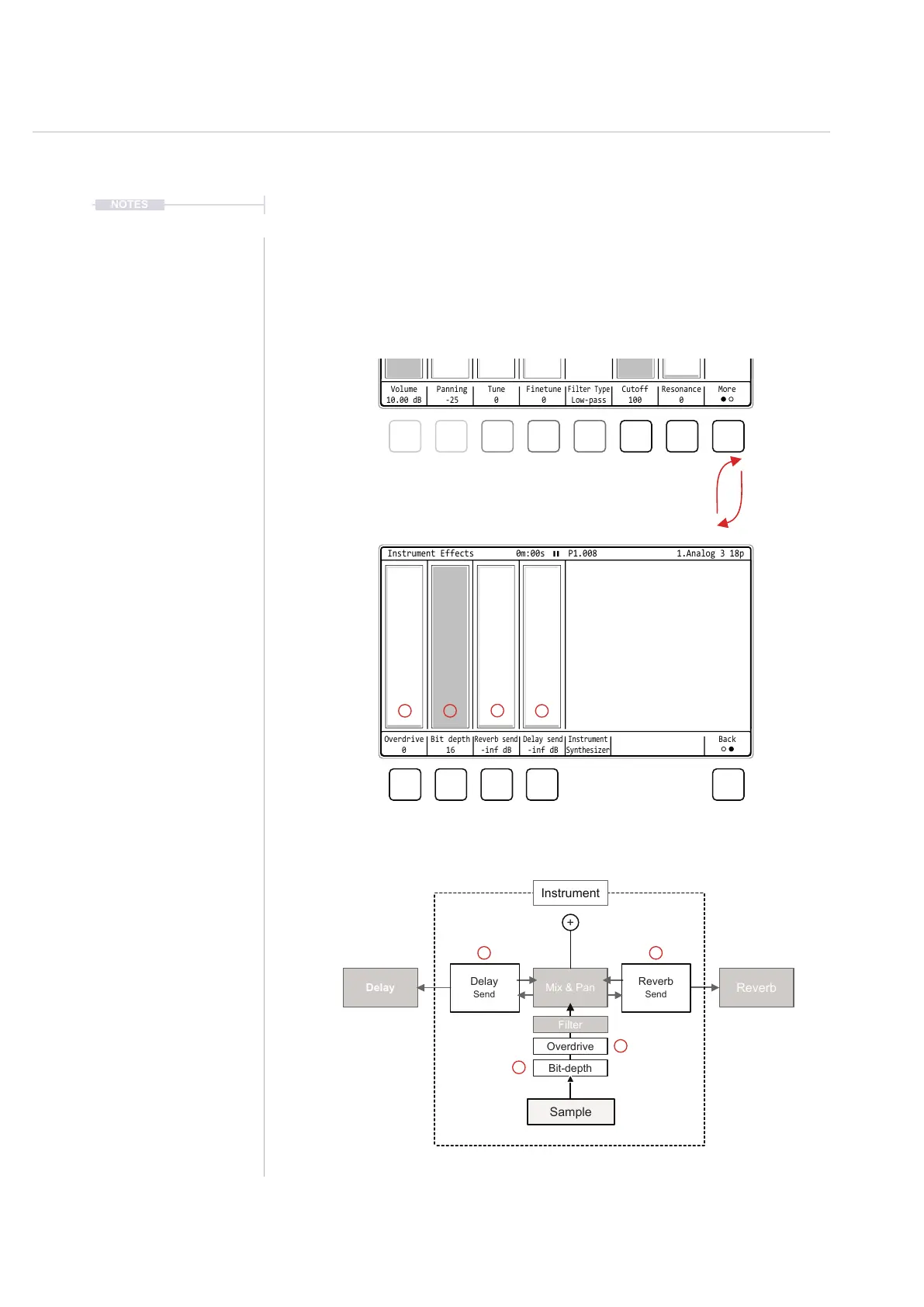
6.4 Instrument Effect Parameters - Page 1
The general settings page 1 also gives access to a series of instrument
effect parameters. There are 2 instrument specic effects, overdrive and bit
depth and also 2 send controls which use the common delay and reverb.
Bit-depth
Overdrive
Filter
Reverb
Send
Delay
Send
Mix & Pan
Reverb
Delay
Instrument
Sample
+
Page 1 of 2: General Sample Based Parameters
Instrument Parameter Effects
Screen buttons select the parameter options or [Right] [Left] to
navigate option. Then turn (Jog) or press [Up] [Down] to adjust / select
Volume
10.00 dB
Panning
-25
Tune
0
Cutoff
100
Finetune
0
Resonance
0
Filter Type
Low-pass
More
Instrument Parameters 1/2 0m:00s P1.008
Disabled
Low-pass
High-pass
Band-pass
1.Analog 3 18p
1.Analog 3 18p
Overdrive
0
Bit depth
16
Reverb send
-inf dB
Delay send
-inf dB
Instrument
Synthesizer
Back
Instrument Effects
0m:00s P1.008
2
2
3
3
4
4
1
1



 To Next Page