55
Polyend Tracker+ Manual
NOTES
Pattern Format
4
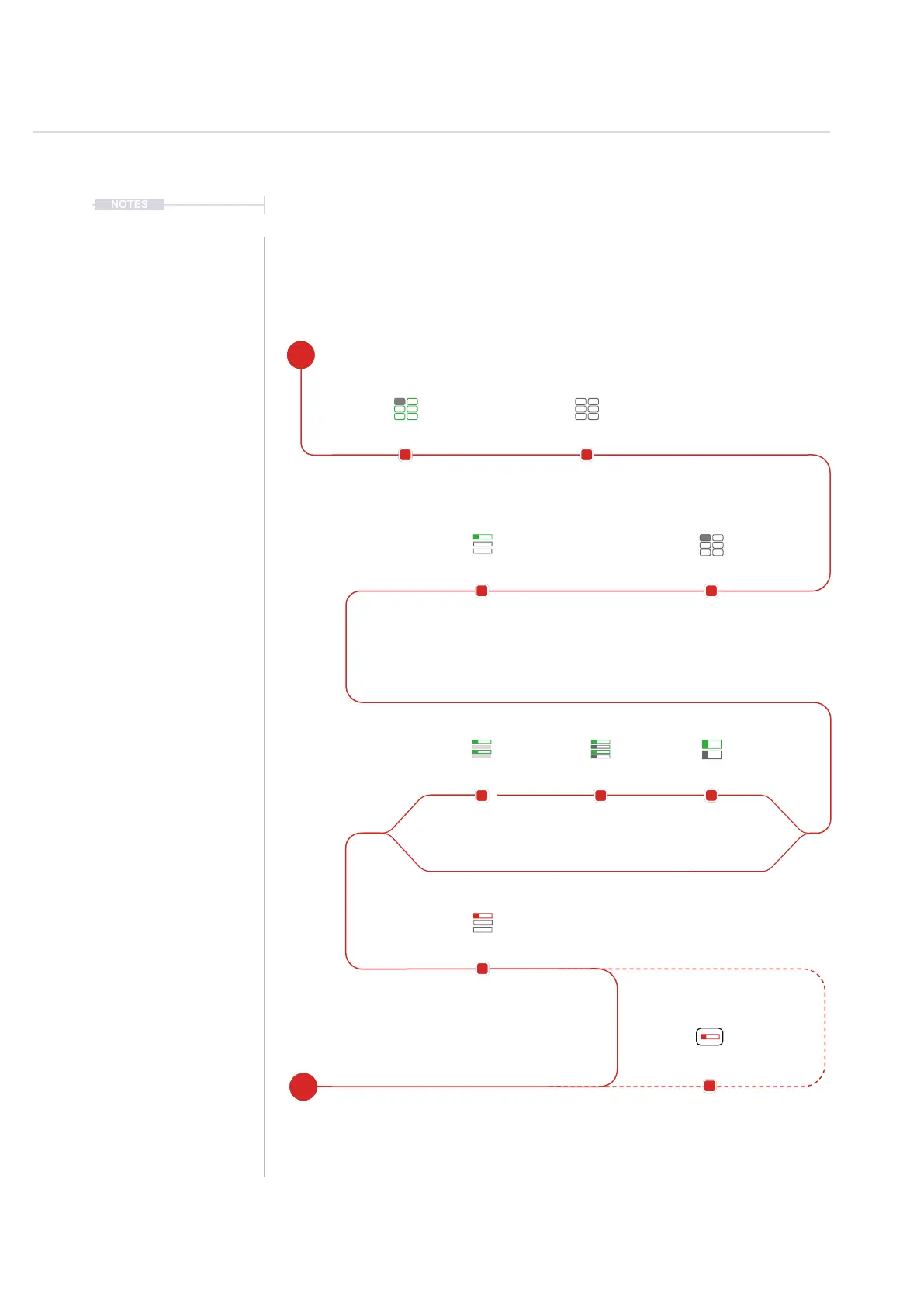
4.2 Process of Creating a Pattern
Formatting and creating a pattern is a simple process but there are some
good practices that will speed up workow and help to move quickly to
making music. A pattern is the container for steps and establishes the step
timing and track format. The dynamic screen buttons are used heavily.
Tempo and Project
Instruments list is populated.
Press [Pattern]
Pattern editing is mainly
performed in pattern mode.
Hold [Pattern] + Turn (Jog)
Pattern is 1
st
Screen Button.
Arrow buttons also used to edit.
Example Pattern = 1
Hold [Length] + Turn (Jog)
Length is 2
nd
Screen Button.
Arrow buttons also used to edit.
Example Length = 32
Manual or
Live Recording to record
steps into the pattern.
Optionally set screen
view, # tracks, vertical /
horizontal etc.
Press [Shrink]
Screen Button
Halves length by removing
every second step
Press [Duplicate]
Screen Button
Doubles pattern length
including steps
Press [Extend]
Screen Button
Doubles length by
inserting steps
Pre-Requisite Select Pattern Mode Page
Shrink DuplicateExtend
Select Pattern NumberLength
Add Steps
Display Options
E
S



 To Next Page