256
Polyend Tracker+ Manual
NOTES
Song Mode
9
9.4 Song v Pattern Relationship
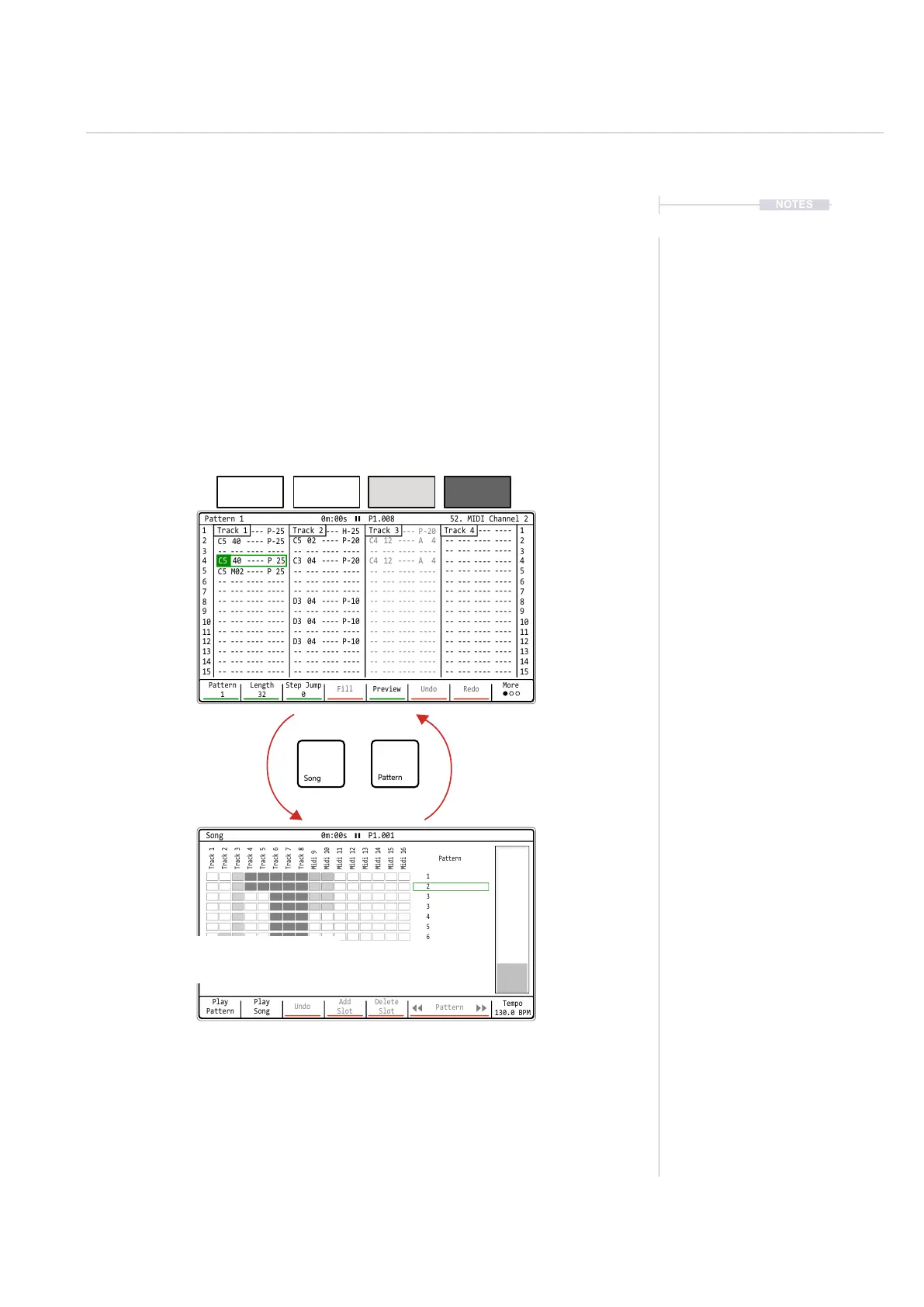
Patterns can be arranged into a song in the song mode utility. Patterns
selected in a song will also be available in the pattern mode and will appear
in song mode as muted / unmuted inline with the status in pattern mode.
Editing tracks in song mode will reect in pattern mode, tracks can be
copied and pasted within song mode which will also be edit the pattern.
Pattern
Unmuted
Pattern
Unmuted
Pattern
Muted
Empty
Unmuted
Play
Pattern
Play
Song
Undo
Add
Slot
Delete
Slot
Pattern
Tempo
130.0 BPM
Song 0m:00s P1.001
1
2
3
3
4
5
6
Track 1
Track 5
Midi 9
Midi 13
Track 2
Track 6
Midi 10
Midi 14
Track 4
Track 8
Midi 12
Midi 16
Track 3
Track 7
Midi 11
Midi 15
Pattern
1 1
2
C5 40 ---- P-25
C5 M02 ----
C5 40 ---- P-25
-- --- ---- ----
-- --- ---- ----
-- --- ---- ----
-- --- ---- ----
-- --- ---- ---- -- --- ---- ---- -- --- ---- ----
-- --- ---- ----
P 25
-- --- ---- ---- -- --- ---- ----
-- --- ---- ---- -- --- ---- ---- -- --- ---- ---- -- --- ---- ----
-- --- ---- ---- -- --- ---- ---- -- --- ---- ---- -- --- ---- ----
-- --- ---- ---- -- --- ---- ---- -- --- ---- ----
-- --- ---- ---- -- --- ---- ---- -- --- ---- ---- -- --- ---- ----
-- --- ---- ---- -- --- ---- ---- -- --- ---- ----
-- --- ---- ---- -- --- ---- ---- -- --- ---- ---- -- --- ---- ----
-- --- ---- ---- -- --- ---- ---- -- --- ---- ----
-- --- ---- ---- -- --- ---- ---- -- --- ---- ---- -- --- ---- ----
-- --- ---- ---- -- --- ---- ---- -- --- ---- ---- -- --- ---- ----
-- --- ---- ---- -- --- ---- ---- -- --- ---- ---- -- --- ---- ----
C5 02 ---- P-20
C3 04 ---- P-20
D3 04 ---- P-10
D3 04 ---- P-10
D3 04 ---- P-10
C5 40 ---- H-25
C4 12 ---- A 4
C4 12 ---- A 4
C5 40 ---- P-20
2
3 3
4 4
5 5
6 6
7 7
9 9
11 11
13 13
15 15
8 8
10 10
12 12
14 14
Pattern
1
Length
32
Step Jump
0
Fill Preview Undo Redo
More
Track 2 Track 3 Track 4Track 1
Pattern 1 0m:00s P1.008 52. MIDI Channel 2
C5 40 ----
P 25
Patterns in Song Mode will reect the track condition from the pattern view including mute
states, step position etc. This is shown by the shade of the track slot and the header position.
Tracks can be re-ordered by copy / paste in Song Mode. This in turn will edit the actual pattern
and as such also be reected in the pattern view.
When pressing [Play] in Song mode, switching to pattern mode will show each pattern as it is
being played in the song structure.
Patterns are muted in pattern or master pages and are reected in the song mode clip shade
as ar empty clips.Tracks edited in Song Mode will in turn edit and reect in the actual pattern.
When pressing [Play] in Pattern mode, switching to Song Mode will only show the selected
pattern being played.
Toggle between modes using
[Song] and [Pattern] buttons,
even while playing.
Song Mode and Pattern Mode can
be in the same or different ‘Red’ -
Edit On or ‘Green’ - Edit Off States.
While pressing [Song] will select the song page,
holding [Song] button with a long press from
within another page will temporarily display it.



 To Next Page