131
Polyend Tracker+ Manual
NOTES
Wavetable Parameters
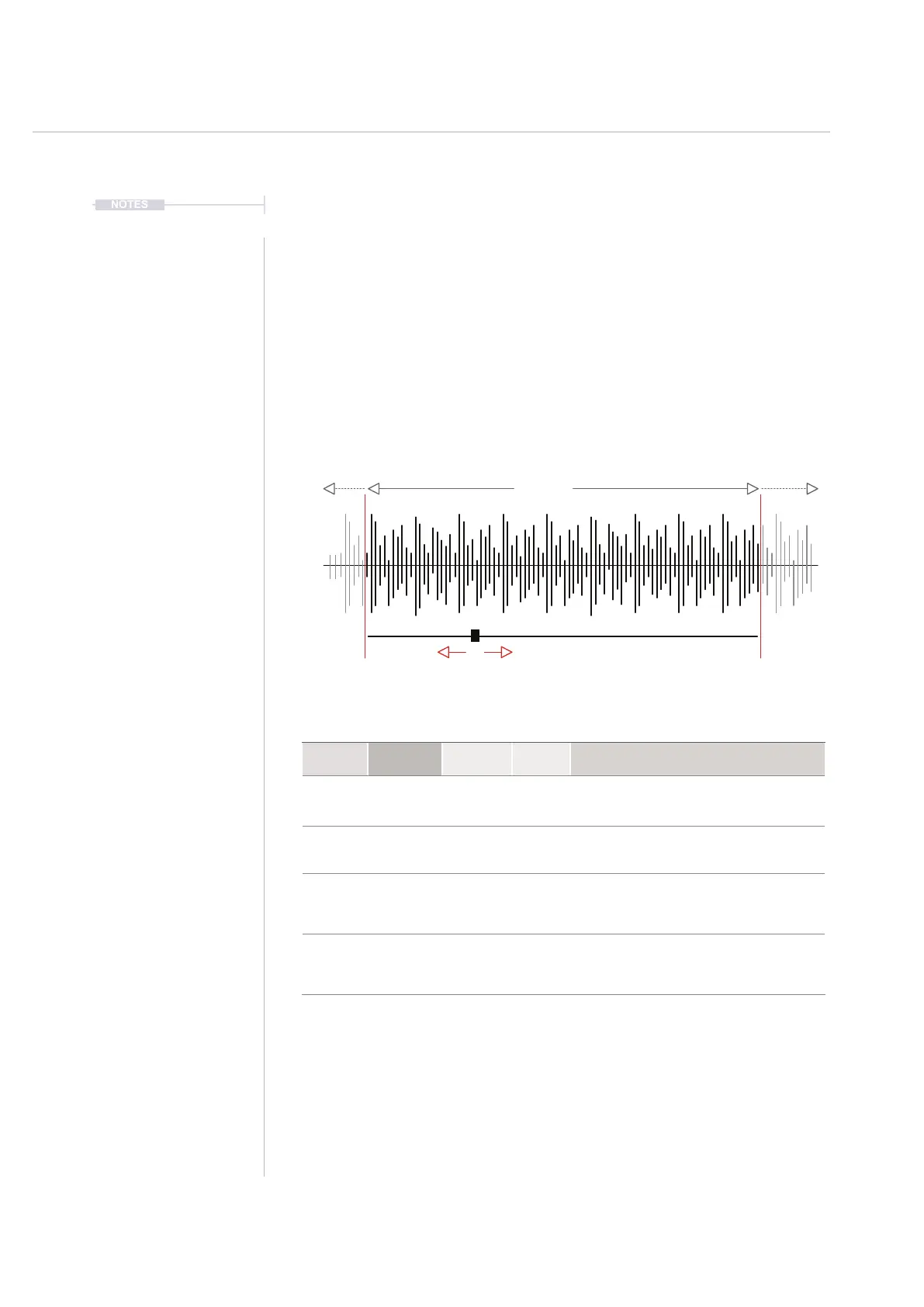
The wavetable play mode is a simplied application of wavetable synthesis
and consists of two core parameters. The Window is the wavetable length
(samples per frame) and has a maximum value based on the original le.
The position parameter is what enables the creative sound design and
audio manipulation. This can be manually adjusted to nd a sweet spot or
modulated with the envelope or LFO.
Instruments
6
Position
Size of window will affect resolution
Window
Function Parameter
Screen
Button
Range Description
Edit Play Mode 7th & 8th
Modes
Selects the play mode to apply. Includes
Wavetable and Granular as well as 1-Shot and the
three loop modes.
Aid Preview 1st
Hold to play the wave from the current position
selected in the window. Also hold while adjusting
position to ‘scan’ for the desired sound.
Aid Window 3rd
Variable
The width of the wavetable can be adjusted down
from the default maximum. The parameters are
normally divisions of 2 down from the maximum
(Typically 2048)
Edit Position 2nd
Variable
Selects the playback position within the wavetable
window. This can be manually adjusted to nd the
desired ‘sweet spot’ or modulated with an LFO or
Envelope for movement and interest.



 To Next Page