284
Polyend Tracker+ Manual
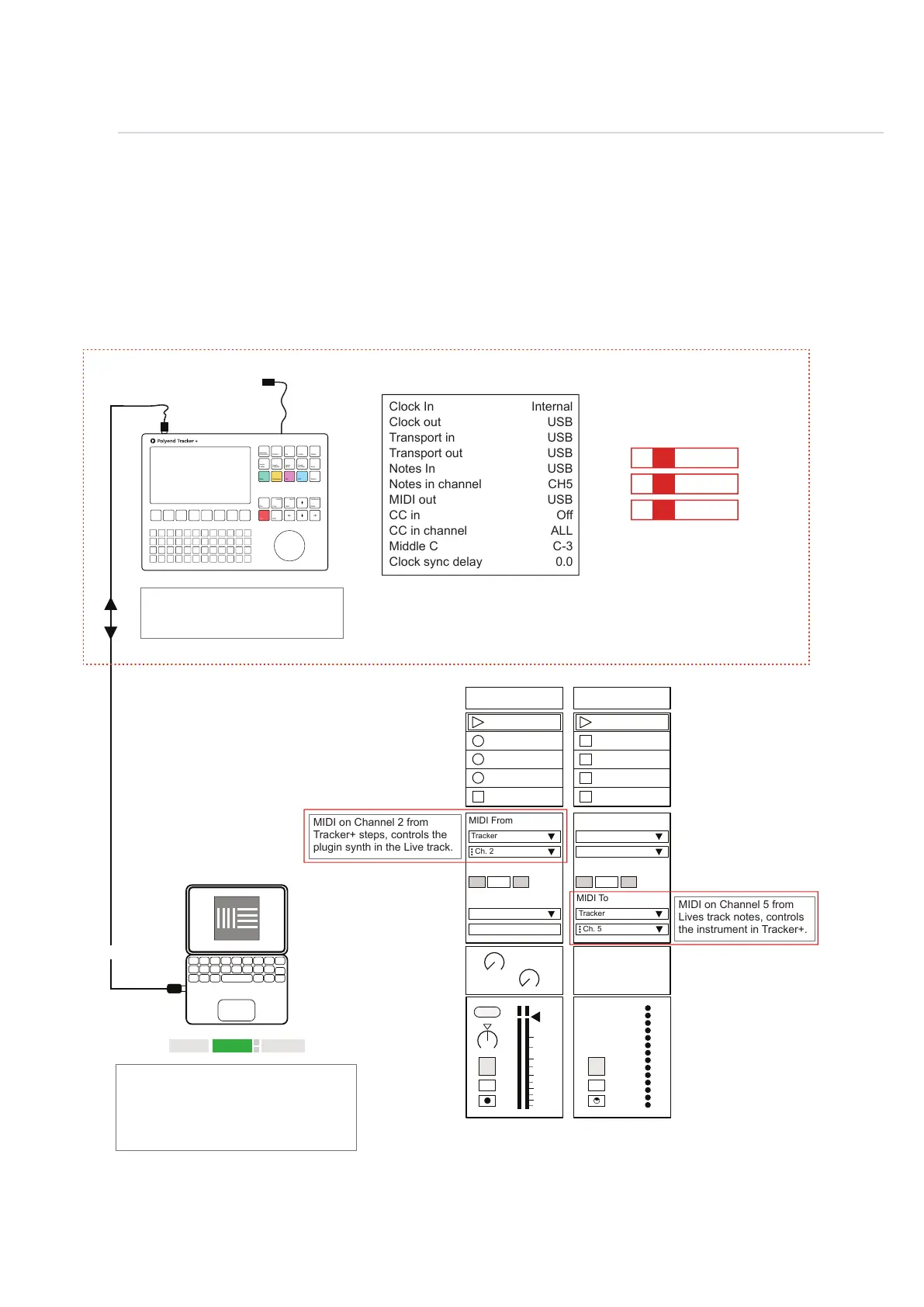
The ability to connect to a PC or Mac via a MIDI connection is possible, which can allow software
synths and plug-ins to be controlled by Tracker+. Tracker+ will need a hub or will need to be
powered by the PC / Mac as the USB connection is the source of power for Tracker+.
MIDI
11
Link EXT TAP
102.00
1 Plugin A 2 MIDI
MIDI From MIDI From
Tracker
Master Tracker
Ch. 2
In In
2
1
s
s
Auto Auto
Monitor Monitor
Audio To MIDI To
A
Sends
B
1.53
0
12
24
36
48
60
Tracker+: Cong > MIDI
Tracker+: Steps Set for MIDI Output.
Instrument; M02 = MIDI Channel 2
Notes out melody to the PC or Mac.
USB MIDI
Tracker+ can also record MIDI Incoming ie from a DAW using in live recording
mode, [Rec] + [Play]. Tracker+ Middle C adjusted from C-5 to C-3 to match
Ableton Live and Channel 5 set for Notes In
Clock In
Clock out
Transport in
Transport out
Notes In
Notes in channel
MIDI out
CC in
CC in channel
Middle C
Clock sync delay
Internal
USB
USB
USB
USB
CH5
USB
Off
ALL
C-3
0.0
Transport control e.g. Play, Stop can be
set by DAW or Tracker+. It is advised to
dened which device control the clock.
MIDI settings in the Live preferences page will
need to be set ‘On’ for MIDI Ports, Input &
Output. When controlling to/from Tracker+.
External function, in Live should be on to use
external sync settings and tempo is
synchronised from Tracker+.
MIDI on Channel 2 from
Tracker+ steps, controls the
plugin synth in the Live track.
MIDI on Channel 5 from
Lives track notes, controls
the instrument in Tracker+.
Example Conguration 2: Tracker+ in / out with Ableton Live.
USB
MIDI OUT
Instrument
Parameters
Sample
Loader
Note
Play
Rec
Master
Song
Pattern
Backspace
Delete
File
Sample
Editor
FX1
Insert
Home
Perform
Sample
Playback
Instrument
Copy
Paste
Shift
Config
Sample
Recorder
FX2
C5 M02 - - - - - - - -
E5 M02 - - - - - - - -
G5 M02 - - - - - - - -
Ch. 5
Off
Off



 To Next Page