Radioddity Extended manual for Radioddity DB25-D, DB40-D & GD-88 v3.0
© Radioddity 2023 page 121 of 252
11.3.5 Safe codeplug to file (Safe as)
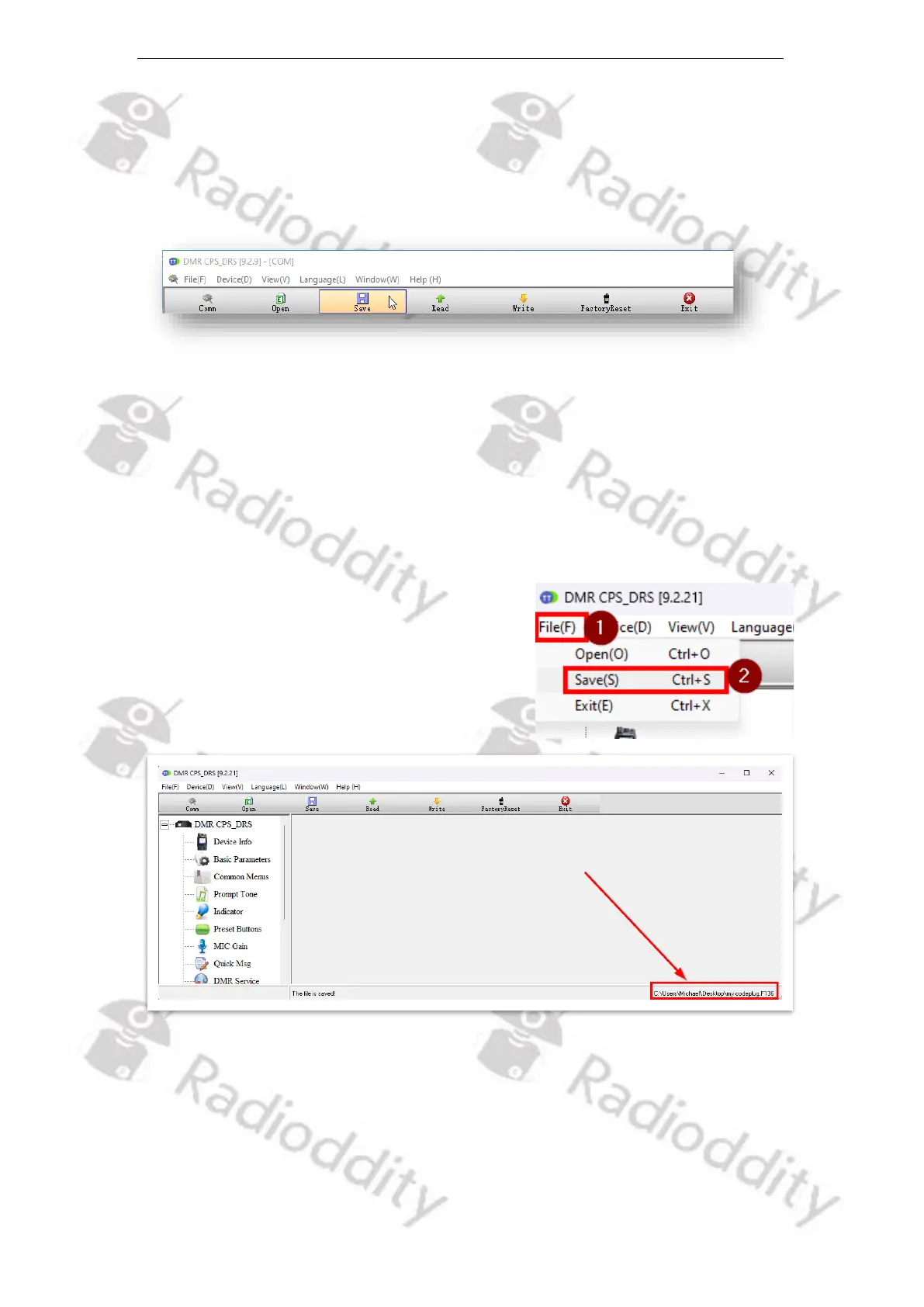
If this is the first time you used the READ-function, we advise to first safe the data
to a file of your choice, such as ‘Factory setting of my radio’. To do so, click on the
‘Save’ button within the toolbar.
A normal file dialog will follow that allows to specify the filename and location to
be used.
11.3.6 Safe codeplug to same file as before (Safe)
The name of the currently loaded codeplug file is displayed in the bottom line of
our CPS.
If you click on ‘File → Save(S)’ or just hit ‘Ctrl-S’ the
current settings will be saved to the very same
file, as specified in the bottom line of the CPS
screen.
11.3.7 Write codeplug to DB25-D, DB40-D or GD-88
Whenever you have made any changes to your current codeplug, using the CPS
and want those changes to become active on the radio, you need to write the
changed codeplug back to the radio. To do so, just click on the button, named
‘Write’ in the toolbar.



 To Next Page