Radioddity Extended manual for Radioddity DB25-D, DB40-D & GD-88 v3.0
© Radioddity 2023 page 46 of 252
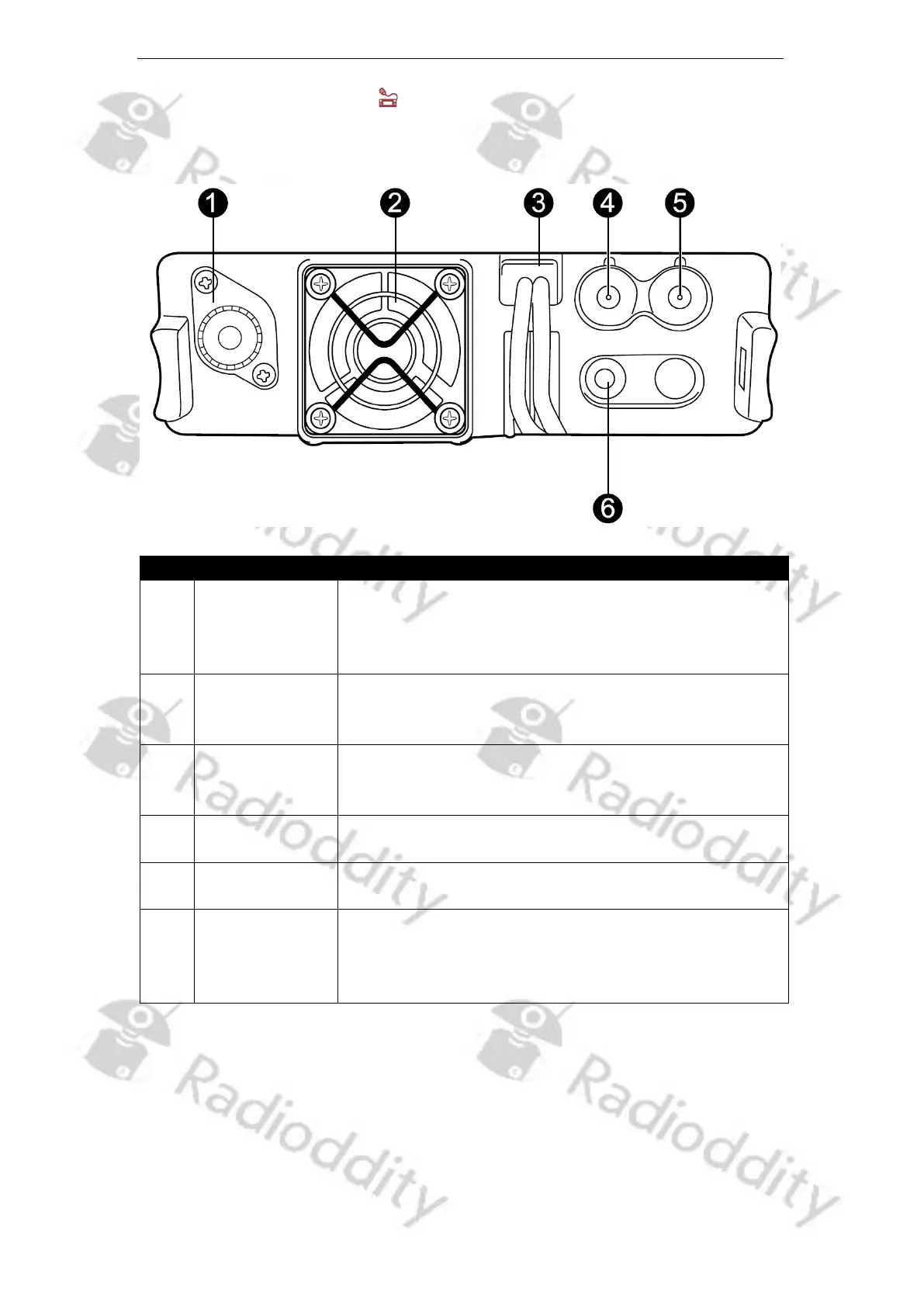
5.6.2 Rear panel of DB40-D
Function description and applications
Install the external antenna to this port. In TX testing,
please install a dummy load to replace the antenna.
The antenna or dummy load should be with 50 Ω
impedance.
When radio reaches the preset temperature, please
start the cooling fan to quickly reduce the
temperature to avoid damage to the radio parts.
Carefully check the polarity (Red: +, Black: -) and
power ratings (13.8 V DC +/- 15%) of the power supply
before connecting to the radio.
Install the GPS antenna to this port for GPS receiving.
Active GPS antennas are supported by the DB40-D.
Connect the Bluetooth antenna to this port
Connect 1 or 2 external speakers for better sound
effects (if needed). A 3.5mm (1/8’) TRS jack is required.
Please see instructions to learn how to use the
speaker.



 To Next Page