Radioddity Extended manual for Radioddity DB25-D, DB40-D & GD-88 v3.0
© Radioddity 2023 page 164 of 252
12.12 Contacts
12.12.1 Contact list
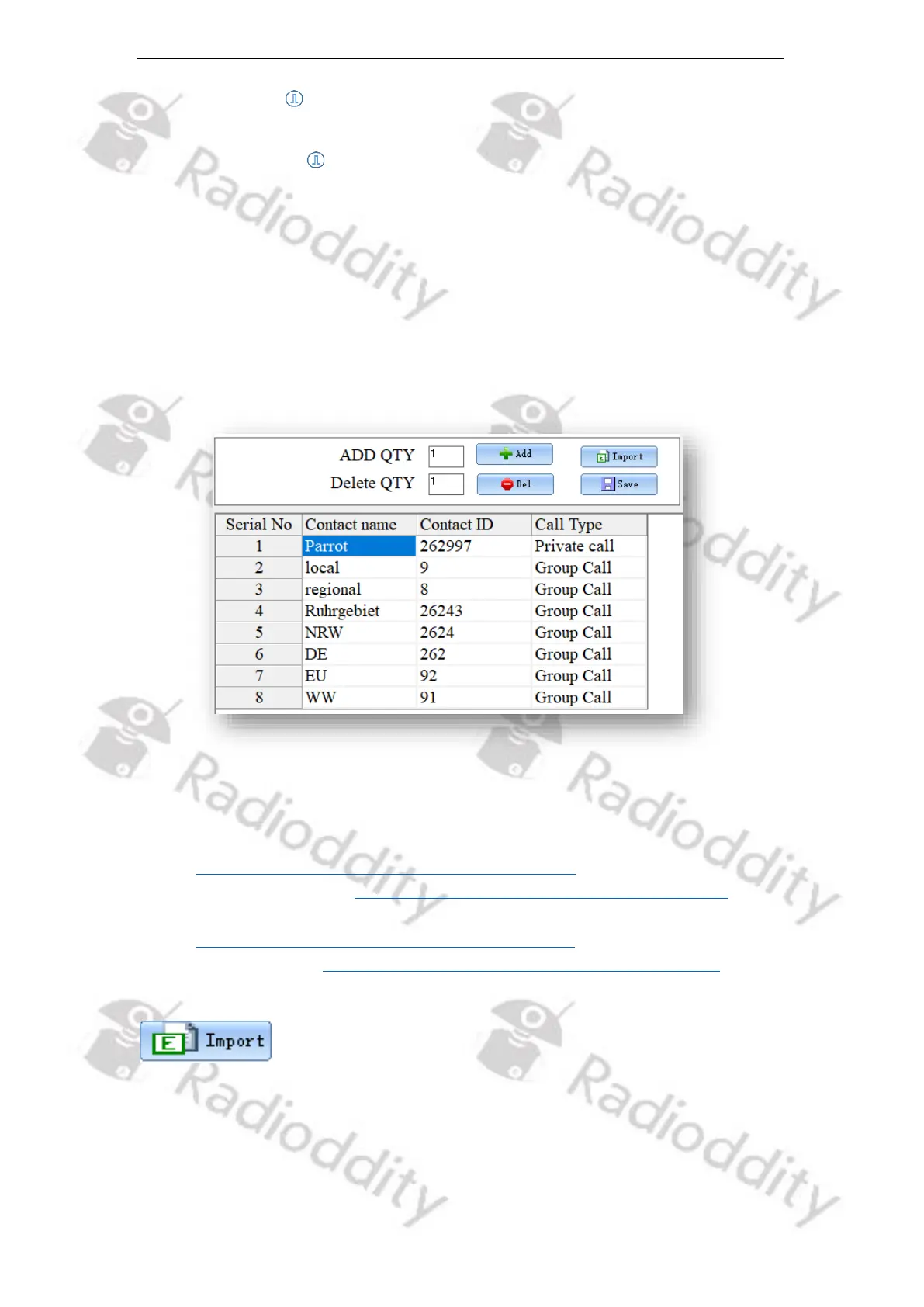
It is convenient for users to create, modify, edit, add and delete digital Contacts in
the current channel, or to copy ham contacts or Ham groups to the contact list,
which is convenient for you to call an associated contact or TalkGroup on a
specified channel for communication. If necessary, you can create, modify, edit,
add, delete the contacts and groups that are in your ‘Contact list’. The capacity of
this contact list can reach up to 2000 private contacts or groups, including ‘Contact
name’ (call sign or TalkGroup), ‘Contact ID’ (DMR ID) and ‘Call Type’ (mainly ‘Private
Call’ or ‘Group Call’).
You may grab lists of currently available TalkGroups as follows:
• Brandmeister network (BM):
https://www.pistar.uk/dmr_bm_TalkGroups.php
or via the BM API at https://api.brandmeister.network/v1.0/groups/
• Thank God It´s Friday (TGIF) network:
https://www.pistar.uk/dmr_tgif_TalkGroups.php
• DMR+ network: https://www.pistar.uk/dmr_dmr+_TalkGroups.php
If you press the button ‘Import’, you will be directed to the default file path of the
system, and you can directly import a CSV file of digital contacts. For your
convenience we have included a sample file ‘contacts 2000.csv ‘. This sample file
has a couple of sample contacts their ‘Serial No’, ‘Contact ID’, ‘Contact name’ and
‘Call Type’, whilst the following assignment is valid for the different call types:



 To Next Page