Radioddity Extended manual for Radioddity DB25-D, DB40-D & GD-88 v3.0
© Radioddity 2023 page 35 of 252
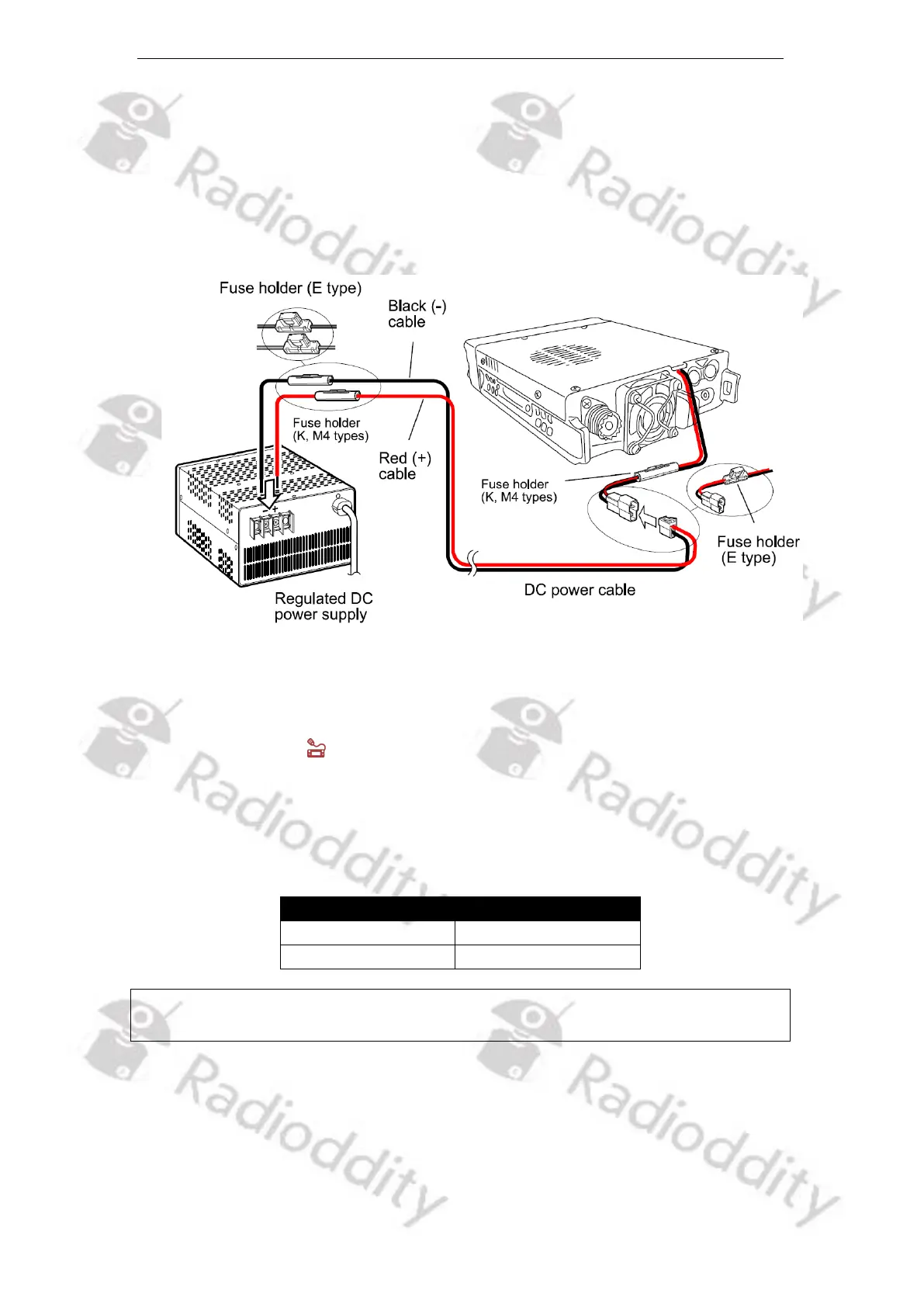
power cable to connect the Radioddity DB40-D to a regulated power supply.
Do not substitute a cable with smaller gauge wires.
3. Connect the radio's DC power connector to the connector on the DC power
cable. Press the connectors firmly together until the locking tab clicks.
Additional clip-on ferrites applied to the power cable and close to the radio will
prevent any HF radiation to enter the power supply lines.
4. Connect a properly matched dual-band (2m/70cm) antenna to the radio’s
antenna port.
5.2.4 Replace fuse
If the fuse is blown, please find out the cause and then solve the problem. After
the problem is fixed then replace the fuse. But if after re-installation the fuse is
still blown, please disconnect the power cord and contact the local authorized
dealer or authorized service center for assistance.
Notes: Please use only the specified type and the rated value of the fuse; otherwise,
it might damage the radio.



 To Next Page