Radioddity Extended manual for Radioddity DB25-D, DB40-D & GD-88 v3.0
© Radioddity 2023 page 48 of 252
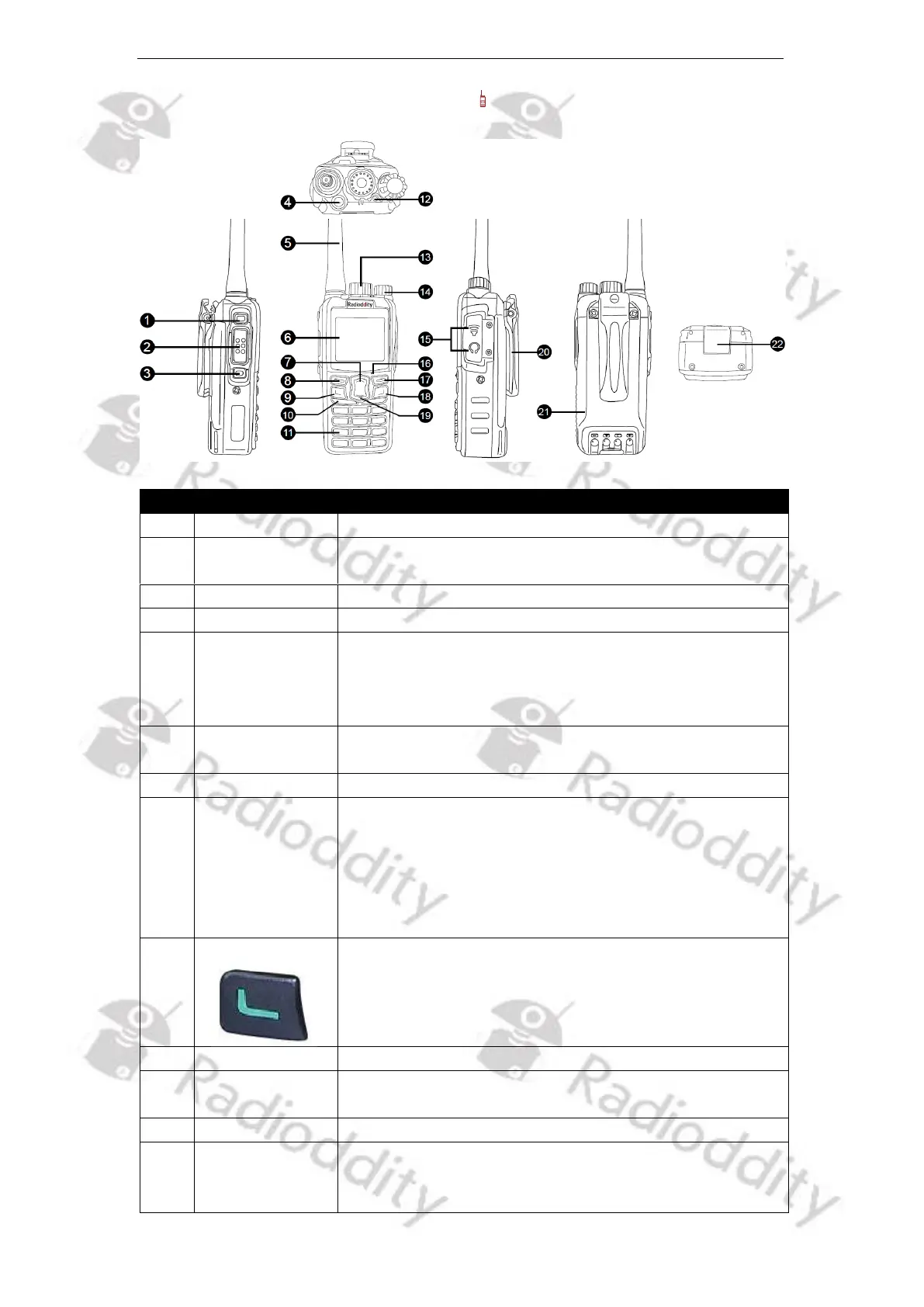
5.7 Radioddity GD-88 radio controls
Function description and applications
Programmable function key 2
Press and then speak in to the microphone to
transmit; Release it to receive.
Programmable function key 2
Programmable function key 3
Install the supplied dual-band antenna to this port. In
TX testing, please install a dummy load to replace the
antenna. The antenna or dummy load should be with
50 Ω impedance.
Display various working states, and combine with
visual icons for easy use and operation
Increase (Up) the frequency, channel, menu, etc.
[Menu]-key /
[Select]-key /
[OK]-key
1) In standby, short press to access the menu of the
current VFO
2) In the current menu mode, short press for
parameter selection and confirmation.
3) Long press (3sec) to input the channel number and
call up the desired channel
Programmable function key 4
(sometimes also called ‘the green button’)
Used to receive audio from others
Used to input frequency / channel number, alias, ID,
and SMS
Used to indicate the RX/TX status, etc.
Operate VFO A/B according to CTRL display and used
to set frequency, channel, menu selection and
parameters



 To Next Page