Radioddity Extended manual for Radioddity DB25-D, DB40-D & GD-88 v3.0
© Radioddity 2023 page 43 of 252
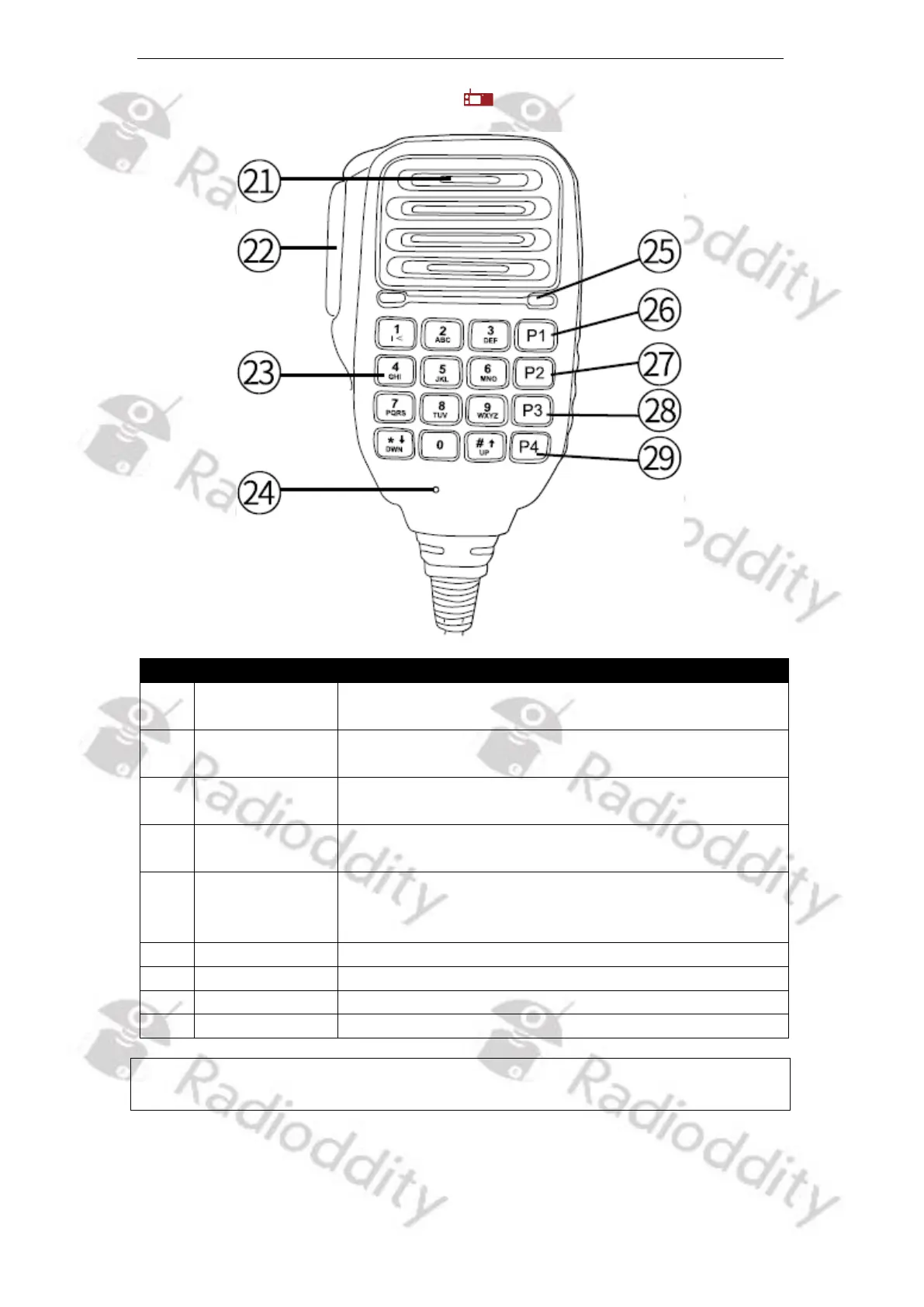
5.5.4 Speaker Microphone of DB25-D
Function description and applications
Used to receive audio from others (Audio output
options can be set from the menu option)
Press and then speak in to the microphone to
transmit; Release it to receive.
Used to input frequency / channel number / DTMF-
code, alias, ID and SMS
Speak to the microphone when pressing the [PTT]-key
to transmit; (3-5 cm away from the mouth)
LED indicator of
the Speaker-
Microphone
In transmitting, LED lights red; if operating on
Speaker-Microphone keypad, LED light will be always
on.
Programmable function key 4 / DTMF-Code A
Programmable function key 5 / DTMF-Code B
Programmable function key 6 / DTMF-Code C
Programmable function key 7 / DTMF-Code D
Notes: For convenient use, there are programmable [P]-keys for definition of various
functions.



 To Next Page