Radioddity Extended manual for Radioddity DB25-D, DB40-D & GD-88 v3.0
© Radioddity 2023 page 52 of 252
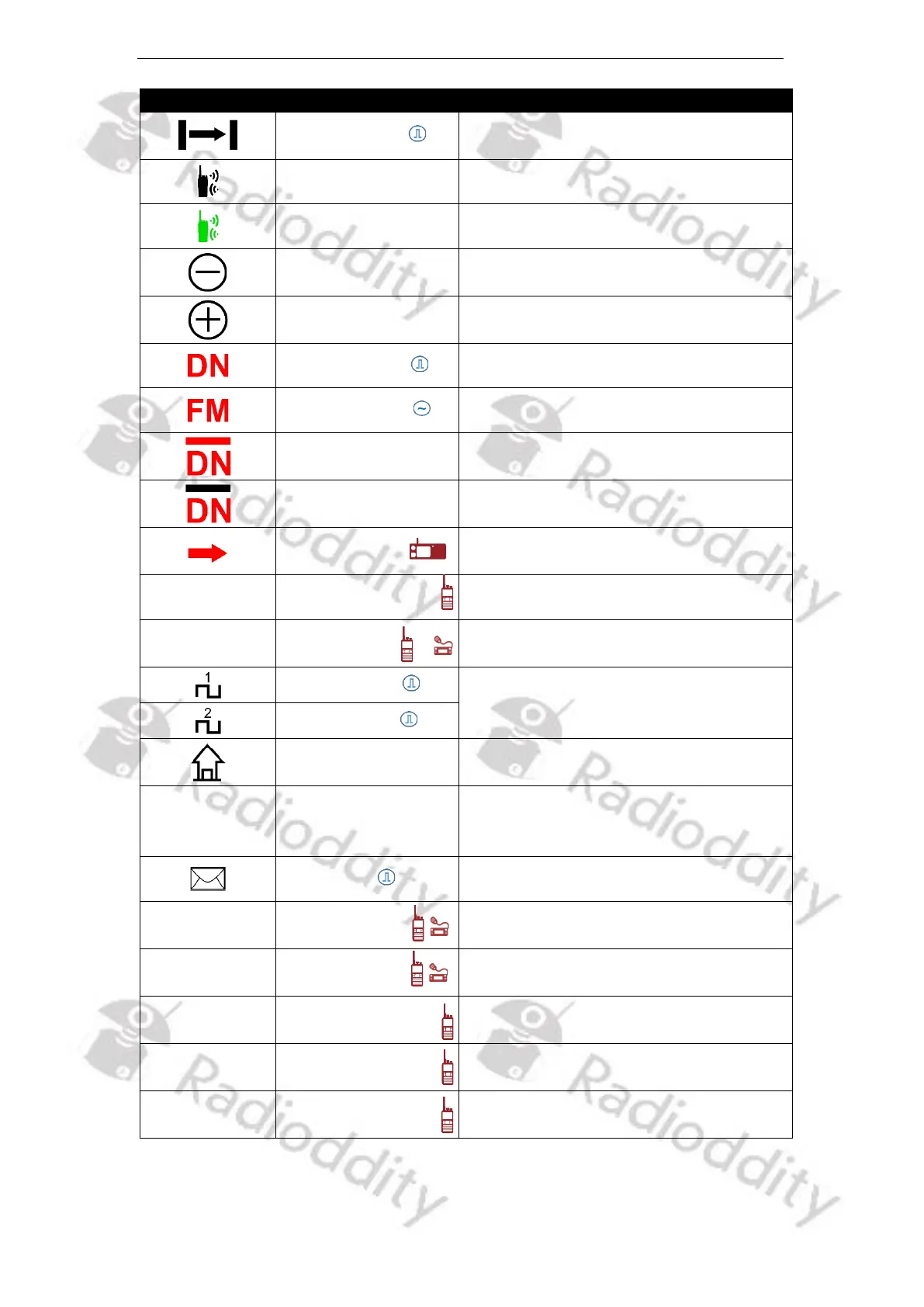
Appears when the radio is in Talk
Around Mode
Appears when Roaming is on
For locking current channel in Roaming
Offset Frequency
Negative direction
Appears when RX frequency is higher
than TX frequency
Offset Frequency
Positive direction
Appears when TX frequency is higher
than RX frequency
VFO setup for digital mode
VFO setup for analog mode
VFO setup for digital/analog auto RX
mode. Digital Mode is for main TX
VFO setup for analog/digital auto RX
mode. Analog Mode is for main TX
VFO selected for menu operations and
transmit
VFO selected for menu operations
VFO selected for transmissions
Indicates the working slot of current
frequency or channel
Indicates the working zone of current
frequency or channel
Indicates working in frequency mode,
frequency can be input via numerical
keypad
Appears when received a new message.
Radio menu applies to VFO A
Radio menu applies to VFO B
VFO A for receiving and
VFO B for transmitting
VFO A or B for receiving and
VFO B for transmitting
VFO B for receiving and
VFO A for transmitting



 To Next Page