TRANSFER UNIT
B291/B295/B296/B297 3-46 SM
3.13.3 TRANSFER BELT CLEANING BLADE AND TONER
OVERFLOW SENSOR
Transfer Belt Cleaning Blade
1. Transfer belt unit. (! 3.13.1)
2. Transfer belt. (!3.13.2)
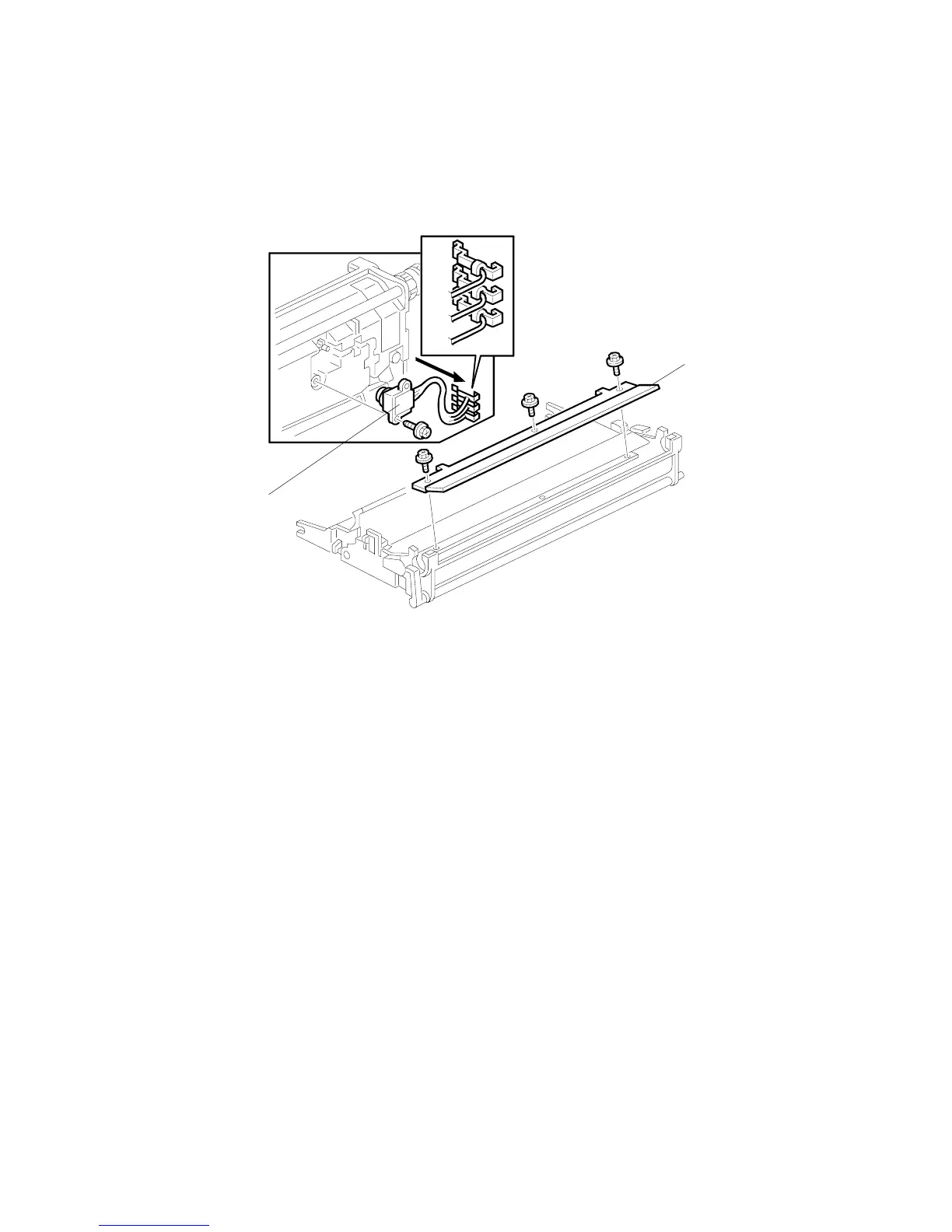
3. Transfer belt cleaning blade [A] (! x3)
NOTE: Avoid touching the edge of the new blade. Check the new blade for
dust or damage.
Toner Overflow Sensor
1. Transfer belt unit. (! 3.13.1)
2. Transfer belt. (! 3.13.2)
3. Transfer belt cleaning blade [A] (! x3)
4. Turn over the transfer unit and empty the used toner in the transfer unit.
5. Toner overflow sensor [B] (! x1, " x3)
NOTE: Re-install the color-coded wires in the correct order.
R: Red, Br: Brown, Bl: Blue
B195R523.WMF
R
Br
Bl
[A]
[B]












 To Next Page