SERVICE PROGRAM MODE TABLES
B291/B295/B296/B297 5-2 SM
5.2 SERVICE PROGRAM MODE TABLES
Please note these general changes in this section:
• Group 8(Data Log 2) is a new group of counters.
• Along with the addition of Group 8, many of the Group 7 counters have been
removed.
5.2.1 SERVICE TABLE KEY
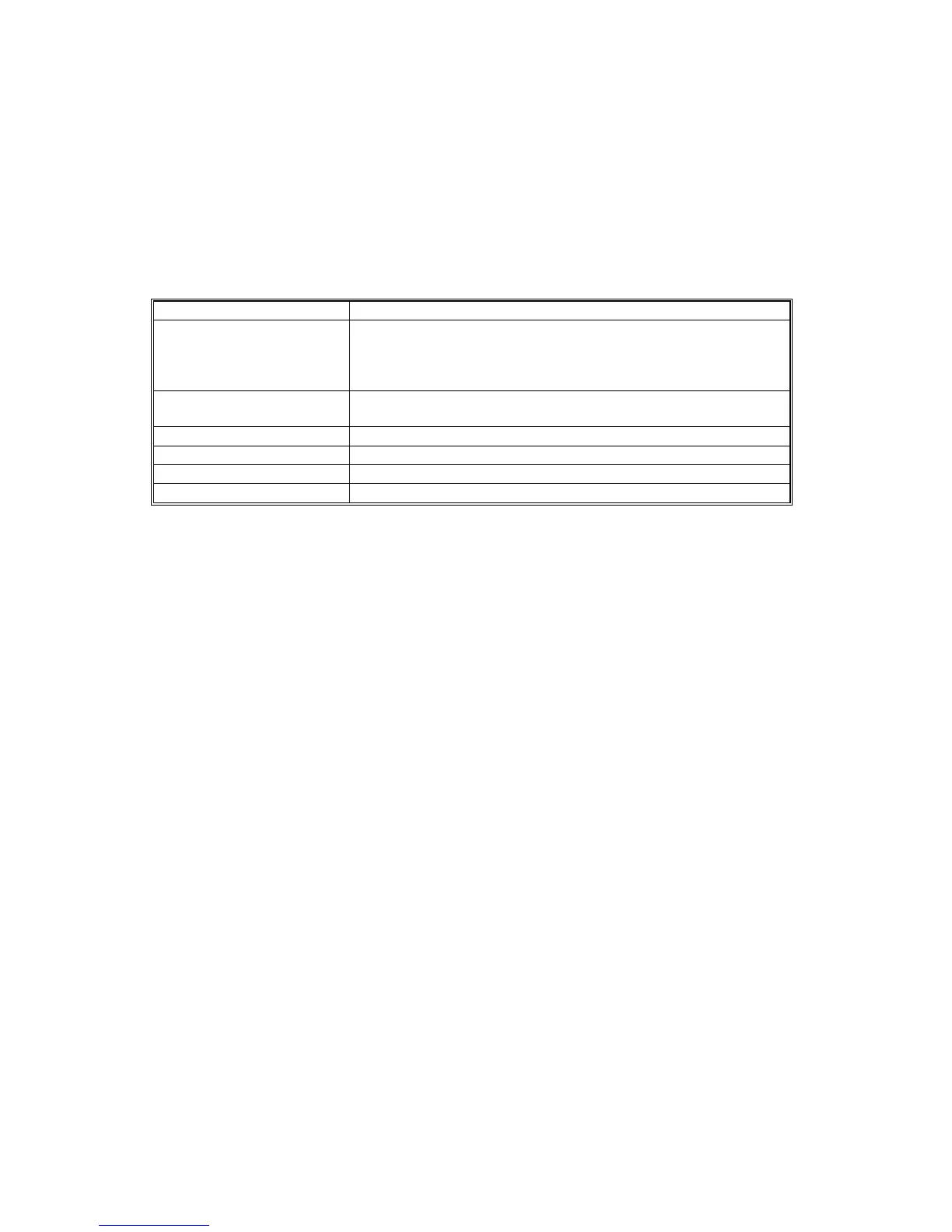
Notation What it means
[range / default / step] Example: [-9 ~ +9 / +3.0 / 0.1 mm step]. The setting can be
adjusted in the range ±9, value reset to +3.0 after an NVRAM
reset, and the value can be changed in 0.1 mm steps with each
key press.
* Value stored in NVRAM. After a RAM reset, this default value
(factory setting) is restored.
35 cpm B291/B296
45 cpm B295/B297
DFU
Denotes “Design or Factory Use”. Do not change this value.
Japan only
The feature or item is for Japan only. Do not change this value.
5.2.2 SERVICE MODE LOCK/UNLOCK
At locations where the machine contains sensitive data, the customer engineer
cannot operate the machine until the Administrator turns the service mode lock off.
This function makes sure that work on the machine is always done with the
permission of the Administrator.
4. If you cannot go into the SP mode, ask the Administrator to log in with the User
Tool and then set “Service Mode Lock” to OFF. After he or she logs in:
[User Tools] > System Settings > Administrator Tools > Service Mode Lock > OFF
• This unlocks the machine and lets you get access to all the SP codes.
• The service technician can do servicing on the machine and turn the
machine off and on. It is not necessary to ask the Administrator to log in
again each time the machine is turned on.
5. If you must use the printer bit switches, go into the SP mode and set SP5169 to
“1”.
6. After machine servicing is completed:
• Change SP5169 from “1” to “0”.
• Turn the machine off and on.
• Tell the administrator that you completed servicing the machine.
• The administrator will then set the “Service Mode Lock” to ON.












 To Next Page