COPY ADJUSTMENTS: PRINTING/SCANNING
SM 3-91 B291/B295/B296/B297
Replacement
Adjustment
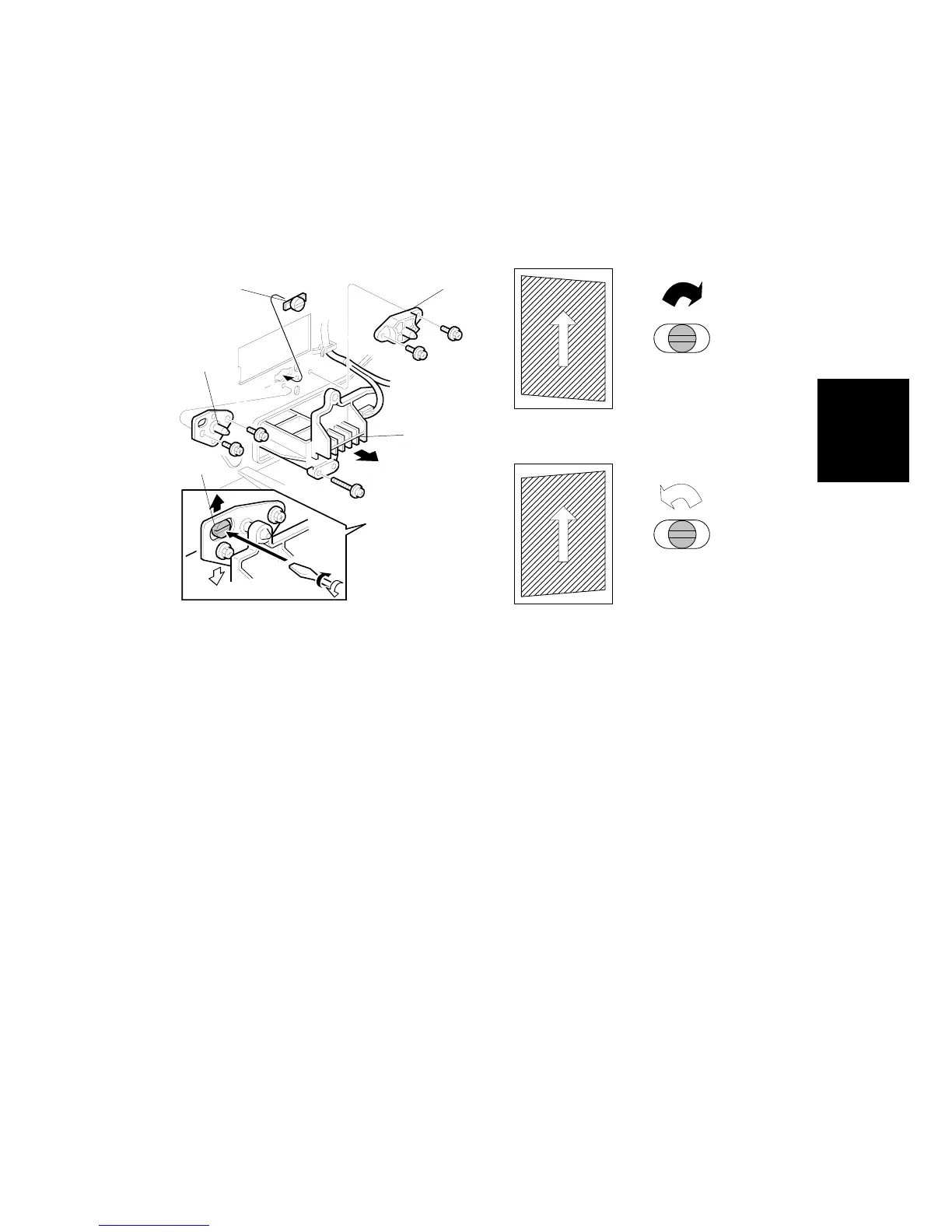
Parallelogram Image Adjustment
Do the following procedure if a parallelogram prints while adjusting the printing
registration or printing margin using a trimming area pattern.
The following procedure should be done after adjusting the side-to-side registration
for each paper tray station.
Use SP2-902-3 No. 10 (Trimming Area) to determine whether a parallelogram
image appears. If the parallelogram pattern appears, perform the following
procedure.
1. Laser unit [A]
2. Bracket [B] (! x2)
3. Install adjustment cam [C] (P/N: A2309003)
4. Secure positioning pin [D] (P/N A2309004) with the two screws removed with
the bracket [B]. Do not tighten the screws at this time.
5. To adjust the position of the laser unit [E].
1) Adjust the laser unit position by turning the adjustment cam. (See the
illustration above.)
2) Tighten the adjustment bracket.
3) Print the trimming area pattern to check the image. If the results are not
satisfactory, repeat step 5.
B195R829.WMF
Turn
clockwise
Turn
counterclockwise
B195R830.WMF
[A]
[B][C]
[D]
[E]












 To Next Page