PHOTOCONDUCTOR UNIT (PCU)
SM 3-31 B291/B295/B296/B297
Replacement
Adjustment
3.11.2 DRUM
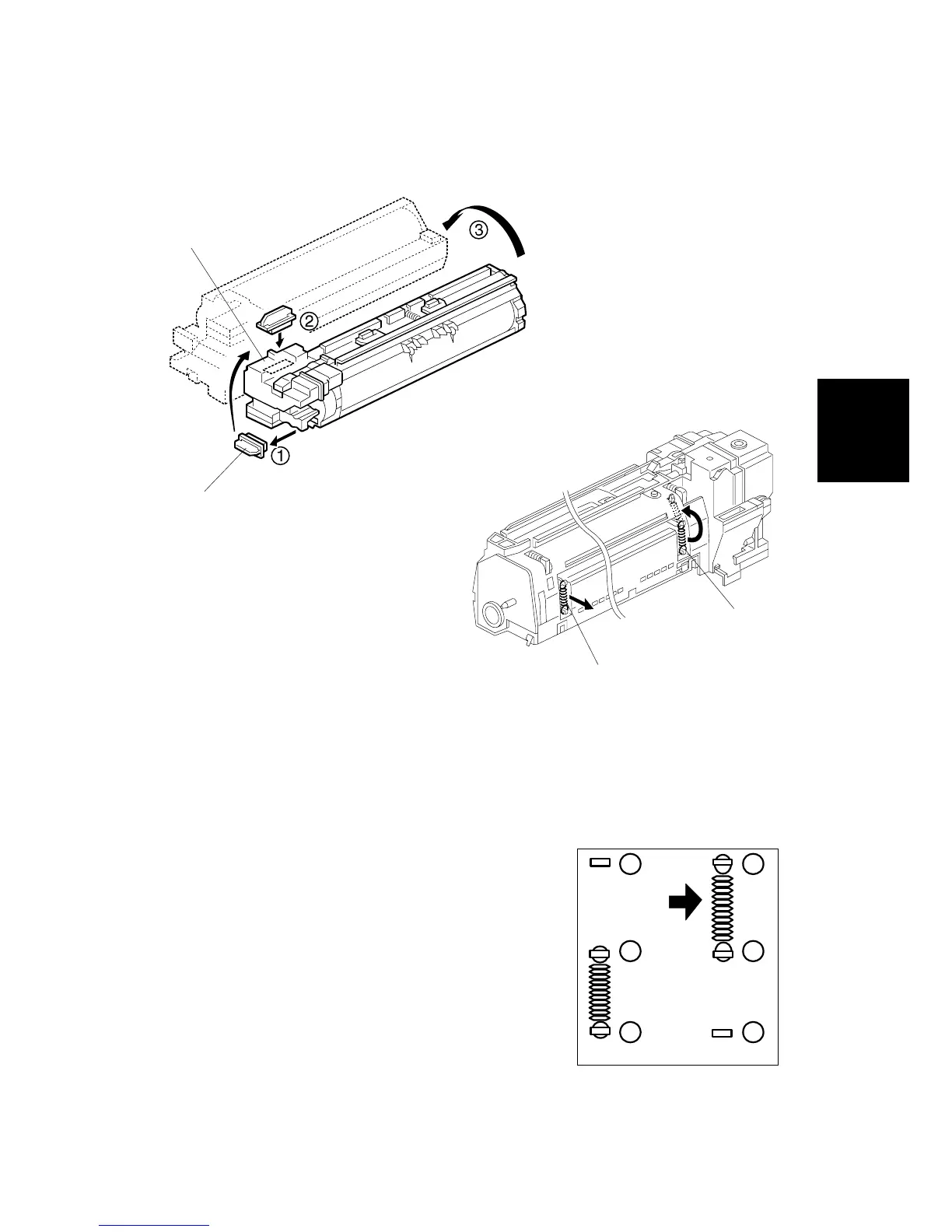
1. Remove the PCU (!3.11.1)
2. Toner cap [A]
3. Insert cap [A] into the toner entrance hole [B].
NOTE: Make sure that the cap is inserted completely into the hole.
4. On the left side of the PCU, disconnect the
spring [C].
5. On the right side of the PCU disconnect the
spring [D] and attach it to hooks as shown.
• To prevent breaking the weaker hook ', use
a pair of needle-nose pliers to disconnect the
spring at (, then re-attach to ( and ).
• Moving this spring retracts the movable drum
cleaning blade so it does not touch the
surface of the drum when the drum is re-
installed.
B195R932.WMF
B195R934.WMF
1
2
3
1
2
3
B195R935.WMF
[A]
[B]
[C]
[D]












 To Next Page