OTHER OPTIONS
SM 15 D315
Printer/
Scanner Unit
D315
1.3 OTHER OPTIONS
1.3.1 IEEE 1284 (B679)
Accessories
Check the accessories and their quantities against the following list:
Description Q'ty
1. IEEE 1284 Interface Board B679........................................ 1
CAUTION
TURN OFF THE MAIN POWER SWITCH AND DISCONNECT THE POWER SUPPLY CORD.
NOTE: You can only install one of these network interfaces: IEEE 802.11b
(Wireless LAN), IEEE1284 (Parallel/Centronics), or Bluetooth.
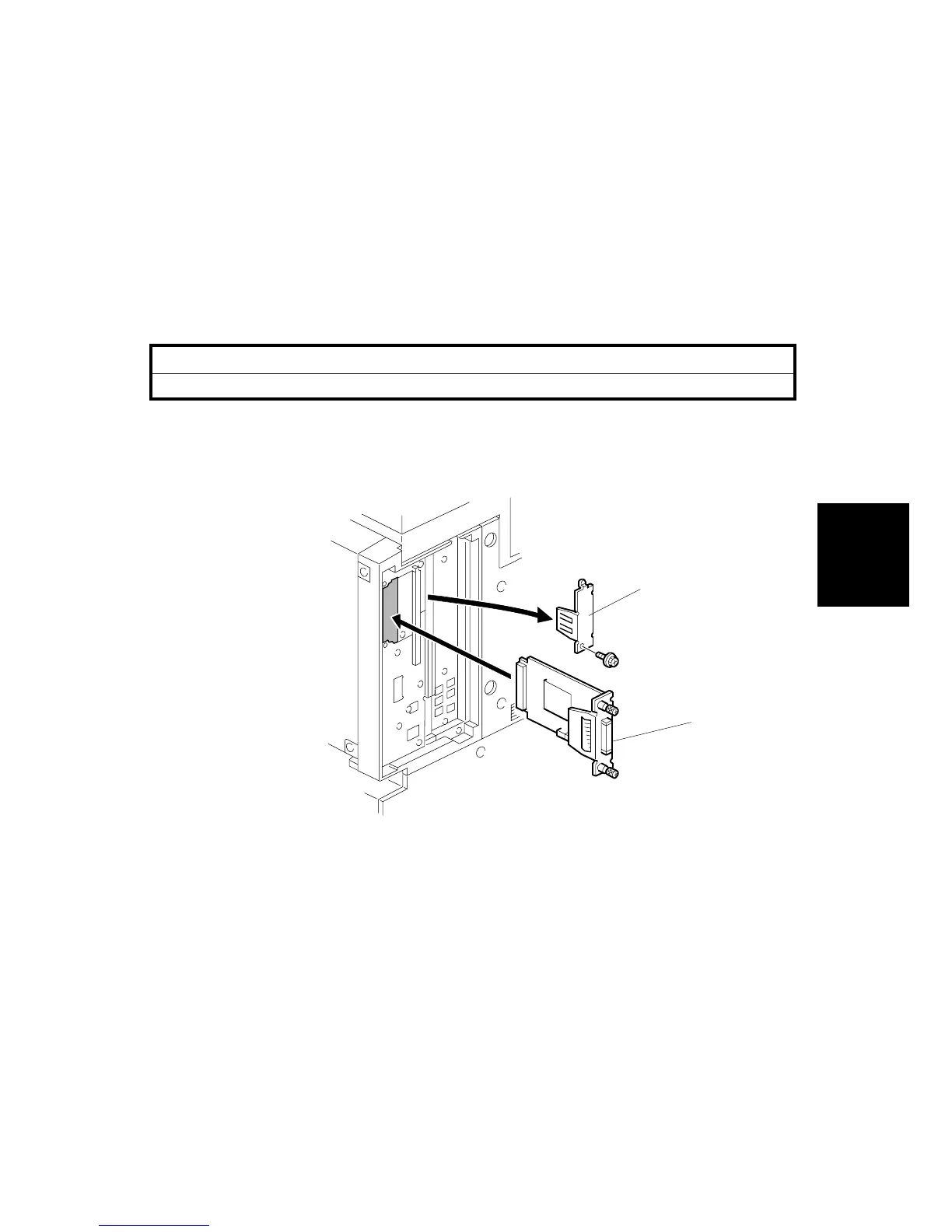
1. Remove the cover [A] of board Slot 1 or 2 ( x1)
2. Install the interface board [B] ( x2 knob screws)
NOTE: Use a screwdriver to tighten the knob-screws. Do not tighten manually,
because this can disconnect the board.
3. Reattach the cover ( x1)
B783I904.WMF
[A]
[B]












 To Next Page