SCANNER ACCESSIBILITY OPTION (B815)
SM B291/B295/B296/B297
1-79
Installation
Pre-installation
• Remove Short Scanner I/F Cable
• Connect the Long Scanner Cable to the Copier
• Install Anti-Static Springs on the Operation Panel
• Replace the Board Shield Plates
On-Site Installation
• Move the Scanner Unit to Its Accessible Location
• Remove the Horizontal Arm
• Connect the Long Scanner I/F Cable to the Copier
• Replace the Front Rubber Feet with the Adjustment Screws
• Connect the Scanner
Pre-installation
Remove Short Scanner Cable
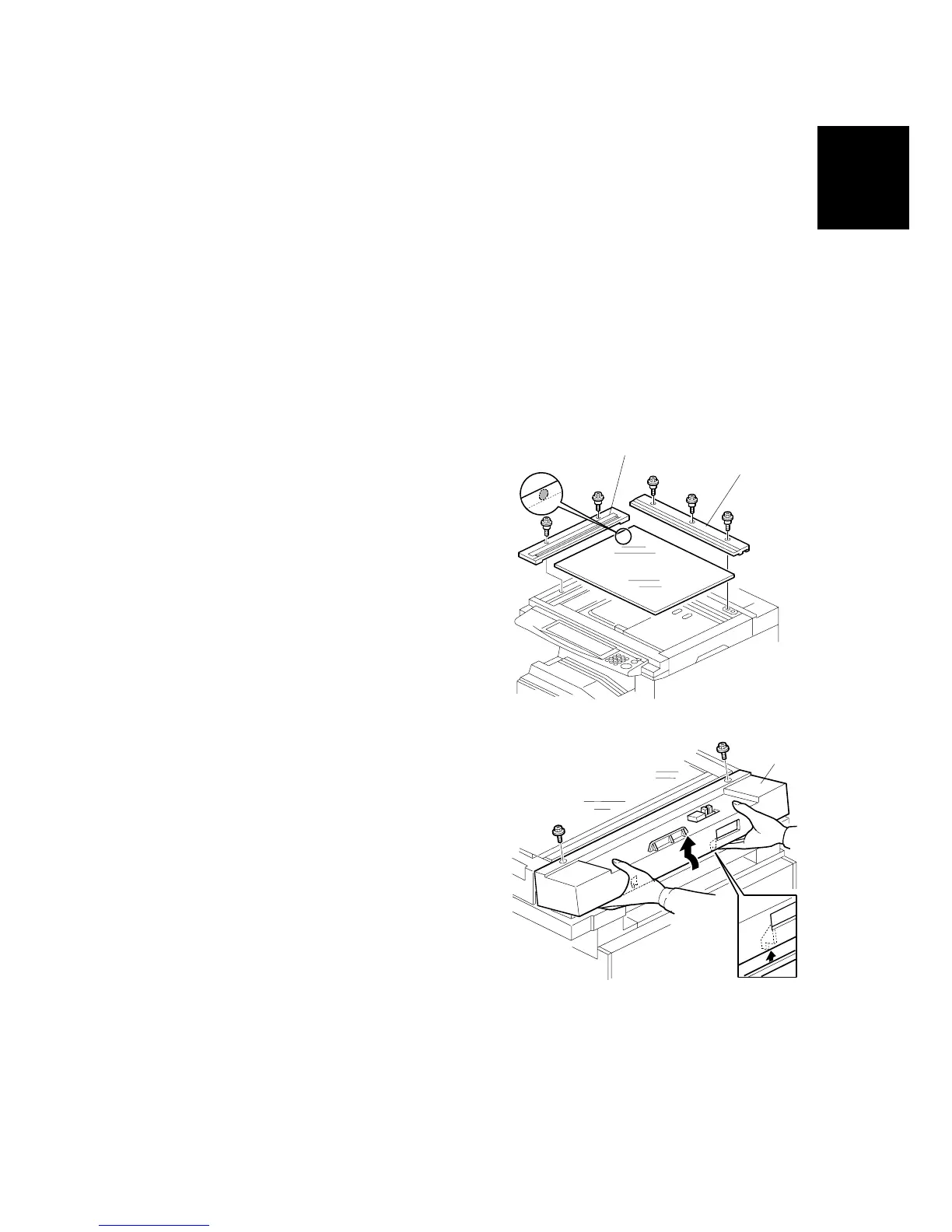
1. If the ARDF is attached, remove it.
2. Remove:
[A]: Rear scale (! x3)
[B]: Left scale and exposure glass (! x2)
3. Remove scanner rear cover [C] (! x2).
B815I101.WMF
B815I103.WMF
[A]
[B]
[C]



 To Next Page