SCANNER ACCESSIBILITY OPTION (B815)
B291/B295/B296/B297 SM
1-80
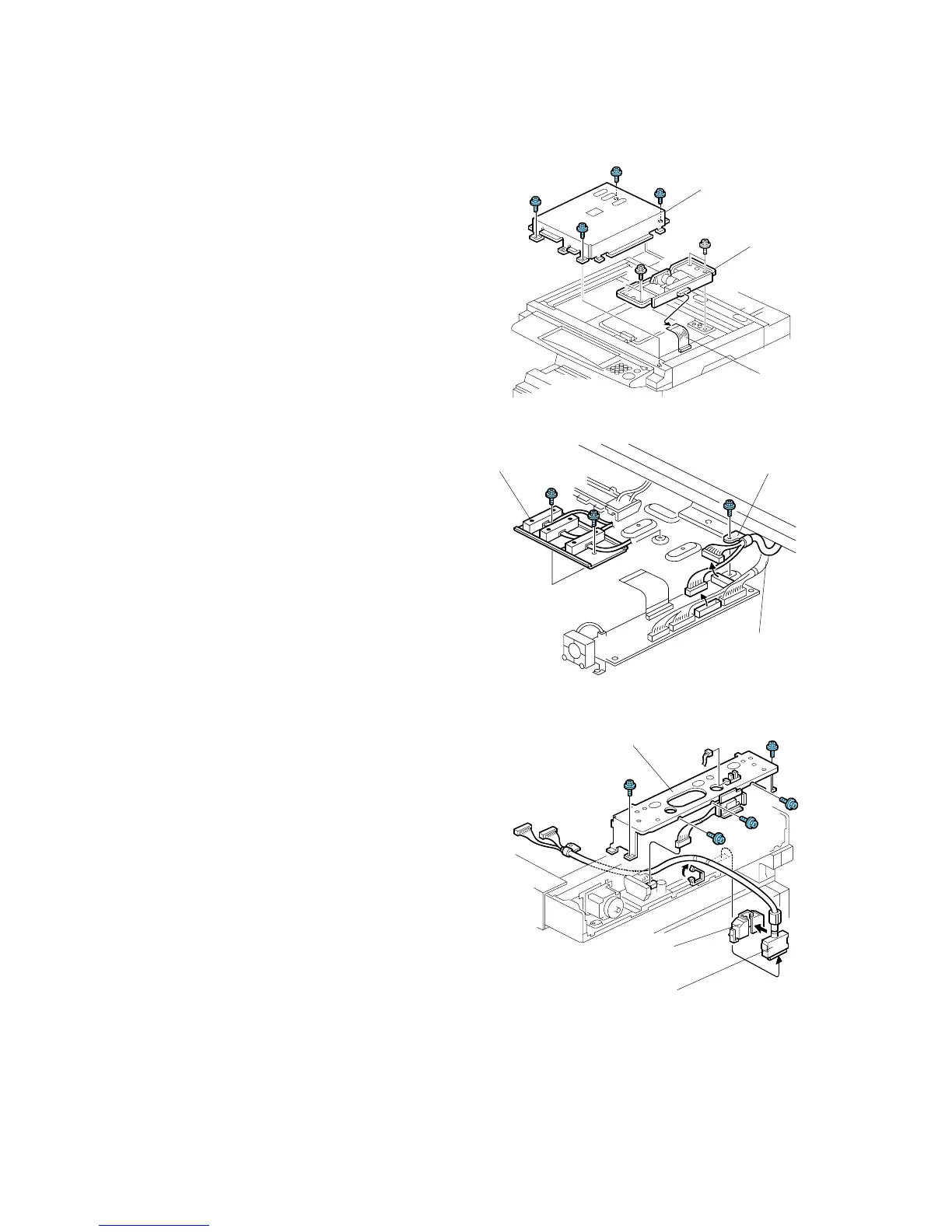
4. Remove:
[A]: Lens block cover (! x4)
[B]: Disconnect flat-film connector from
the lens block.
[C]: Lens block assembly (! x4)
5. Disconnect:
[D]: Original length sensor (! x1)
• Push the sensor forward toward the
front. It is not necessary to
disconnect or remove the sensor.
[E]: Ground wire [E] (! x1)
[F]: Short scanner I/F cable ($ x2).
6. Remove the rear cover [G]
(! x5, $ x1)
7. Remove the connector cap [H] and
disconnect the short scanner I/F cable
[I] from the mainframe ($x1, %x1).
8. Pull the short scanner I/F cable out of
the scanner unit.
B815I102.WMF
B815I104A.WMF
B815I105.WMF
[A]
[C]
[B]
[G]
[H]
[I]
[D]
[E]
[F]



 To Next Page