SCANNER ACCESSIBILITY OPTION (B815)
SM B291/B295/B296/B297
1-81
Installation
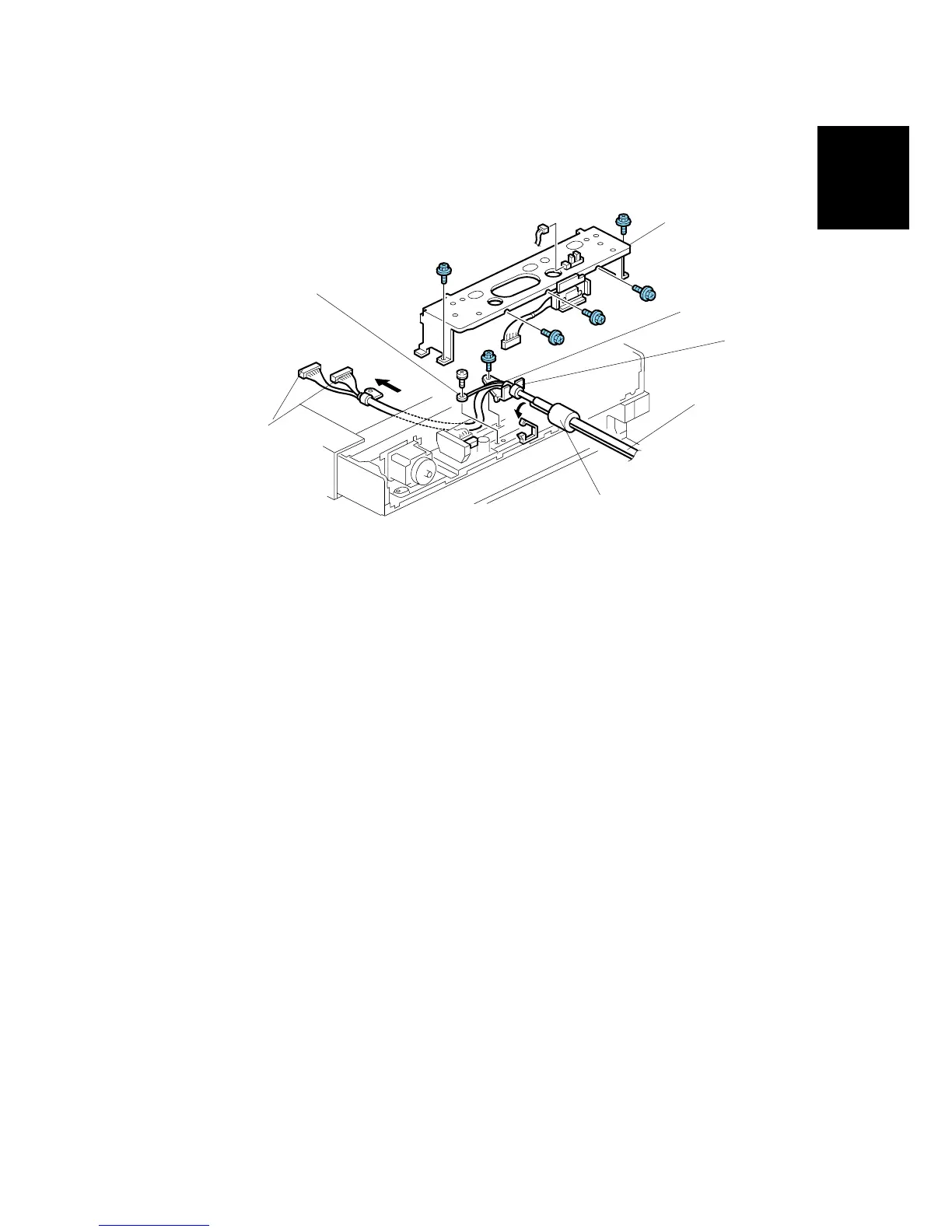
Connect the Long Scanner Cable to the Copier
1. Position the cable [A] and ground wire [B] of the long scanner I/F cable as
shown.
2. Reattach the long scanner I/F connectors [C] and ground wire [D] (!x2)
• Make sure the ground wire and cable loop behind the large boss.
3. Reattach (!Pg. 1-80)
• Original length sensor (! x1).
• Lens block assembly (! x4).
• Lens block cover (! x4)
4. Set the collar [E] of the long scanner I/F cable in the bracket and clamp the
cable (%x1)
5. Reinstall rear bracket [F] (! x5, $ x2).
6. Pull the ferrite core [G] slightly away from the back of the machine.
7. Reattach: (!Pg. 1-79)
• Scanner rear cover (! x2)
• Rear scale (! x3)
• Exposure glass and left scale (! x2)
B815I106.WMF
[A]
[B]
[C]
[D]
[E]
[F]
[G]



 To Next Page