G3 INTERFACE UNIT TYPE 3045
B779 8 SM
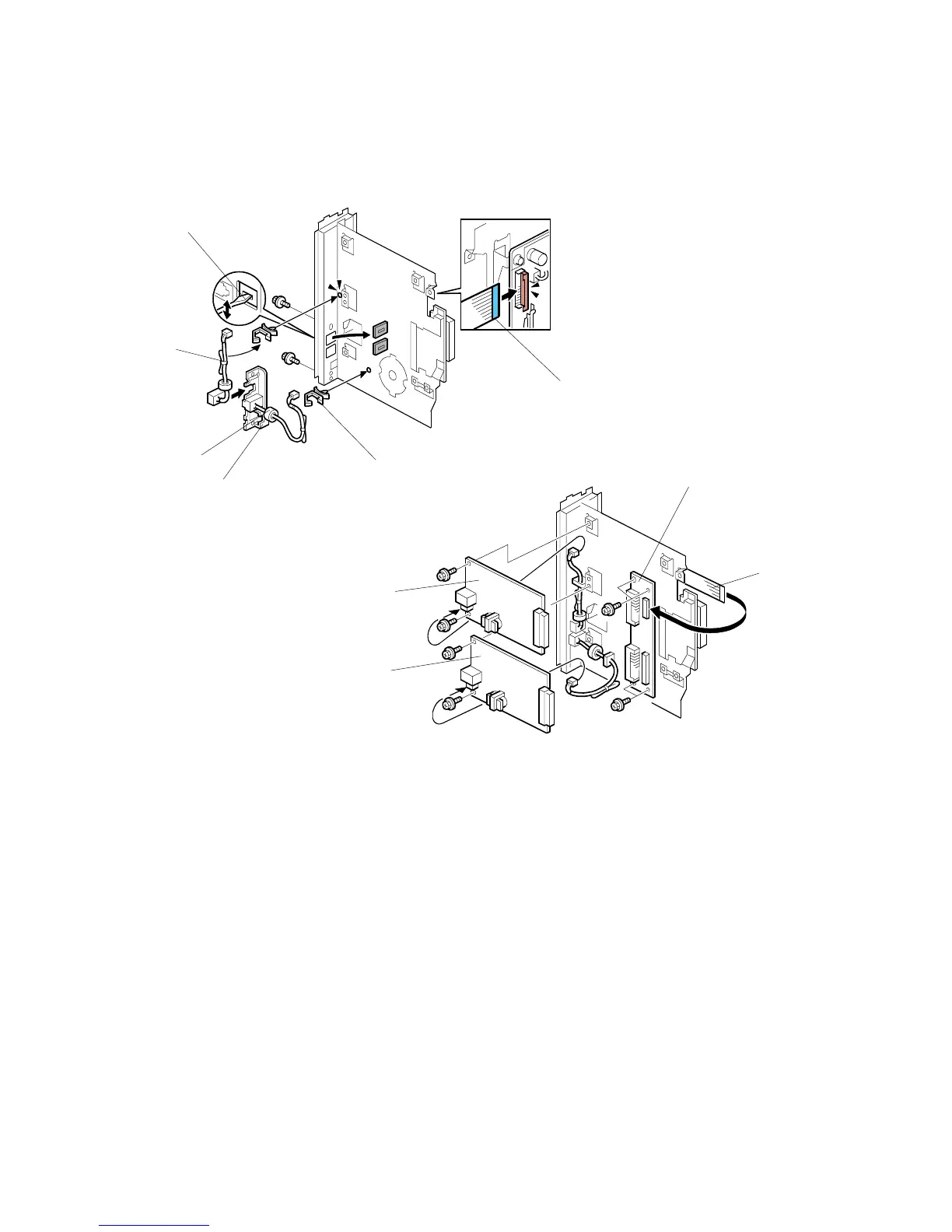
1.3.3 INSTALLATION: TWO G3 BOARDS
1. Remove the two knockouts [A].
2. Attach the clamps [B] ( x1).
3. For the lower board:
• Attach the head of the RJ-45 connector [C] to the bracket [D].
• Set the bracket [D] and fasten it. ( x2).
4. For the upper board, set the second RJ-45 connector [E] in the bracket.
NOTE: Cut the band [E] before connecting.
5. Attach one end of the flat film connector [F].
6. Attach the CCUIF [G] ( x4)
7. Attach the other end of the flat film connector [H] to the CCUIF.
8. Attach the lower G3 board [I] ( x2, x1, x2).
9. Attach the upper G3 Board [J] ( x2, x1, x2).
10. Return to page 3 and complete the installation.
B779I906.WMF
B779I907.WMF
[A]
[B]
[C]
[D]
[E]
[F]
[G]
[H]
[I]
[J]












 To Next Page