Page 161
STAT
IM
2000/2000S Service Guide
96-108639 Rev 3.0
7. Electrical and Electronic Components
STATIM 2000/2000S/2000 G4 Service Guide
Power (on/off) Switch
Removing the Power Switch
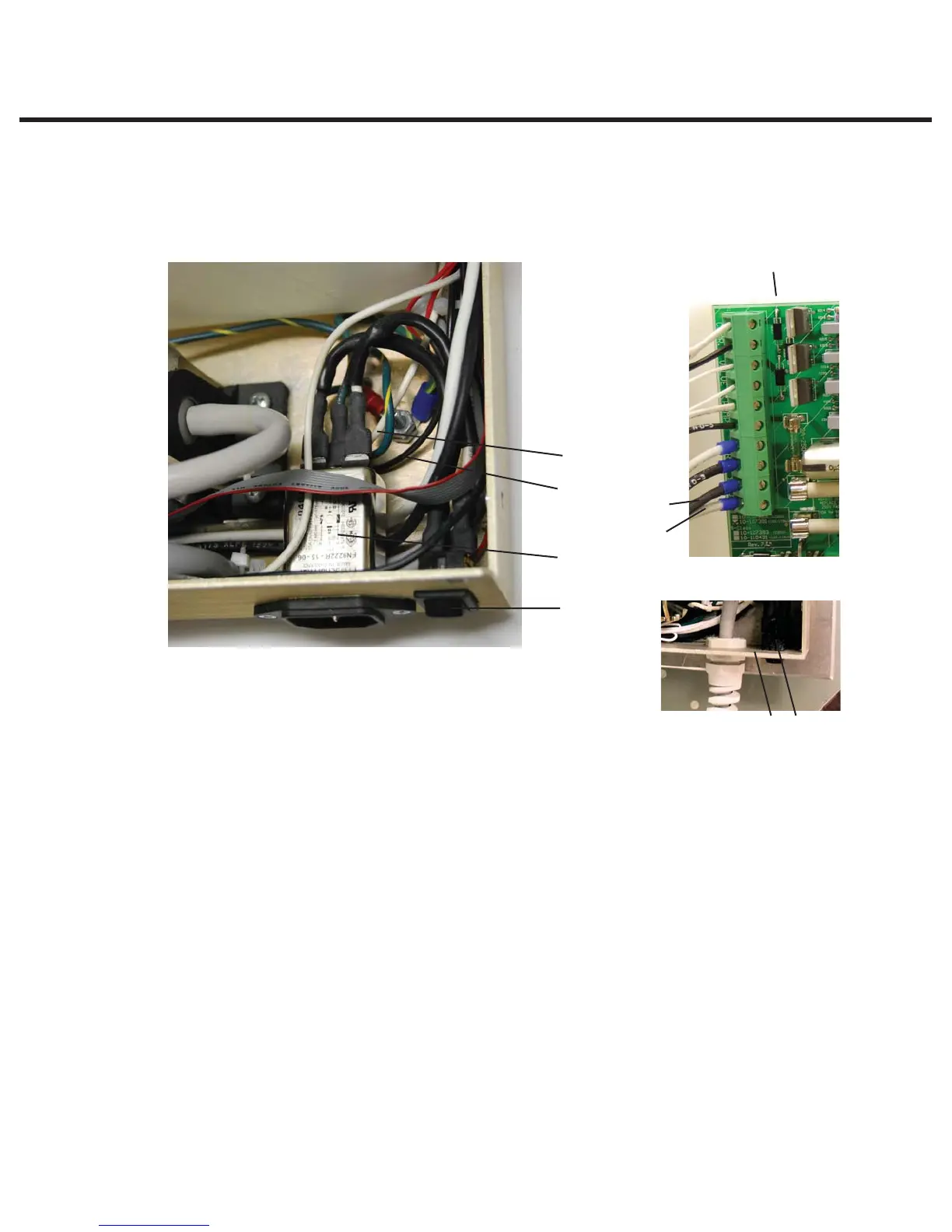
To remove the power switch (1), proceed as follows, (See Figure 21):
1. Turn the power switch OFF, and unplug the power cord from the wall outlet.
2. Remove the cord (2) from the unit. See, Removing a Directly Wired Power Cord or Removing a
Detachable Power Cord.
3. If an A.C. inlet receptacle (3) or receptacle / line filter (4) is present, disconnect the leads to
the power switch. At the switch, disconnect the white wire (5a) from the upper spade terminal,
labelled 1, and the black wire (5b) from the upper spade terminal, labelled 2, nearest the
pump.
4. At the switch, disconnect the white wire (7a) extending from controller board (6) terminal J1-1
to the lower power switch spade terminal labelled 1a and the black wire (7b) extending from
controller board terminal J1-2 to the lower power switch spade terminal, labelled 2a, nearest
the pump.
5. The panel mount style switch is held into the panel with tabs. Compress the tabs (8) on the top
and bottom of the switch and push the disconnected power switch out of the chassis (9) wall.
1. Power switch
2. Line cord (not shown)
3. A.C. receptacle
4. Line filter
5.
a. White wire
b. Black wire
6. Controller Board
7.
a. White wire (J1-1)
b. Black wire (J1-2)
8. Power switch tabs
9. Chassis wall
89
5a
7a
6
7b
5b
3, 4
1
Figure 21



 To Next Page