Page 244
STAT
IM
2000/2000S Service Guide
96-108639 Rev 3.0
12. Printer and Data Logger
3. To adjust and test print quality, connect the printer cable to the STATIM and the STATprinter
and turn the host unit power switch ON.
4. Open the printer module and turn the printer power button ON.
5. Start and then quickly stop a cycle. Doing so causes an error message to be printed. While the
error message is printing, adjust the pot (R21).
6. If further adjustment is required, repeat steps 3 to 5.
7. Reinstall the cover.
Removing the Printer Assembly
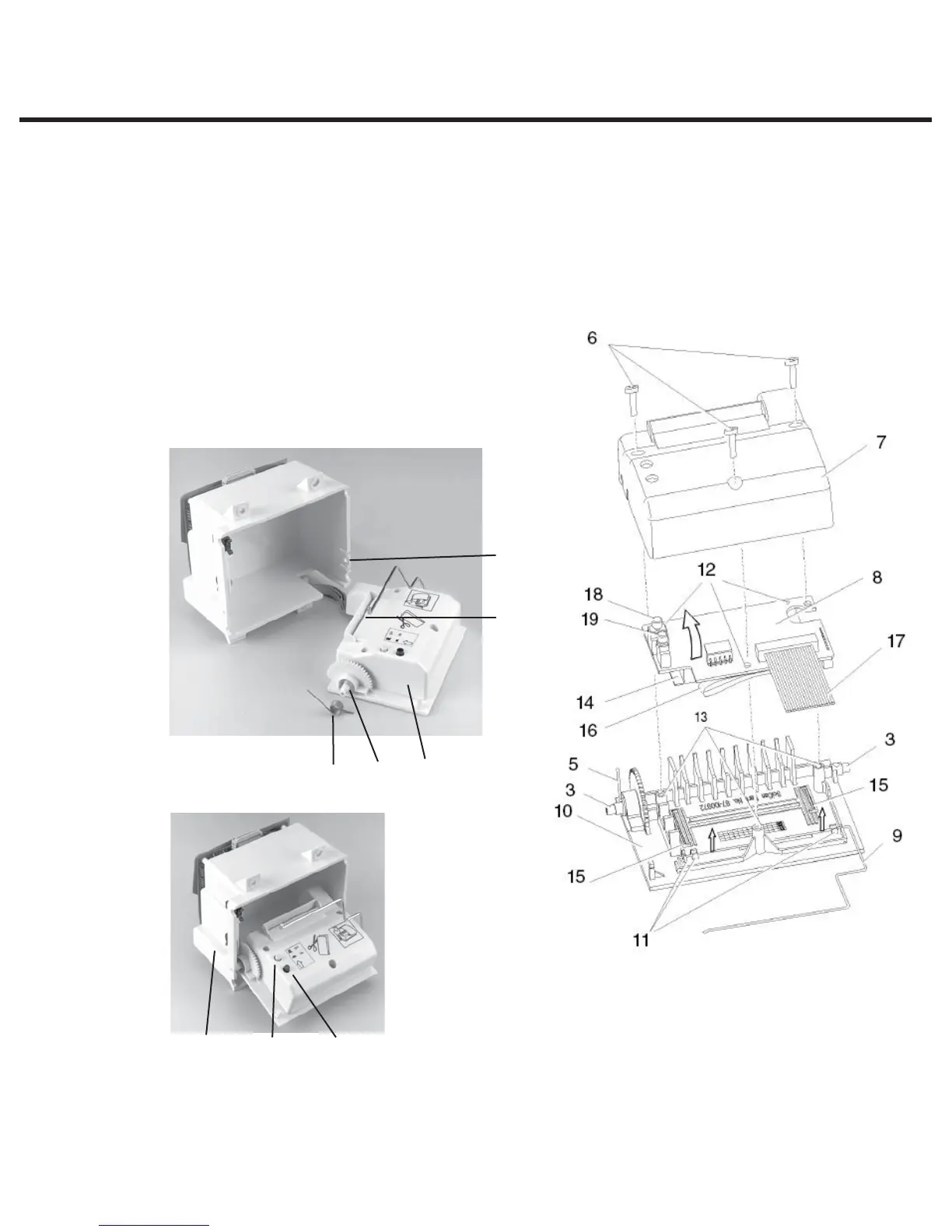
To remove the printer assembly (1) from the printer
module assembly (2), proceed as follows (see Figure 3):
1
2
3
4
5
18 19
20
1. Cover
2. Printer module assembly
3. Hinge pin
4. Snap mechanism
5. Spring
6. Screws
7. Printer housing
8. Printer board
9. Paper roll arm
10. Printer door
11. Paper roll arm retaining clips
12. Printer board mounting holes
13. Mounting bosses
14. Printer body
15. Locating ribs
16. Print head flexible cable
17. Printer ribbon cable
18. Power button
19. Paper advance button
20. Paper feed slot
Figure 3
STATIM 2000/2000S/2000 G4 Service Guide



 To Next Page