Page 143
STAT
IM
2000/2000S Service Guide
96-108639 Rev 3.0
7. Electrical and Electronic Components
STATIM 2000/2000S/2000 G4 Service Guide
Removing the controller board assembly
To remove the controller board assembly, proceed as follows:
NOTE: Exercise extra caution. The thermocouple leads at the board end are very fragile.
1.
b. For all boards up to and including Rev. 6.x —
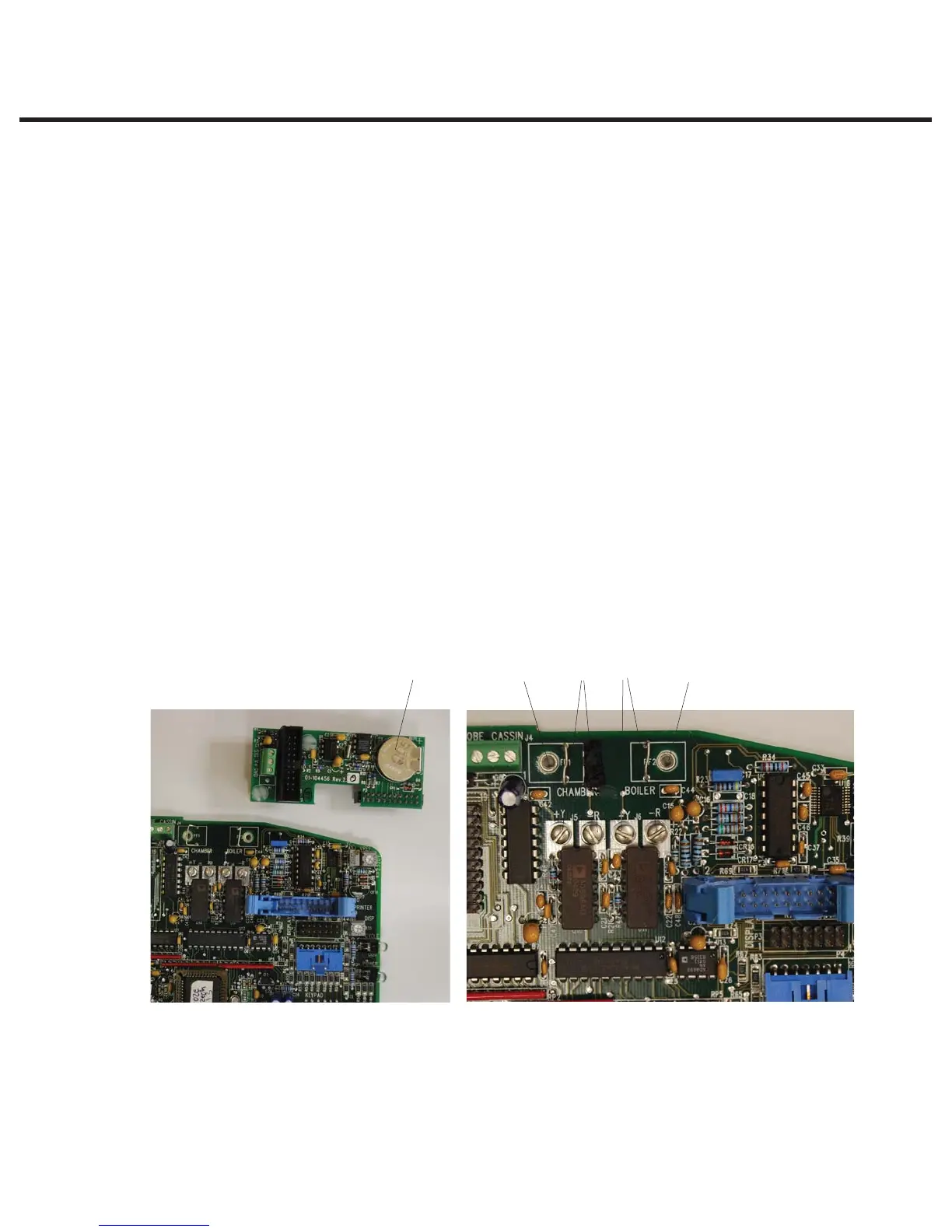
t Detach pressure interface board (1) to access thermocouple wires (S class units only),
or if a validation thermocouple is present (later or upgraded non S units) detach the
validation thermocouple interface board. Note that on some non S units where no
validation thermocouple is present, there may be a printer cable attached in this
socket. Remove this if present. Rev. 3.x/4.x units DO NOT have this socket.
t Disconnect the steam generator thermocouple wires (2) from controller board terminal
positions BOILER +Y and -R.
t Disconnect the chamber thermocouple wires (4) from controller board terminal
position CHAMBER +Y and -R.
t Disconnect the ground terminal (3) from the position marked BOILER. Disconnect the
ground terminal (5) from the position marked CHAMBER. Retain the ground terminal
screws. Leave the screws with contact washers in the terminals. Carefully bend the
leads so they do not contact the controller board when it is removed.
Figure 3 Figure 4
154 32
1. Pressure interface board
2. Steam generator terminals
3. Boiler flag terminals
4. Chamber thermocouple terminals
5. Chamber flag terminals



 To Next Page