Page 38
STAT
IM
2000/2000S Service Guide
96-108639 Rev 3.0
2. Tools, Maintenance Schedules, Procedures and Testing
3. Before installing the replacement bacteria-retentive filter check that the arrow mark on the filter
matches the direction of the arrow on the bracket. Push the left hand filter fitting into the outlet
tube.
4. Gently press the replacement filter into the filter bracket. The arrow mark on the filter is facing
out and pointing to the left.
5. Re-connect the inlet tube to the right hand filter fitting.
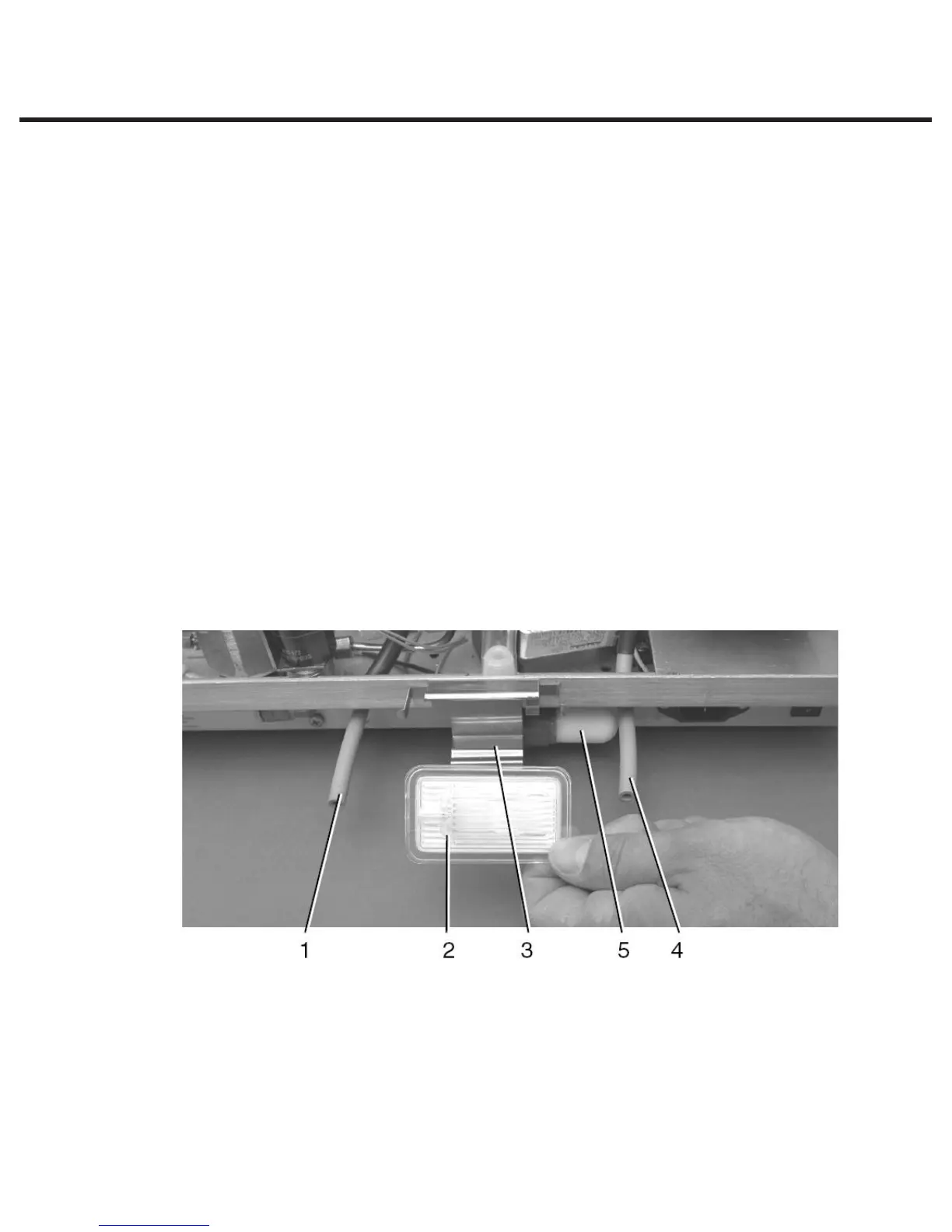
Compressor Filter
1. To enable access to the compressor filter, disconnect the inlet tube (4) from the bacteria-
retentive filter (2) and remove the filter from the filter bracket (3). Note the orientation of the
arrow mark on the filter and bracket.
2. When the filter is free of the bracket, locate and remove compressor filter (5) by unscrewing
anti-clockwise using thumb and forefinger. Note: the filter should only be finger tight.
3. Install new compressor filter by screwing clockwise using thumb and forefinger. The filter
should ONLY be finger tight. Tightening the filter using mechanical means may damage the
filter or filter housing.
4. Gently press the bacteria retentive filter back into the filter bracket. The arrow mark on the
filter is facing out and pointing to the left.
5. Re-connect the inlet tube to the right hand filter fitting.
STATIM 2000/2000S/2000 G4 Service Guide
Figure 24



 To Next Page