Page 205
STAT
IM
2000/2000S Service Guide
96-108639 Rev 3.0
9. Solenoid Valve and Pressure Transducer
STATIM 2000/2000S/2000 G4 Service Guide
Removing and Replacing the Battery
Observe appropriate electrostatic discharge safeguards performing this operation.
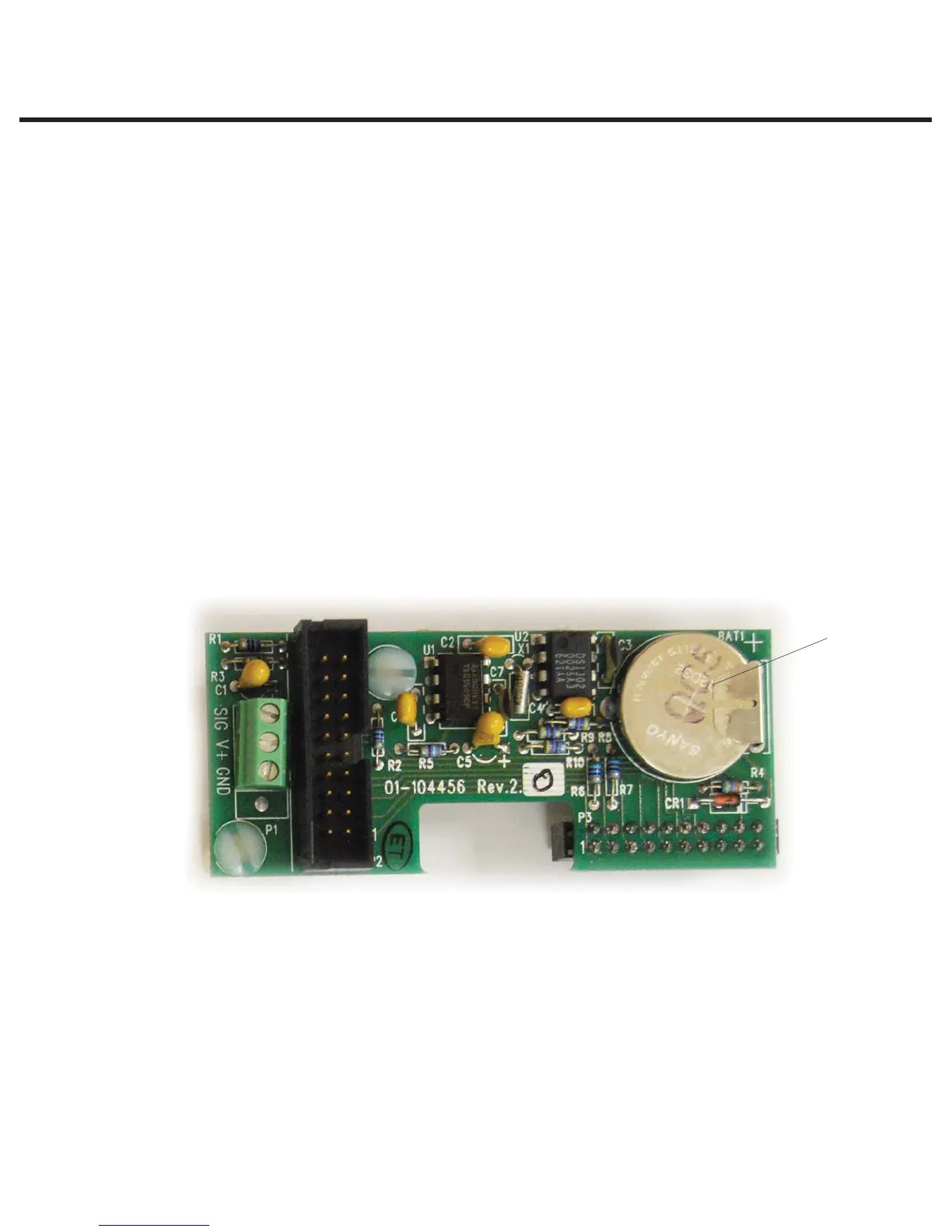
When installed and a printer attached, the real time clock and battery on the pressure interface
board (or main PCB for revision 7 units) replace the clock and battery found in the printer module.
The battery requires replacement if the date / time are not saved when the power is off.
To remove the battery (12), proceed as follows (See Figure 7 and 8):
1. Remove the pressure interface board or main PCB as appropriate to the PCB revision.
2. Carefully desolder BAT1 from the solder side of the board. Note the orientation of the anode
and cathode. Always replace the battery with a SciCan battery of equal rating and size. Solder
the replacement battery in position BAT1.
3. Discard the old battery. Observe all applicable environmental laws.
4. Replace the Pressure Interface Board or main PCB as appropriate to the PCB revision.
Figure 8
BAT1



 To Next Page